Google Veo Review searches have exploded as Google’s flagship AI video model has become one of the biggest names in AI-powered video creation. Between its cinematic visuals, realistic motion, and built-in audio generation, Veo has quickly earned a reputation as one of the most impressive AI video generators available—but it’s also one of the most misunderstood.
Unlike tools such as Runway or Pika, Google Veo isn’t a standalone platform where you simply create an account and start generating videos. Instead, it’s woven throughout Google’s AI ecosystem, powering experiences in Gemini, Google Flow, Vertex AI, Google AI Studio, and other products. That flexibility is powerful, but it can also make it difficult for first-time users to know where to begin.
In this Google Veo review, we’ll walk through everything you need to know before deciding whether it’s the right AI video generator for your workflow. We’ll cover its features, video quality, pricing, ease of use, strengths, weaknesses, and real-world performance, while also explaining how Google’s growing ecosystem fits together.
If you’re still weighing up several options before making a decision, don’t miss our guide to the Best AI Video Generators, where we compare today’s leading AI video tools side by side.
Table of Contents
Google Veo Review: Our Verdict
| Category | Rating |
| Video Quality | ⭐⭐⭐⭐⭐ |
| Prompt Adherence | ⭐⭐⭐⭐⭐ |
| Native Audio Generation | ⭐⭐⭐⭐⭐ |
| Ease of Use | ⭐⭐⭐⭐☆ |
| Editing Features | ⭐⭐⭐⭐☆ |
| Value for Money | ⭐⭐⭐⭐☆ |
| Beginner Friendliness | ⭐⭐⭐☆☆ |
| Overall Rating | 9.4/10 |
Quick Verdict
Google Veo sets the standard for AI-generated video quality. It produces cinematic footage with realistic movement, understands complex prompts remarkably well, and stands out from much of the competition thanks to its ability to generate synchronized audio alongside video.
It’s not the easiest platform to learn, though.
Because Veo is available through several different Google products, new users often spend as much time figuring out where to use it as they do learning the software itself. Pricing also varies depending on how you access the model, which can make comparing plans more complicated than with traditional AI video generators.
If you’re already invested in Google’s AI ecosystem—or you’re looking for some of the highest-quality AI video generation currently available—Google Veo is an excellent choice. If you simply want the quickest route to creating AI videos, some competitors offer a smoother onboarding experience.
What Is Google Veo?
Google Veo is Google’s flagship AI video generation model, developed by Google DeepMind to create videos from text prompts, reference images, and other creative inputs.
Rather than editing existing footage, Veo generates entirely new video clips using generative AI. The model has quickly become one of the industry’s leading options thanks to its ability to produce videos with impressive realism, natural motion, and cinematic presentation.
Among its core capabilities are:
- High-quality text-to-video generation
- Image-to-video animation
- Realistic camera movement
- Cinematic lighting
- Natural scene composition
- Synchronized dialogue and ambient audio
- Professional-quality visual storytelling
Unlike many AI video tools that mainly target short-form social media content, Veo is designed to support a much wider range of creative work. Whether you’re producing YouTube videos, advertising campaigns, storyboards, product demonstrations, or enterprise content, the platform is built to scale beyond simple clips.
One of its biggest strengths is prompt understanding. Instead of relying on short, basic instructions, Veo can interpret detailed descriptions covering camera angles, lighting, movement, mood, cinematic style, and environmental details. That often means fewer generations are needed before arriving at a result that’s close to your original vision.
Understanding Google’s AI Video Ecosystem
One of the biggest sources of confusion surrounding Google Veo is that it isn’t available through a single application.
Instead, Veo acts as the AI engine behind several Google products, each aimed at a different audience.
Gemini
For most individual users, Gemini is the easiest way to access Google Veo.
Depending on your subscription, you can generate AI videos directly from prompts inside Google’s conversational AI interface without dealing with developer tools or enterprise software.
Gemini is ideal for:
- Content creators
- Solo entrepreneurs
- YouTubers
- Marketers
- Casual users experimenting with AI video
It’s the simplest starting point if you mainly want to generate videos without building complex production workflows.
Google Flow
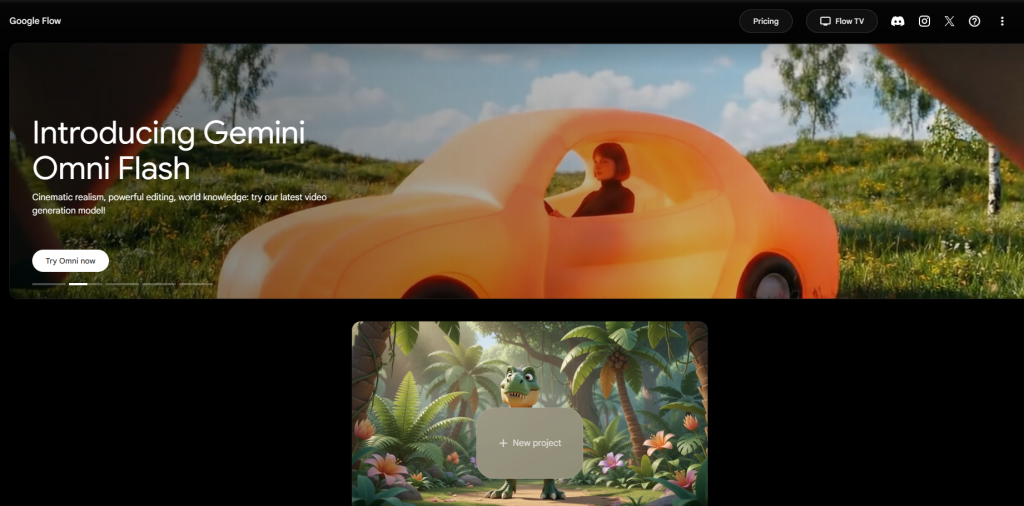
Google Flow is Google’s dedicated AI filmmaking workspace built around Veo.
Rather than functioning like a chatbot, Flow provides creators with an environment focused on planning scenes, organizing projects, refining generations, and producing more cinematic content.
It’s particularly well suited to:
- Filmmakers
- Creative professionals
- Agencies
- Marketing teams
- Narrative storytelling
If you’re producing larger creative projects instead of one-off clips, Flow offers significantly more control than Gemini.
Vertex AI
Vertex AI brings Google Veo into Google’s enterprise cloud platform.
Instead of targeting individual creators, it’s designed for organizations and developers that want to integrate AI video generation into software products or large-scale production workflows.
Common use cases include:
- Enterprise automation
- API-driven video generation
- Scalable content production
- Internal creative workflows
- AI-powered applications
For casual users, Vertex AI will almost certainly be more than you need. For companies already using Google Cloud, however, it’s an extremely powerful solution.
Google AI Studio and APIs
Developers can also access Veo through Google’s developer tools and APIs.
This allows AI-generated video to become part of automated workflows, SaaS products, and custom applications instead of remaining a standalone creative tool.
For organizations building AI-powered software, this flexibility is one of Veo’s biggest advantages.
Google Vids
Google Vids serves a different purpose entirely.
Instead of focusing on cinematic filmmaking, it’s designed for business presentations, internal communication, training materials, and workplace content.
While it benefits from Google’s AI technology, it’s aimed at productivity rather than professional video production.
Understanding these different access points is important because your experience with Google Veo depends heavily on which Google product you choose. Veo isn’t a standalone application—it’s the underlying model powering several different creative workflows across Google’s expanding AI ecosystem.
Google Veo Pros and Cons
Before diving into the individual features, it’s worth stepping back and looking at Google Veo’s biggest strengths and weaknesses.
There’s no doubt that it produces some of the most impressive AI-generated video available today. At the same time, it isn’t the most beginner-friendly platform, and its ecosystem can feel surprisingly complex if you’re encountering it for the first time.
| Pros | Cons |
| Outstanding cinematic video quality | Google ecosystem can feel confusing with multiple access points |
| Native synchronized audio generation | Pricing varies depending on how you access Veo |
| Excellent prompt understanding | Individual clips are still relatively short |
| Strong image-to-video capabilities | Character consistency can drift across longer projects |
| Professional camera movement and cinematography | Usage limits and quotas may change over time |
| Google Flow offers advanced filmmaking workflows | Steeper learning curve than many competitors |
| Enterprise-ready APIs and Google Cloud integration | Doesn’t replace professional editing software |
| Supports reference images and scene extension | Some prompts are restricted by Google’s safety policies |
Pros Explained
The first thing you’ll notice when using Google Veo is the quality of the output.
Its videos consistently feature realistic lighting, smooth camera movement, convincing physics, and polished cinematography that often rivals—or even surpasses—many competing AI video generators.
Another major advantage is native audio generation.
Most AI video tools still produce silent clips that require separate software for dialogue, sound effects, and ambient noise. Veo shortens that workflow considerably by generating synchronized audio alongside the video itself. Depending on the prompt, that can include dialogue, environmental sounds, and atmospheric effects, making concept videos feel far more complete straight out of the generator.
Google’s wider AI ecosystem is another strength.
Whether you’re creating marketing assets in Gemini, planning cinematic scenes in Flow, or integrating AI video generation into enterprise software through Vertex AI, Veo adapts to very different types of workflows. That flexibility is especially valuable for businesses and professional creators already using Google’s products.
Cons Explained
As impressive as Google Veo is, it isn’t the easiest AI video generator to get your head around.
The biggest hurdle isn’t actually generating videos—it’s understanding where you’re supposed to generate them.
Google distributes Veo across Gemini, Flow, Vertex AI, Google Vids, AI Studio, and developer APIs. Each serves a different audience, and not every feature is available everywhere. For new users, that fragmented approach can be confusing.
Pricing also lacks the simplicity offered by many competitors.
Instead of paying one monthly subscription with a predictable number of credits, you’ll encounter a mix of subscriptions, usage limits, API billing, enterprise pricing, and generation quotas depending on how you access Veo. That makes budgeting more difficult, particularly if you’re generating videos frequently.
Like virtually every AI video model currently available, Veo also struggles with long-form consistency.
As projects become larger, characters, clothing, props, and environments can gradually change between generations. It’s a common limitation across today’s AI video tools, but it’s something to keep in mind if you’re planning more ambitious productions.
Finally, while Google Flow introduces useful project management and creative tools, Google Veo shouldn’t be viewed as a replacement for professional editing software. Most finished projects still benefit from applications such as Premiere Pro or DaVinci Resolve for editing, sequencing, captions, branding, and final polish.
Google Veo Features
Google Veo includes many of the capabilities you’d expect from a premium AI video generator, but what makes it particularly compelling is how those features work together inside Google’s broader ecosystem.
Rather than focusing exclusively on short AI-generated clips, Veo supports professional workflows ranging from cinematic storyboarding and advertising concepts to enterprise automation and developer integrations.
Let’s take a closer look at its standout features.
Text-to-Video Generation
Text-to-video generation sits at the heart of Google Veo.
You simply describe the scene you want using natural language, and the model generates a video based on those instructions.
What separates Veo from many earlier AI video generators is how well it understands detailed prompts.
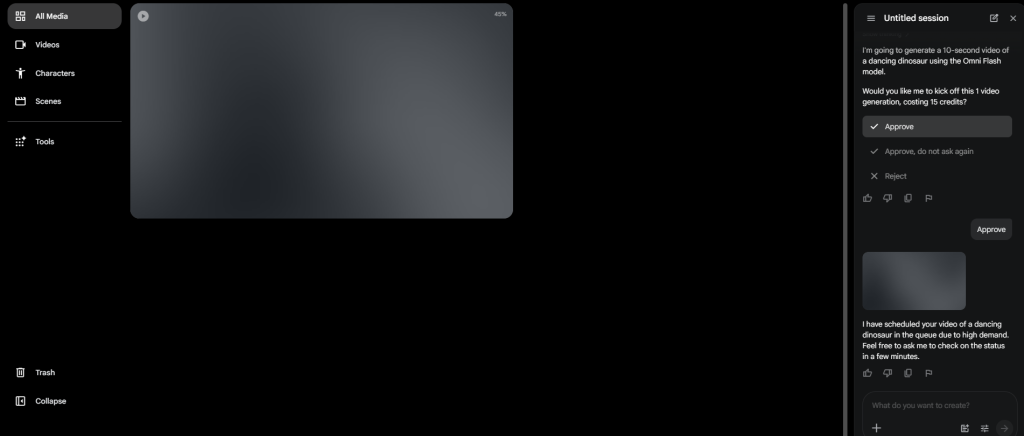
Instead of relying on simple instructions, you can specify:
- Camera angles
- Lens styles
- Subject movement
- Lighting conditions
- Visual mood
- Environmental details
- Dialogue
- Sound effects
- Cinematic styles
For example, rather than entering:
“A person walking.”
You could describe something far more detailed:
A cinematic tracking shot follows a lone astronaut walking across a frozen alien landscape at sunrise while distant mountains glow beneath soft orange light. Wind sweeps across the snow as subtle environmental ambience fills the scene.
Google Veo generally handles these kinds of cinematic prompts remarkably well, producing footage that often requires far fewer regeneration attempts than earlier AI video models.
For filmmakers, advertisers, and experienced creators, that improved prompt understanding translates into a faster and more efficient creative process.
Image-to-Video Generation
Image-to-video generation lets you animate existing images instead of starting every project from scratch.
Upload a reference image, describe the movement you want, and Veo attempts to transform that still image into a dynamic video.
Some common use cases include:
- Animating portraits
- Product showcases
- Bringing concept art to life
- Enhancing illustrations
- Creating cinematic B-roll
- Building stories from static images
One area where Veo performs particularly well is preserving the overall composition of the original image while introducing realistic motion.
For marketers and ecommerce businesses, that makes it an effective way to turn existing product photography into engaging promotional videos.
That said, AI-generated animation isn’t flawless.
Small details—such as packaging, logos, text, or product proportions—can still change during generation, so it’s worth reviewing every clip carefully before using it commercially.
Native Audio Generation
Native audio generation is arguably Google Veo’s biggest competitive advantage.
Most AI video generators create silent footage, leaving creators to source dialogue, sound effects, ambience, and music separately.
Google Veo takes a different approach.
Depending on your workflow and prompt, it can generate:
- Character dialogue
- Environmental ambience
- Sound effects
- Background atmosphere
- Lip-synchronized speech
- Music-like audio elements
For creators producing short films, advertisements, educational videos, or marketing content, this can remove several time-consuming steps from the production process.
Instead of generating silent footage and building the soundtrack afterwards, much of that work happens during the generation itself.
Professional productions will still often replace AI-generated voices or fine-tune the audio during editing, but for first drafts and concept videos, Veo’s integrated approach is genuinely impressive.
Camera Controls and Cinematic Direction
Another area where Google Veo stands out is its understanding of cinematic language.
Rather than simply animating a scene, it can interpret prompts describing how the virtual camera should move, producing footage that feels closer to professionally filmed video than traditional AI animation.
Supported cinematic movements include:
- Slow dolly shots
- Tracking shots
- Smooth pans
- Zooms
- Crane-style movements
- Orbit shots
- Low-angle perspectives
- Aerial viewpoints
For example, instead of prompting:
“A luxury sports car.”
You might write:
A cinematic low-angle tracking shot follows a red sports car driving through rain-soaked city streets at night, with reflections shimmering across the pavement, shallow depth of field, and smooth cinematic camera movement.
Google Veo generally interprets these instructions with impressive accuracy, creating scenes that feel purposeful and professionally directed rather than randomly animated.
While complex prompts may still require multiple attempts, Veo’s understanding of cinematic language is among the strongest currently available in AI video generation.
Scene Consistency
Keeping characters, environments, and objects consistent across multiple AI-generated clips is one of the biggest challenges in AI video today.
Google Veo performs better than most competitors, but it’s still important to have realistic expectations.
Within a single clip, Veo generally maintains excellent consistency. Characters tend to retain their appearance, lighting stays coherent, environments remain stable, and the overall visual style feels unified from beginning to end.
Where things become more difficult is during longer projects that require multiple generations.
As you extend scenes or create additional shots, you may occasionally notice:
- Minor facial changes
- Slight clothing variations
- Different hairstyles
- Objects shifting position
- Small environmental inconsistencies
These issues aren’t unique to Google Veo—they’re common across virtually every current AI video model.
For that reason, professional creators rarely rely on one long AI-generated sequence. Instead, they generate several shorter clips, choose the strongest versions, and assemble everything during editing. This approach provides much greater control over pacing, continuity, and overall quality.
Google has also introduced reference-image workflows and asset preservation tools that help improve consistency, although careful review remains an essential part of any professional production process.
Video Extension
Because AI-generated clips are still relatively short, the ability to extend successful generations is becoming increasingly important.
Google Veo allows you to continue existing scenes instead of starting over from scratch, making it easier to build longer sequences while preserving the overall look and feel of the original clip.
This is especially useful for:
- Narrative storytelling
- Product demonstrations
- Marketing campaigns
- Educational videos
- Cinematic sequences
Being able to expand a successful scene instead of regenerating it from the beginning saves both time and generation credits.
That said, extending videos isn’t completely seamless.
As sequences become longer, subtle inconsistencies in movement, lighting, or character appearance can still appear. Professional creators often avoid this by treating AI-generated clips as individual building blocks that are later combined in traditional editing software.
Ingredients-to-Video
One of Google Veo’s more innovative features is Ingredients-to-Video.
Instead of relying entirely on written prompts, this workflow allows creators to provide specific visual assets that the AI should preserve throughout the generation process.
Those assets can include:
- Product images
- Brand assets
- Packaging
- Logos
- Characters
- Props
Rather than asking the model to recreate these elements from memory, Veo uses them as reference points while generating new scenes.
For marketers and businesses, this is a significant improvement.
Traditional text-only prompting often results in products changing shape, logos shifting, or packaging becoming inconsistent between generations. Ingredients-to-Video helps reduce those problems, producing content that’s far more suitable for commercial use.
It’s not perfect yet, but it’s a clear indication that Google is building Veo for real production workflows rather than simply showcasing impressive AI demonstrations.
Editing and Iterative Generation
Google Veo isn’t designed to replace dedicated editing software, but it does support a flexible, iterative creative workflow.
Rather than accepting the first result the AI produces, creators can gradually refine their projects through multiple generations and targeted adjustments.
Depending on which Google interface you’re using, you can:
- Remove unwanted objects
- Add new elements
- Adjust prompts
- Regenerate individual scenes
- Improve compositions
- Experiment with different camera movements
- Refine continuity between clips
This mirrors the way professional creatives actually work.
Instead of expecting perfection on the first attempt, they generate several versions, compare the results, keep the strongest clips, and continue refining until they’re satisfied.
For agencies, filmmakers, and marketing teams, this process is often more valuable than a simple one-click generator because it provides far greater creative control throughout production.
Ease of Use
Google Veo offers incredibly powerful technology, but how easy it feels to use depends largely on where you’re accessing it.
If you’re generating a few videos through Gemini, the experience is fairly straightforward. You enter a prompt, adjust any available settings, and let the model create your video.
Google Flow is a different story.
Designed for filmmakers and advanced creators, it introduces project organization, scene management, and iterative workflows that offer much more creative flexibility. Those extra capabilities are valuable, but they also increase the learning curve.
Developers working with Vertex AI or Google’s APIs face an even steeper climb, since those tools are intended for large-scale production and software integration rather than casual content creation.
Overall, the experience looks something like this:
| User Type | Ease of Use |
| Beginners | ⭐⭐⭐☆☆ |
| Content Creators | ⭐⭐⭐⭐☆ |
| Marketers | ⭐⭐⭐⭐☆ |
| Filmmakers | ⭐⭐⭐⭐☆ |
| Developers | ⭐⭐⭐☆☆ |
| Enterprise Teams | ⭐⭐⭐⭐☆ |
The biggest obstacle isn’t actually generating videos—it’s understanding Google’s ecosystem.
New users often find themselves asking questions like:
- Which product should I use?
- Do I need Gemini or Google Flow?
- What’s the difference between Gemini and Vertex AI?
- Which subscription includes Veo?
- When should I use the API instead?
Once those questions are answered, the generation process itself feels surprisingly intuitive, especially if you’ve used prompt-based AI tools before.
In other words, Google Veo is easier to use than it first appears—but Google’s ecosystem creates an unnecessary layer of complexity that many competitors simply don’t have.
Video Quality
Video quality is where Google Veo truly distinguishes itself.
Across a wide variety of prompts, it consistently produces footage that feels more like professionally filmed video than AI-generated animation. Motion is smoother, camera work is more deliberate, and scenes generally display stronger composition than many competing models.
No AI video generator is perfect, but if realism and cinematic storytelling are your priorities, Google Veo comfortably ranks among the industry’s best.
Let’s break down the areas that matter most.
Realism
Realism is arguably Google Veo’s strongest selling point.
Rather than producing footage that immediately looks artificial, Veo frequently generates scenes with convincing lighting, believable movement, natural environments, and realistic physics.
It performs particularly well with:
- Human movement
- Facial expressions
- Natural landscapes
- Urban environments
- Atmospheric effects
- Depth of field
- Weather conditions
- Reflections and shadows
Its understanding of cinematic composition helps videos feel intentionally directed instead of randomly assembled.
Occasionally you’ll still encounter distorted hands, unusual object behaviour, or other minor visual artifacts—particularly with highly complex prompts—but those issues are becoming increasingly rare.
Overall, Google Veo consistently delivers some of the most realistic AI-generated video currently available.
Motion Quality
Motion has traditionally been one of the biggest weaknesses of AI-generated video.
Earlier models often struggled with unnatural walking animations, jerky movement, inconsistent physics, and abrupt camera transitions that immediately gave away the fact that the footage was AI-generated.
Google Veo performs noticeably better.
Movement generally feels smooth, intentional, and physically believable—especially when prompts clearly describe how subjects or cameras should move.
Areas where Veo consistently performs well include:
- Natural human movement
- Realistic vehicle motion
- Convincing animal animation
- Environmental effects such as rain and wind
- Smooth camera tracking
Fast-paced action scenes can still challenge the model, but for cinematic sequences, advertisements, documentaries, and product videos, Veo delivers some of the most convincing motion currently available.
Lighting and Cinematography
Lighting is one of the biggest factors separating average AI-generated footage from videos that genuinely look professional.
Fortunately, it’s another area where Google Veo excels.
The model demonstrates an impressive understanding of cinematic lighting techniques, including:
- Golden hour lighting
- Night scenes
- Soft indoor illumination
- High-contrast dramatic lighting
- Sunset environments
- Atmospheric haze
- Volumetric lighting
- Reflections and shadows
Combined with its strong camera controls, these lighting capabilities allow Veo to produce footage that often resembles professionally filmed content rather than AI-generated animation.
For creators producing advertisements, YouTube videos, product showcases, or cinematic concepts, this level of visual quality is a major selling point.
Prompt Accuracy
Prompt adherence measures how closely an AI follows your instructions.
This is another area where Google Veo consistently impresses.
Whether you’re describing the subject, environment, mood, lighting, camera movement, or artistic style, Veo usually captures those details with a high degree of accuracy.
It performs particularly well with prompts involving:
- Slow cinematic tracking shots
- Rain-soaked city streets
- Documentary-style visuals
- Fantasy landscapes
- Wildlife scenes
- Product showcases
- Futuristic architecture
Highly detailed prompts don’t always produce the perfect result on the first attempt, but Veo generally requires fewer regenerations than many competing AI video generators.
That translates into less trial and error, fewer wasted credits, and a smoother creative workflow.
Audio Quality
Native audio generation is one of Google Veo’s defining features—and one of the biggest reasons it stands apart from most competitors.
Instead of producing silent video that requires additional editing later, Veo can generate synchronized dialogue, ambient sound, and environmental effects alongside the visuals.
Depending on the prompt, generated audio may include:
- Spoken dialogue
- Crowd ambience
- Wind
- Rain
- Footsteps
- Environmental sound effects
- Background atmosphere
Professional productions will still often use custom voice actors and dedicated sound design, but for prototypes, concept videos, advertisements, and social content, Veo’s integrated audio can dramatically reduce post-production time.
It’s one of the clearest examples of Google focusing on complete creative workflows rather than just AI-generated visuals.
Scene Composition
Another area where Google Veo consistently performs well is scene composition.
Rather than placing subjects randomly within the frame, the model shows a strong understanding of visual storytelling, producing shots that feel carefully directed.
It handles elements such as:
- Foreground and background separation
- Camera framing
- Subject placement
- Environmental scale
- Perspective
- Depth
These seemingly small details make a noticeable difference.
Even creators with little filmmaking experience can generate videos that feel polished because Veo naturally applies many of the principles professional cinematographers use.
Overall Video Quality Verdict
Across every major evaluation category, Google Veo delivers some of the strongest AI-generated video currently available.
Its biggest strengths include:
- Outstanding realism
- Smooth, natural motion
- Cinematic camera work
- Excellent prompt understanding
- Native synchronized audio
- Professional scene composition
Its limitations are largely the same ones affecting every leading AI video generator today:
- Character consistency across long projects
- Occasional visual artifacts
- Short individual clip lengths
- The need for iterative refinement
None of those issues are unique to Google Veo, and in many cases it handles them better than much of the competition.
If visual quality is your highest priority, Google Veo comfortably earns its place among the best AI video generators on the market.
Google Veo Pricing
Pricing is one of the few areas where Google Veo feels more complicated than most competing AI video generators.
Rather than offering a single subscription with a fixed number of monthly credits, Google provides access through several different products, each with its own pricing structure, usage limits, and billing model.
Depending on your workflow, you may access Veo through:
- Google AI subscription plans
- Gemini
- Google Flow
- Vertex AI
- Google Cloud APIs
Because Google’s AI offerings continue to evolve, available plans, generation quotas, and subscription options may change over time.
For most individual creators, Google’s consumer AI subscriptions provide the easiest way to get started. Developers and enterprise customers, meanwhile, will generally access Veo through Vertex AI or API-based billing.
When comparing costs, it’s often more helpful to think about how frequently you’ll generate videos rather than simply comparing monthly subscription prices.
Who Should Choose Each Access Method?
Gemini
Best for:
- Individual creators
- Students
- YouTubers
- Casual experimentation
If you simply want to generate AI videos without managing cloud infrastructure or developer tools, Gemini is by far the easiest place to begin.
Google Flow
Best for:
- Filmmakers
- Creative professionals
- Marketing teams
- Agencies
Flow provides a more structured filmmaking environment and is the better option for creators managing larger, more complex projects that require organization and iterative refinement.
Vertex AI and APIs
Best for:
- Developers
- SaaS companies
- Enterprise organizations
- Automated production workflows
These options offer the greatest flexibility but also require considerably more technical knowledge and a willingness to work with usage-based billing rather than simple monthly subscriptions.
Does Google Veo Offer Good Value?
Google Veo isn’t the cheapest AI video generator available, but judging it solely on subscription cost doesn’t tell the full story.
Its combination of cinematic video quality, advanced prompt understanding, native audio generation, and deep integration with Google’s AI ecosystem can save creators a significant amount of production time.
For professional users, those time savings often justify the higher cost.
Filmmakers, agencies, and businesses may find that Veo reduces the amount of manual editing, sound design, and iteration required, making it a worthwhile investment despite the more complex pricing structure.
On the other hand, casual users creating the occasional social media clip may get better value from platforms with simpler pricing and more generous free plans.
Ultimately, Google Veo offers excellent value for creators who fully utilize its advanced capabilities—but it may be more than many hobbyists actually need.
Real-World Performance
A feature list only tells part of the story.
What really matters is how Google Veo performs when you’re using it to create actual content. Whether you’re producing YouTube videos, marketing campaigns, short films, or enterprise projects, the platform needs to fit naturally into your workflow—not just generate impressive demo clips.
The good news is that Google Veo performs exceptionally well across a wide range of professional use cases. Its biggest strengths are its cinematic quality, reliable prompt interpretation, and integrated audio generation. Like every AI video generator, though, it still works best alongside traditional editing software rather than replacing it entirely.
Let’s look at how it performs in different real-world scenarios.
YouTube Content Creation
Google Veo is an excellent tool for YouTube creators who need high-quality visuals without organizing expensive shoots or relying entirely on stock footage.
It’s particularly effective for creating:
- Cinematic B-roll
- Documentary-style sequences
- Educational visuals
- Intro animations
- Travel scenes
- Historical recreations
- Sci-fi and fantasy concepts
- Product showcases
When combined with voice-over narration and conventional editing software, Veo can dramatically reduce the time needed to produce visually engaging videos.
That said, most YouTubers will still finish their projects in software such as Adobe Premiere Pro, DaVinci Resolve, or Final Cut Pro. Veo is best viewed as a content generation tool that feeds into a broader editing workflow rather than a complete production suite on its own.
Marketing and Advertising
Marketing teams are likely to see some of the biggest productivity gains from Google Veo.
Creating traditional advertising content often involves hiring actors, securing locations, renting equipment, recording voice-overs, and spending hours editing footage.
With Veo, many of those early creative concepts can be produced in minutes.
It works particularly well for:
- Social media advertising
- Product launches
- Promotional campaigns
- Brand storytelling
- Creative testing
- Internal campaign presentations
Because the platform combines realistic visuals with synchronized audio, teams can quickly prototype multiple campaign ideas before investing in a full production. That ability to iterate rapidly can save both time and budget during the creative process.
Filmmaking and Storyboarding
Filmmakers are among the users who stand to benefit most from Google Veo.
When paired with Google Flow, the platform becomes a powerful pre-production tool that helps directors visualize ideas before stepping onto a film set.
Potential applications include:
- Storyboarding
- Shot planning
- Scene visualization
- Camera experimentation
- Mood exploration
- Pitch presentations
- Pre-production planning
Rather than replacing traditional filmmaking, Veo helps accelerate the creative process by making it easier to test ideas, experiment with different shots, and communicate concepts visually.
Its understanding of cinematic language is especially valuable for creators who already think in terms of lenses, camera movement, composition, and lighting.
Business Presentations and Corporate Content
Businesses increasingly rely on video for communication, training, and marketing.
Google Veo fits naturally into these workflows by allowing organizations to generate custom visuals instead of relying exclusively on stock footage or expensive video production.
Common business applications include:
- Internal training
- Product education
- Client presentations
- Company announcements
- Sales materials
- Executive communications
Organizations already using Google Workspace and other Google services may find Veo particularly appealing because it integrates with tools they already use.
For many businesses, this leads to faster production cycles and reduced dependence on outside creative agencies.
Developer Workflows
Unlike many AI video generators aimed primarily at consumers, Google Veo also caters to developers.
Through Vertex AI and Google’s APIs, organizations can integrate AI-powered video generation directly into software products and automated workflows.
Potential use cases include:
- Content automation
- SaaS applications
- Marketing automation
- AI-powered products
- Customer personalization
- Dynamic video generation
This flexibility makes Veo more than just a creative tool—it becomes part of a scalable production system that developers can build into their own products and services.
Overall Performance
Across professional workflows, Google Veo consistently delivers excellent results.
Its biggest strengths include:
- Outstanding visual quality
- Reliable prompt interpretation
- Native audio generation
- Cinematic camera movement
- Deep integration with Google’s AI ecosystem
Most of its limitations aren’t related to generation quality but to the realities of current AI video technology.
Users should still expect to:
- Generate multiple versions
- Review outputs carefully
- Assemble longer projects in editing software
- Refine prompts through several iterations
These aren’t shortcomings unique to Google Veo—they’re part of working with today’s most advanced AI video generators.
Who Should Use Google Veo?
Google Veo isn’t trying to appeal to every creator.
Instead, it targets users who value cinematic quality, advanced AI capabilities, and integration with Google’s broader ecosystem.
Here’s who will get the most out of the platform.
Content Creators
Google Veo is an excellent choice for creators producing:
- YouTube videos
- Educational content
- Documentary visuals
- Product reviews
- Brand content
- Social media campaigns
Its realistic visuals and excellent prompt understanding make it easy to create professional-looking footage without the cost of traditional production.
If your content relies heavily on cinematic B-roll or visual storytelling, Veo is one of the strongest options available.
Marketers
Marketing professionals will appreciate how quickly Veo can generate polished promotional content.
It works especially well for:
- Product launches
- Paid advertising
- Brand storytelling
- Campaign concepts
- Client presentations
Native audio generation further speeds up production by reducing the need to create sound separately, allowing campaigns to move from concept to prototype much faster.
Filmmakers
Filmmakers are arguably Google’s ideal audience.
Some of the platform’s biggest strengths include:
- Cinematic camera language
- Storyboarding
- Scene visualization
- Reference-image workflows
- Professional composition
When combined with Google Flow, Veo becomes a highly effective creative planning tool that helps directors and production teams explore ideas before committing to expensive shoots.
Developers
Developers looking to integrate AI-generated video into their own products will find Google’s infrastructure particularly attractive.
API access enables:
- Automated video creation
- Dynamic marketing assets
- AI-powered software
- Enterprise-scale deployment
For teams already building within Google Cloud, Veo fits naturally into existing development workflows.
Businesses and Enterprise Organizations
Organizations already invested in Google’s ecosystem can benefit from Veo’s enterprise-ready capabilities, including:
- Google Cloud integration
- Scalable infrastructure
- API access
- Governance features
- Enterprise security
- Workflow automation
These features make Google Veo much more than a creative application—it becomes part of a larger AI production ecosystem that can support teams of all sizes.
Who Should Look Elsewhere?
Google Veo is an outstanding AI video generator, but it isn’t automatically the right choice for every creator.
Depending on your budget, experience level, and workflow, another platform may offer a better overall experience.
Here are the situations where you may want to consider an alternative.
You Want the Simplest Possible Experience
If you’re completely new to AI video generation and don’t want to spend time learning Google’s ecosystem, there are easier platforms to start with.
The combination of Gemini, Google Flow, Vertex AI, AI Studio, APIs, and multiple subscription options can feel overwhelming at first.
If your goal is simply to generate videos quickly with minimal setup, a more streamlined platform may suit you better.
Your Budget Is Limited
Google Veo delivers premium technology, but those capabilities come at a cost.
If you’re only generating a handful of videos each month, paying for Veo may not provide the best return on your investment.
Creators on tighter budgets may find better value in AI video generators that offer:
- Lower subscription costs
- More generous free plans
- Simpler pricing structures
- Predictable monthly credit allowances
You Need Long Continuous Videos
Although Google Veo supports video extension, it still generates relatively short clips.
If you’re producing lengthy narratives or documentaries, you should expect to generate multiple scenes and assemble them during editing rather than creating an entire production in one pass.
That’s true of most AI video generators today, but it’s worth considering if your projects regularly involve long-form storytelling.
You Want an All-in-One Editing Platform
Google Veo focuses primarily on AI video generation—not comprehensive post-production.
If your ideal workflow includes:
- Timeline editing
- Transitions
- Captions
- Motion graphics
- Publishing tools
- Complete video editing
inside a single application, you’ll probably prefer a platform with a more extensive built-in editing suite.
You Mainly Create Viral Social Content
If your primary goal is producing memes, trending short-form videos, or rapid-fire social media content, Google Veo’s professional focus may be more than you actually need.
Some competing platforms prioritize speed, simplicity, and social-first workflows over cinematic realism, making them a better fit for creators publishing multiple short videos every day.
Google Veo Alternatives
Google Veo is undoubtedly one of the strongest AI video generators available today, but it’s far from the only excellent option.
The best alternative depends on your workflow, technical experience, budget, and the type of content you create.
Here are the platforms worth considering.
Runway
Runway remains one of Google Veo’s closest competitors and continues to be one of the most complete AI video platforms on the market.
Compared with Veo, Runway offers:
- A more mature editing environment
- Powerful AI video generation
- Advanced image and video editing
- Motion Brushes
- Inpainting
- Background removal
- Asset management
Runway is particularly appealing to creators who want both AI generation and professional editing tools within the same platform.
Choose Runway if you:
- Need integrated editing tools
- Produce commercial video projects
- Prefer an established creative workflow
- Want an all-in-one production platform
If you’d like a more detailed comparison, check out our full Runway Review.
Kling AI
Kling AI has quickly established itself as one of the best options for creators prioritizing realistic AI-generated video.
Its biggest strengths include:
- Outstanding realism
- Excellent motion quality
- Natural character animation
- Competitive pricing
- Frequent feature updates
Compared with Google Veo, Kling AI generally offers a simpler onboarding experience, although Google’s broader ecosystem provides stronger enterprise capabilities and developer integrations.
For a deeper look, read our complete Kling AI Review.
Pika
Pika focuses on accessibility rather than complexity.
Instead of targeting professional filmmakers, it aims to make AI video generation approachable for everyday creators.
It’s particularly well suited to:
- Social media creators
- Casual experimentation
- Quick marketing videos
- Meme-style content
- Beginners
Pika’s interface is considerably easier to learn than Google’s ecosystem, although it doesn’t currently match Veo’s cinematic realism or integrated audio generation.
You can learn more in our detailed Pika Review.
OpenAI Sora
OpenAI Sora is another premium AI video model aimed at creators seeking highly realistic AI-generated footage.
Like Google Veo, it emphasizes:
- Cinematic storytelling
- Realistic environments
- Natural motion
- High-quality scene composition
Both models represent the cutting edge of AI video generation, and many creators will naturally compare them before deciding which ecosystem best suits their needs.
Luma Dream Machine
Luma Dream Machine has earned a loyal following thanks to its speed and straightforward workflow.
Its strengths include:
- Fast video generation
- Beginner-friendly interface
- Responsive prompt interpretation
- Efficient creative workflow
While Luma has improved significantly over the past year, Google Veo generally produces more polished cinematic results, particularly for professional content creation.
Adobe Firefly Video
Adobe Firefly Video is an especially attractive option for creators already working inside Adobe Creative Cloud.
Its biggest advantage is seamless integration with tools such as Premiere Pro and Photoshop.
For designers, agencies, and creative professionals already paying for Adobe subscriptions, Firefly fits naturally into existing workflows.
However, if your priority is purely AI-generated cinematic video, Google Veo currently holds the edge in overall generation quality.
Final Verdict
Google Veo represents one of the biggest advances in AI video generation we’ve seen so far.
Rather than existing as a standalone application, it serves as the foundation of Google’s rapidly expanding AI video ecosystem, powering creative workflows across Gemini, Google Flow, Vertex AI, and several other Google products.
Its strengths are immediately obvious.
The platform delivers:
- Exceptional cinematic quality
- Outstanding prompt understanding
- Smooth camera movement
- Native synchronized audio
- Powerful image-to-video generation
- Excellent enterprise integrations
Those capabilities make Google Veo an outstanding choice for filmmakers, marketers, agencies, YouTubers, developers, and businesses looking to produce professional-quality AI-generated video.
That doesn’t mean it’s perfect.
Google’s ecosystem can feel fragmented, pricing isn’t always easy to understand, and longer productions still require multiple generations alongside traditional editing software.
Those limitations don’t overshadow what Veo does exceptionally well—they simply highlight that it’s a professional creative tool rather than a one-click replacement for conventional video production.
Our Recommendation
Choose Google Veo if you:
- Want some of the highest-quality AI-generated video available
- Already use Google’s AI ecosystem
- Create cinematic YouTube content
- Produce marketing campaigns
- Work in filmmaking or advertising
- Need enterprise or API integrations
- Value realistic motion and native audio generation
Consider another platform if you:
- Want the simplest beginner experience
- Need the lowest-cost option
- Prefer an all-in-one editing platform
- Primarily create quick social media videos
- Don’t need Google’s broader ecosystem
Overall, Google Veo earns its place among the very best AI video generators available today.
While it requires a little more learning than some competitors, the payoff is a remarkably capable platform that consistently delivers outstanding visual quality—and one that will likely become even more powerful as Google’s AI ecosystem continues to evolve.
Overall Rating: 9.4/10
Frequently Asked Questions
What is Google Veo?
Google Veo is Google’s advanced AI video generation model that creates realistic videos from text prompts, images, and reference assets. It powers video creation across several Google products, including Gemini, Google Flow, Vertex AI, and Google AI Studio.
Is Google Veo free?
Google Veo is not completely free. Access depends on the Google product you’re using, and availability, subscription plans, usage limits, and pricing vary across Gemini, Google Flow, Vertex AI, and API access. Google occasionally updates these options, so the exact terms may change over time.
Can Google Veo generate audio?
Yes. One of Google Veo’s standout features is native audio generation.
Depending on your prompt and workflow, it can generate synchronized dialogue, ambient sounds, environmental effects, and other audio elements alongside the video. This reduces the amount of post-production work compared with AI video generators that only produce silent footage.
Is Google Veo better than Runway?
It depends on what you need.
Google Veo generally delivers stronger cinematic realism, excellent prompt understanding, and native audio generation. Runway, on the other hand, offers a more mature editing environment with additional creative tools for refining projects after generation.
If your priority is the highest-quality AI-generated footage, Google Veo has the edge. If you want a more complete all-in-one creative platform, Runway may be the better fit.
For a full comparison, you can check out our thorough Google Veo vs Runway post.
Does Google Veo support image-to-video generation?
Yes.
Google Veo can animate reference images, making it useful for product demonstrations, concept art, marketing assets, and creative storytelling. It aims to preserve the original composition while introducing realistic movement, although it’s still important to review generated clips for minor inconsistencies.
Can businesses use Google Veo?
Yes.
Google Veo is designed for both individual creators and enterprise users. Through Google Cloud, Vertex AI, and API access, businesses can integrate AI video generation into internal workflows, marketing systems, and customer-facing applications.
Is Google Veo good for YouTube?
Absolutely.
Google Veo is well suited for creating cinematic B-roll, educational visuals, product showcases, documentary-style sequences, and other assets that enhance YouTube videos. Most creators will still use traditional editing software to assemble their final videos, but Veo can significantly speed up the content creation process.
What are the biggest limitations of Google Veo?
Like other leading AI video generators, Google Veo still has some limitations.
The most notable include:
- Short clip lengths
- Character consistency challenges across longer projects
- A relatively complex ecosystem with multiple access points
- Pricing that can be difficult to understand for new users
- The need for conventional editing software to complete larger productions
These limitations are worth considering, but they don’t outweigh the platform’s strengths in video quality and creative flexibility.
If this is the end of the draft, the article is now complete and has been fully humanized while preserving the original structure and using only a single H1 heading.