If you’re searching for the Best AI Video Generators, you’ve probably noticed there’s no shortage of options. Over the last few years, AI video tools have gone from simple text-to-video experiments to powerful creative platforms capable of producing marketing videos, social media content, product demonstrations, and even cinematic scenes in just a few minutes.
That rapid progress has also made choosing the right platform much harder. Some AI video generators focus on photorealistic visuals, while others prioritize speed, beginner-friendly workflows, or professional editing features. A tool that’s perfect for a YouTube creator may not be the best fit for a marketing agency or an ecommerce business.
Instead of trying to crown a single winner for everyone, this guide compares the leading AI video generators based on the factors that actually matter in day-to-day use, including:
- Video quality
- Prompt accuracy
- Image-to-video performance
- Editing capabilities
- Rendering speed
- Ease of use
- Pricing and overall value
- Business and commercial workflows
Whether you’re creating YouTube videos, building an affiliate marketing business, running social media campaigns, or producing content for clients, you’ll find an option that matches your experience level and workflow.
Rather than simply ranking tools by popularity, we’ll explain where each platform shines, where it falls short, and who should actually use it. By the end of this guide, you’ll have a much clearer idea of which AI video generator deserves a place in your toolkit.
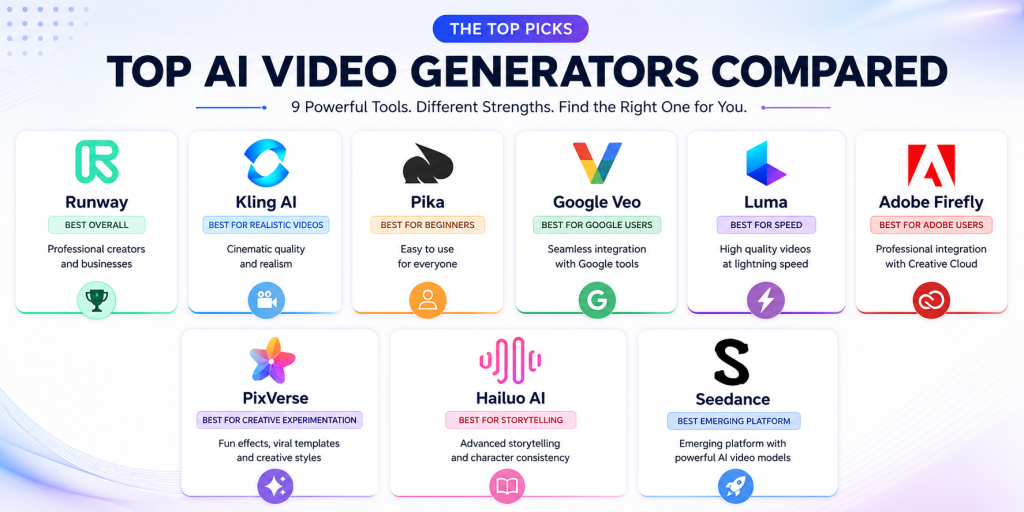
Table of Contents
Quick Verdict
If you just want the short version, here’s how the top AI video generators compare.
| Category | Winner |
| Best AI Video Generator Overall | Runway |
| Best for Realistic AI Videos | Kling AI |
| Best for Beginners | Pika |
| Best for Professional Editing | Runway |
| Best for Social Media Content | Pika |
| Best Image-to-Video Generator | Kling AI |
| Best Enterprise Platform | Runway |
| Best for Creative Experimentation | PixVerse |
| Best for Google Ecosystem Users | Google Veo |
Each of these tools excels in different areas, and we’ll break down exactly why throughout the rest of this guide.
The Best AI Video Generators at a Glance
| AI Video Generator | Best For | Free Plan | Starting Price |
| Runway | Professional creators, businesses, agencies | Yes | Paid plans available |
| Kling AI | Realistic cinematic video generation | Yes | Paid plans available |
| Pika | Beginners and social media creators | Yes | Paid plans available |
| Google Veo | AI video generation within Google’s ecosystem | Limited availability | Pricing varies |
| Luma | Fast cinematic video creation | Yes | Paid plans available |
| Adobe Firefly | Adobe Creative Cloud users | Yes | Included with Adobe plans |
| MiniMax Hailuo | AI storytelling | Yes | Paid plans available |
| PixVerse | Creative effects and viral content | Yes | Paid plans available |
| Seedance | Emerging AI video workflows | Availability varies | Pricing varies |
How We Evaluated the Best AI Video Generators
Every platform in this roundup was assessed using the same criteria to keep the comparisons as fair and practical as possible.
Video Quality
The most important question is simple: does the final video actually look good?
We paid close attention to:
- Realism
- Motion quality
- Lighting
- Facial consistency
- Camera movement
- Visual artifacts
- Overall polish
Platforms that consistently produced publish-ready videos ranked higher than those that frequently required multiple retries.
Prompt Adherence
A great AI video generator should understand what you’re asking it to create.
We looked at how accurately each platform followed detailed prompts, handled camera instructions, maintained visual styles, and interpreted more complex scene descriptions.
The fewer regeneration attempts required to get a usable result, the better the score.
Image-to-Video Performance
Many creators aren’t starting with a blank page anymore.
Instead, they already have product photos, illustrations, brand assets, or character artwork that they want to animate.
For that reason, we evaluated how well each platform preserved:
- Character identity
- Facial features
- Composition
- Lighting
- Motion realism
Strong image-to-video performance has become increasingly valuable for marketers, ecommerce brands, and YouTubers alike.
Editing Capabilities
Generating a video is only part of the process.
We also looked at editing features such as:
- AI inpainting
- Object removal
- Background replacement
- Camera controls
- Timeline editing
- Scene extension
- Video expansion
- Motion refinement
Platforms that supported more of the production workflow naturally scored higher than those focused solely on generation.
Ease of Use
Not every creator has a background in filmmaking or video editing.
We considered:
- Interface design
- Onboarding experience
- Learning curve
- Workflow simplicity
- Documentation
- Accessibility for beginners
The best platforms balanced powerful features with an interface that didn’t feel intimidating.
Pricing and Value
A lower monthly price doesn’t automatically make a tool better value.
Instead, we looked at:
- Free plans
- Credit systems
- Rendering limits
- Commercial licensing
- Included features
- Upgrade flexibility
Some subscriptions cost more but deliver significantly greater long-term value once you factor in generation limits and productivity.
Business Suitability
Finally, we evaluated how well each platform fits professional workflows.
Important considerations included:
- Collaboration
- Project organization
- Scalability
- Commercial use
- Integrations
- API availability
- Enterprise features
This helps ensure the recommendations are useful whether you’re a solo creator experimenting with AI or part of a larger marketing team producing content at scale.
The 9 Best AI Video Generators Ranked
The AI video generation market has become incredibly competitive over the past year. Nearly every major platform can now create videos from text prompts, animate images, and produce impressive results in minutes.
The difference lies in how they approach those tasks.
Some focus on giving professionals a complete production suite, while others prioritize speed, simplicity, or creative experimentation. Depending on your workflow, one tool may save you hours every week, whereas another could leave you wishing for features it simply doesn’t offer.
After comparing video quality, editing capabilities, usability, pricing, and long-term value, these are the AI video generators that stand out in 2026.
1. Runway — Best AI Video Generator Overall
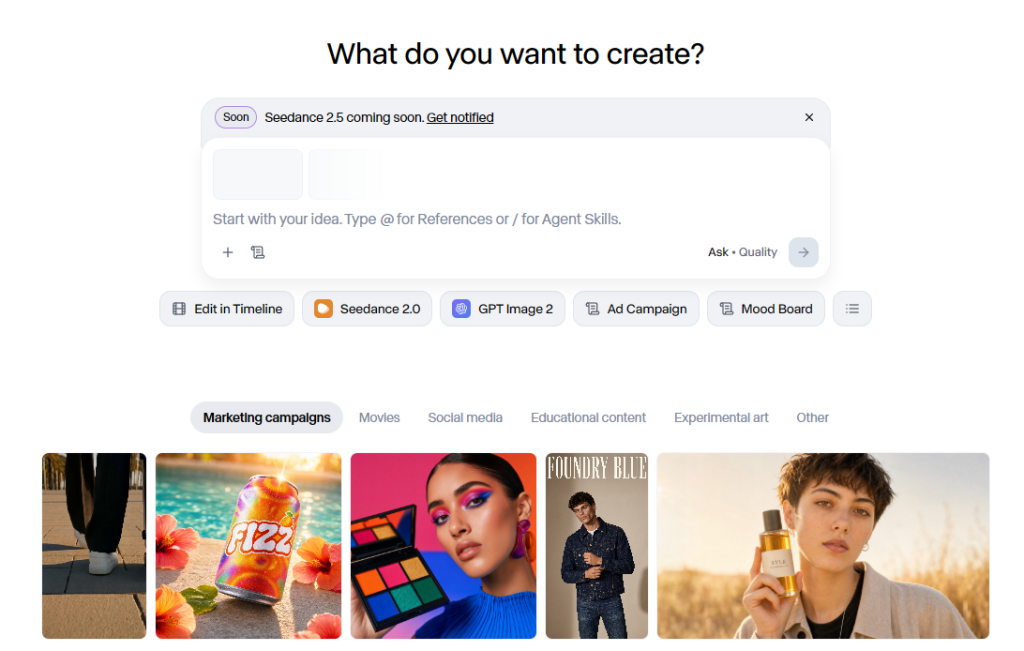
Runway continues to set the benchmark for what a modern AI video platform should look like.
Rather than stopping at text-to-video generation, it combines AI-powered creation with advanced editing tools, collaborative workspaces, and professional production features. The result is a platform that feels less like a standalone AI generator and more like a complete creative studio.
That’s why it earns our top spot. While other tools outperform it in certain areas—such as photorealism or beginner friendliness—few match its balance of video quality, editing flexibility, and overall workflow.
Want a deeper look at its features, pricing, strengths, and limitations? Read our full Runway review.
Best For
- Professional content creators
- Businesses
- Marketing teams
- Creative agencies
- YouTubers
- Commercial video production
- Teams managing larger projects
What We Like
- Consistently high-quality AI video generation
- Excellent text-to-video and image-to-video performance
- Powerful AI editing tools
- Professional timeline-based workflow
- Collaboration features for teams
- Frequent feature updates and model improvements
Things to Consider
- The interface can feel overwhelming at first
- Premium functionality requires a paid subscription
- Heavy users can consume credits quickly
- Beginners may need some time to learn the workflow
Standout Features
Runway has evolved into much more than an AI video generator.
Instead of forcing creators to move between multiple applications, it brings together many of the tools needed throughout the production process.
Notable features include:
- Text-to-video generation
- Image-to-video generation
- AI-powered video editing
- Motion Brush
- Camera Controls
- Inpainting
- Background replacement
- Object removal
- Video extension
- Frame interpolation
- Green screen replacement
- Lip sync
- Collaboration tools
- Project management
For creators producing videos regularly, keeping everything inside a single workspace can significantly speed up production.
Video Quality
One of Runway’s biggest strengths is consistency.
Across a wide variety of prompts, it regularly produces videos with:
- Smooth camera movement
- Realistic lighting
- Strong prompt interpretation
- Natural object motion
- Minimal visual artifacts
- Cinematic composition
While Kling AI occasionally produces even more realistic footage, Runway delivers reliable results across far more scenarios. If you’re deciding between these two platforms, check out our detailed Kling AI vs Runway Comparison.
That consistency makes it especially attractive for businesses and agencies that need dependable output rather than spectacular results every once in a while.
Editing Workflow
This is where Runway separates itself from much of the competition.
Many AI video generators stop once the clip has been created.
Runway lets you continue refining it without exporting everything into another editor.
Within the same platform, you can:
- Remove unwanted objects
- Replace backgrounds
- Extend scenes
- Fine-tune motion
- Adjust camera movement
- Improve compositions
- Generate additional footage
Those features can eliminate several manual editing steps and make production noticeably more efficient.
Ease of Use
Despite offering a professional feature set, Runway remains surprisingly approachable.
New users can start generating videos within minutes, while experienced creators have access to deeper controls as their projects become more complex.
It’s the kind of platform that scales well as your skills improve, rather than one you’ll outgrow after a few months.
Pricing
Runway offers a free plan that gives users an opportunity to test the platform before committing to a subscription.
Paid plans increase:
- Monthly AI credits
- Export capabilities
- Storage
- Collaboration features
- Professional workflow tools
- Overall production capacity
Anyone creating videos regularly will quickly benefit from one of the paid tiers.
Why Runway Is Ranked #1
No AI video generator dominates every category.
Runway comes closest.
It consistently performs well across nearly every area that matters, including:
- Video quality
- Editing capabilities
- Workflow efficiency
- Ease of use
- Scalability
- Collaboration
- Commercial readiness
Rather than excelling in just one niche, it delivers a balanced experience that works for solo creators, businesses, and enterprise teams alike. That’s what makes it our overall pick for the best AI video generator in 2026.
If you want to also see it side by side to another platform, you can check our full comparison between Google Veo vs Runway.
2. Kling AI — Best for Realistic AI Videos
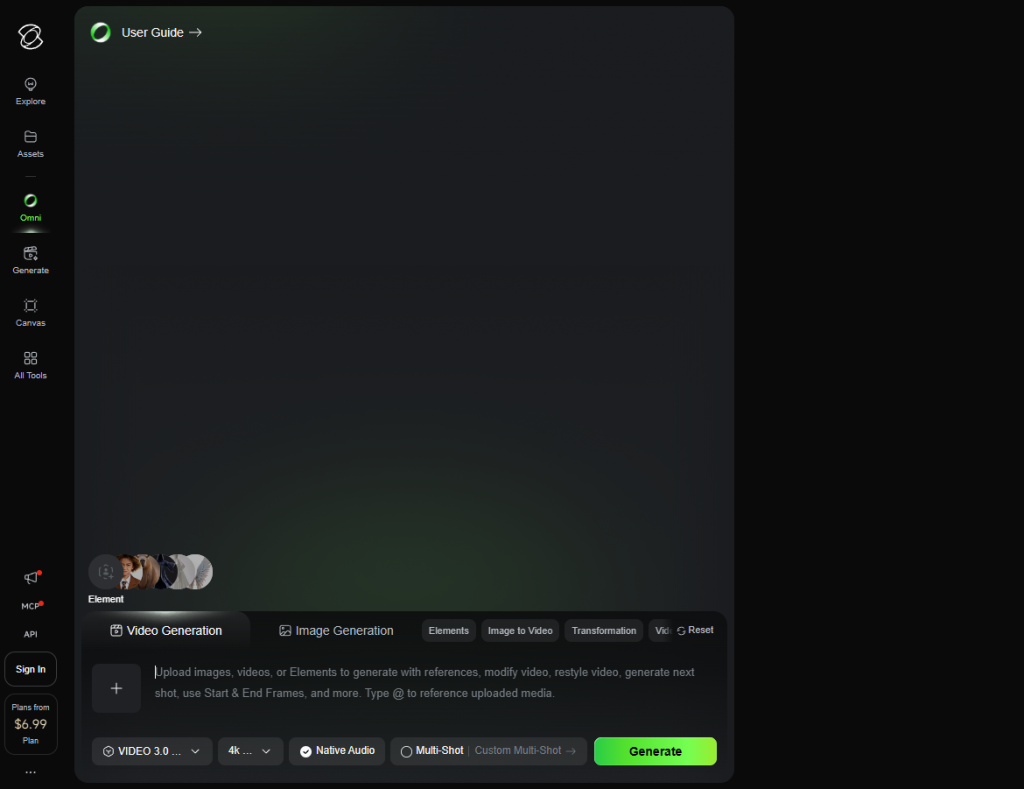
If your priority is creating AI-generated videos that look as realistic as possible, Kling AI deserves a place at the top of your shortlist.
Since its launch, it has built a reputation for producing cinematic footage with remarkably natural motion, convincing lighting, and strong prompt adherence. In many situations, its outputs look closer to traditionally filmed footage than those produced by competing platforms.
Unlike Runway, Kling AI isn’t trying to be a complete production suite. Instead, it focuses on generating the highest-quality visuals it can—and it does that exceptionally well.
For a complete breakdown of its pricing, features, and real-world performance, read our in-depth Kling AI Review.
Best For
- Cinematic AI filmmaking
- Realistic video generation
- Advertising
- Storytelling
- Image-to-video creation
- Professional creators
- High-end visual content
What We Like
- Outstanding realism
- Excellent prompt adherence
- High-quality image-to-video generation
- Natural character movement
- Strong lighting and scene composition
- Smooth, cinematic camera motion
Things to Consider
- Editing tools aren’t as comprehensive as Runway’s
- The workflow focuses more on generation than post-production
- Credit usage can become expensive during experimentation
- Some advanced features are still evolving
Standout Features
Kling AI puts nearly all of its attention into generation quality rather than editing.
Its strongest capabilities include:
- Advanced text-to-video generation
- High-quality image animation
- Natural facial movement
- Cinematic camera movement
- Strong prompt understanding
- Detailed environmental rendering
- Realistic physics simulation
- Multiple visual styles
If your goal is to generate visually impressive footage with minimal tweaking, Kling AI consistently delivers.
Video Quality
Kling AI’s biggest selling point is the quality of its output.
Where many AI video generators still struggle with unnatural movement or inconsistent scenes, Kling AI regularly produces videos with:
- Natural human motion
- Convincing facial expressions
- Realistic lighting
- Smooth camera movement
- Believable environmental interactions
- Strong visual consistency
If you’re judging these tools purely on how realistic the finished video looks, Kling AI is one of the strongest options currently available.
That’s one of the main reasons filmmakers, advertisers, and creators producing cinematic content continue to gravitate toward it.
Prompt Adherence
Another area where Kling AI performs exceptionally well is prompt understanding.
It handles detailed prompts involving multiple characters, camera movements, lighting conditions, and scene transitions more reliably than many competing platforms.
In practice, that means you’ll often spend less time regenerating videos or tweaking prompts before getting a result you’re happy with.
Since every generation costs credits, better prompt adherence can also make the platform more cost-effective over time.
Ease of Use
Despite producing professional-quality results, Kling AI doesn’t feel intimidating.
The interface is clean and relatively straightforward, allowing new users to get started without a steep learning curve.
There is still some experimentation involved—particularly when writing prompts—but once you understand how the model responds, generating impressive videos becomes much more predictable.
Pricing
Kling AI offers a free plan that lets users explore the platform before committing to a subscription.
Paid plans provide:
- More monthly credits
- Faster generation
- Higher usage limits
- Increased production capacity
The free tier is perfectly adequate for testing the platform, but anyone creating videos regularly will likely benefit from upgrading.
Why Kling AI Ranked #2
Kling AI narrowly misses the top spot because it focuses almost entirely on generation quality rather than offering a complete production workflow.
If you’re looking for editing tools, collaboration features, and project management, Runway remains the stronger all-round package.
Still unsure which one fits your workflow? Our Kling AI vs Runway comparison walks through both platforms side by side.
However, if your goal is simply to create the most realistic AI-generated videos possible, Kling AI arguably has the edge.
For creators who value visual realism above everything else, it’s one of the easiest recommendations on this list.
3. Pika — Best AI Video Generator for Beginners
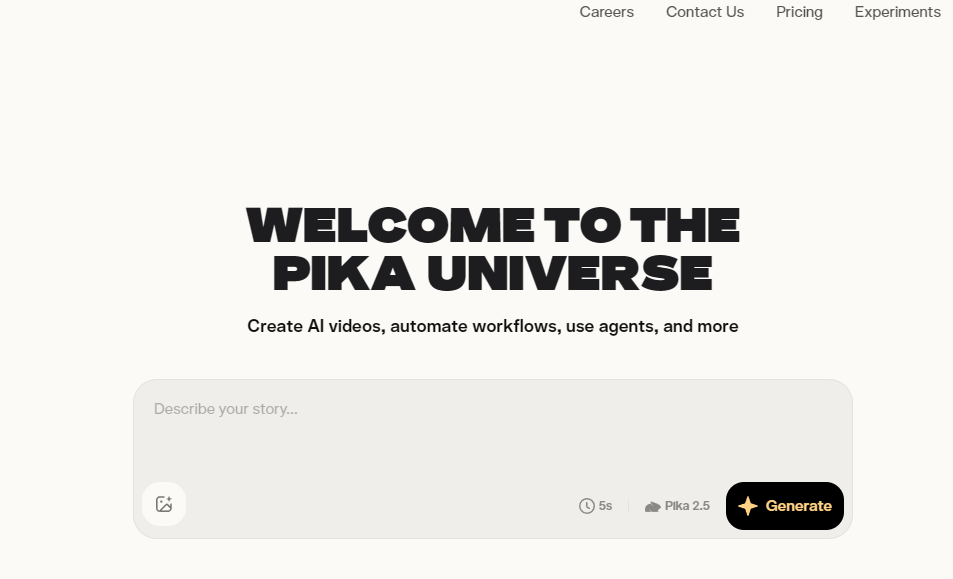
Getting started with AI video generation can feel overwhelming.
Many platforms are packed with advanced editing features, technical controls, and production workflows that make perfect sense to experienced creators—but can be intimidating for everyone else.
That’s where Pika stands out.
Instead of trying to be the most feature-rich platform on the market, it focuses on making AI video creation approachable. The interface is clean, the workflow is easy to understand, and most users can create their first video within just a few minutes.
For anyone taking their first steps into AI video generation, Pika offers one of the smoothest onboarding experiences available today.
If you’re considering Pika, our complete Pika Review covers everything from pricing and features to real-world usability.
Best For
- Beginners
- Social media creators
- Influencers
- Affiliate marketers
- Bloggers
- Entrepreneurs
- Short-form content creators
What We Like
- Extremely easy to learn
- Fast video generation
- Excellent image-to-video capabilities
- Creative AI effects
- Intuitive interface
- Great for social media content
- Minimal learning curve
Things to Consider
- Editing tools aren’t as comprehensive as Runway’s
- Professional production workflows are more limited
- Collaboration features are fairly basic
- Better suited to short-form content than complex productions
If you’re trying to decide whether simplicity or advanced editing is more important, read our full Pika vs Runway comparison.
Standout Features
Pika keeps things refreshingly simple.
Instead of overwhelming users with dozens of technical controls, it focuses on the features people actually use most often, including:
- Text-to-video generation
- Image-to-video animation
- AI scene creation
- Camera movement controls
- Creative transformations
- Style presets
- Quick editing tools
- Visual effects
- Fast rendering
The result is a platform that’s easy to pick up without feeling overly limited.
Video Quality
Pika consistently produces visually engaging videos that work particularly well for:
- TikTok
- Instagram Reels
- YouTube Shorts
- Product promotions
- Marketing campaigns
- Social media advertising
Its videos may not always reach the same level of realism as Kling AI or the same production polish as Runway, but that’s rarely the goal.
Instead, Pika focuses on creating content that’s eye-catching, fast to produce, and ready for social platforms—an area where it performs exceptionally well.
Image-to-Video Performance
One of Pika’s strongest features is its image-to-video capability.
Instead of starting with a text prompt, you can upload an existing image and let Pika animate it while preserving the original composition and style. Whether you’re working with product photos, illustrations, or AI-generated artwork, the results are generally smooth and visually engaging.
Pika does a particularly good job of maintaining:
- Character identity
- Composition
- Lighting
- Overall visual style
For affiliate marketers showcasing products, ecommerce businesses creating promotional content, or creators bringing static artwork to life, this feature alone makes Pika an appealing option.
Ease of Use
If there’s one area where Pika clearly stands above most competitors, it’s usability.
The entire workflow feels straightforward, even if you’ve never used AI video software before. Rather than presenting dozens of settings and technical controls, the platform guides you through the process step by step.
A typical workflow looks something like this:
- Enter your prompt.
- Choose a visual style.
- Upload a reference image if needed.
- Generate your video.
- Export and share it.
Because the interface stays out of your way, you spend more time creating content and less time figuring out how the software works.
Pricing
Pika includes a free plan, making it easy to experiment before spending any money.
Paid subscriptions increase:
- Monthly generation credits
- Usage limits
- Export options
- Premium features
- Overall production capacity
Compared to several competitors, Pika’s paid plans remain competitively priced, particularly for creators producing short-form content on a regular basis.
Why Pika Ranked #3
Pika isn’t trying to compete directly with enterprise-focused platforms like Runway.
Instead, it excels by solving a different problem.
If your goal is to create engaging videos quickly without learning a professional editing suite, Pika delivers one of the best experiences available today.
For beginners, solo creators, entrepreneurs, and social media marketers, its combination of simplicity, speed, and quality is difficult to beat.
4. Google Veo — Best AI Video Generator for Google’s AI Ecosystem
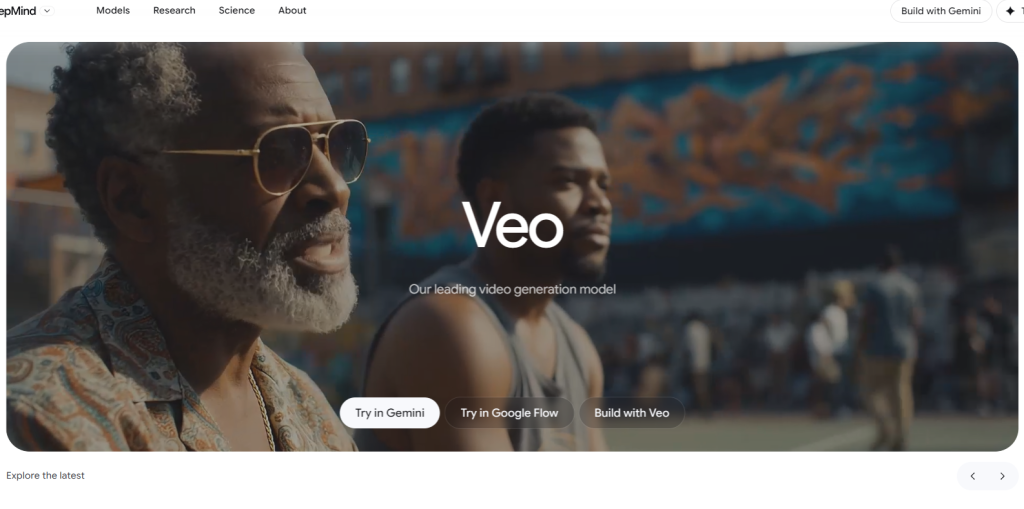
Google Veo is one of the newest names on this list, but it’s already attracting plenty of attention.
Developed using Google’s latest multimodal AI research, Veo has demonstrated impressive video quality, strong prompt understanding, and realistic scene generation. While access has been more limited than some competing platforms, its rapid development suggests it’s a serious contender for the future of AI video creation.
If you’re already invested in Google’s AI ecosystem—or you’re interested in seeing where the company’s AI research is heading—Veo is worth keeping on your radar.
If you want to learn more about it, you can check out our complete Google Veo Review.
Best For
- Google AI users
- Businesses using Google services
- Professional creators
- Marketing teams
- Developers
- Experimental AI workflows
What We Like
- Excellent prompt understanding
- High-quality video generation
- Strong visual realism
- Backed by Google’s AI research
- Potential for deep ecosystem integration
- Rapid ongoing development
Things to Consider
- Availability is still more limited than many competitors
- Some features depend on your region
- The ecosystem is still evolving
- Enterprise access varies depending on Google’s rollout
Standout Features
Google Veo focuses primarily on producing high-quality AI-generated videos rather than providing an extensive editing suite.
Key capabilities include:
- Advanced text-to-video generation
- Cinematic scene creation
- Long-form prompt interpretation
- Natural camera movement
- Strong visual consistency
- AI-assisted storytelling
Because Google continues investing heavily in AI research, Veo is likely to improve rapidly as newer models become available.
Video Quality
Early demonstrations have shown that Google Veo is capable of producing highly polished videos with:
- Realistic movement
- Detailed environments
- Natural lighting
- Smooth camera work
- Accurate prompt interpretation
Even at this relatively early stage, its output competes with many of the strongest AI video generators currently available.
Ease of Use
Like many of Google’s AI products, Veo aims to make advanced technology accessible.
The interface focuses on writing prompts rather than overwhelming users with technical controls, making it approachable for beginners while still offering enough flexibility for experienced creators.
Pricing
Pricing depends on how you access Google Veo and which Google products you’re using.
Because availability is still expanding, subscription options and included features may continue to evolve over time.
Why Google Veo Ranked #4
Google Veo has enormous long-term potential.
The technology behind it is undeniably impressive, but compared with more established platforms like Runway and Pika, it still has ground to cover in terms of accessibility and ecosystem maturity.
As Google continues expanding access and refining the platform, Veo could easily climb higher in future rankings.
You can also review a full comparison between Google Veo vs Runway here.
5. Luma — Best for Fast Cinematic Video Creation
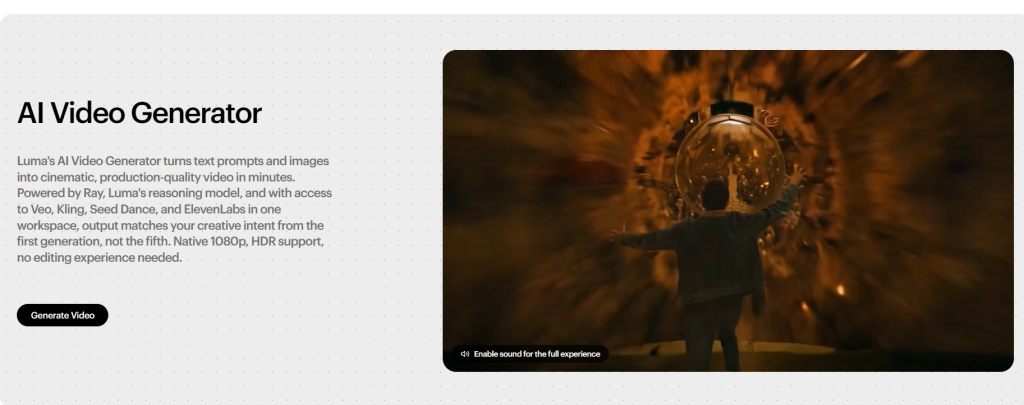
If speed is one of your biggest priorities, Luma deserves a close look.
Rather than trying to compete with platforms that offer dozens of editing tools, Luma focuses on helping creators generate polished, cinematic-looking videos as quickly as possible. That streamlined approach makes it particularly appealing for creators who publish frequently and don’t want to spend hours refining every clip.
Whether you’re producing YouTube content, social media videos, or marketing assets, Luma strikes an impressive balance between quality and efficiency.
Best For
- Fast content production
- YouTube creators
- Marketing videos
- Social media content
- Cinematic visuals
- Small businesses
What We Like
- Fast rendering speeds
- Smooth, natural motion
- Strong overall visual quality
- Beginner-friendly workflow
- Cinematic camera movement
- Clean, uncluttered interface
Things to Consider
- Editing tools aren’t as extensive as Runway’s
- Limited collaboration features
- Less flexibility for complex production workflows
- Better suited to content creation than large-scale video production
Standout Features
Luma focuses on delivering quality results with minimal complexity.
Its core feature set includes:
- Text-to-video generation
- Image animation
- Smooth camera movement
- Cinematic rendering
- Natural scene transitions
- High-quality exports
Instead of replacing professional editing software, Luma complements existing workflows by producing attractive AI-generated clips that often require very little post-production.
Video Quality
Luma consistently produces videos with fluid motion and a polished, cinematic look.
While it may not quite match Kling AI’s realism or Runway’s production flexibility, the quality is more than sufficient for most marketing, educational, and social media projects.
The platform performs particularly well when generating atmospheric scenes, cinematic camera movements, and visually engaging short clips.
Ease of Use
Luma keeps the interface refreshingly simple.
Most users can begin generating videos almost immediately without spending hours learning complicated controls or production workflows.
That accessibility makes it a solid choice for creators who value speed over extensive customization.
Pricing
Luma includes a free plan, allowing users to test the platform before committing to a subscription.
Paid plans generally provide:
- Additional monthly credits
- Higher generation limits
- Faster rendering
- Better export options
- Increased production capacity
Why Luma Ranked #5
Luma succeeds because it knows exactly what it’s trying to achieve.
It doesn’t attempt to become an all-in-one production suite or overwhelm users with advanced editing tools. Instead, it focuses on delivering high-quality AI-generated videos quickly and consistently.
For creators who publish frequently and value efficiency, that’s often exactly what’s needed.
6. Adobe Firefly — Best AI Video Generator for Adobe Creative Cloud Users
If you already rely on Adobe Creative Cloud, Adobe Firefly is one of the easiest AI video tools to integrate into your existing workflow.
Rather than positioning itself as a standalone AI video generator, Firefly is designed to enhance familiar Adobe applications like Premiere Pro, Photoshop, and After Effects. That makes it especially attractive for designers, editors, and creative professionals who want AI-powered features without completely changing how they work.
Instead of replacing traditional editing software, Firefly aims to make those tools even more efficient.
Best For
- Adobe Creative Cloud users
- Professional designers
- Video editors
- Marketing teams
- Creative agencies
- Commercial production
What We Like
- Excellent integration with Adobe products
- Commercial-focused workflow
- Familiar interface for existing Adobe users
- Useful AI-assisted creative tools
- Strong brand ecosystem
- Continuous platform improvements
Things to Consider
- Delivers the most value if you’re already paying for Adobe
- Less appealing as a standalone AI video platform
- Doesn’t offer the same end-to-end AI workflow as some competitors
- Creative Cloud subscriptions can become expensive
Standout Features
Adobe Firefly is built around accelerating creative work rather than replacing professional editing software.
Its most useful capabilities include:
- AI video generation
- Generative Fill technology
- AI-assisted editing
- Commercial content creation
- Adobe ecosystem integration
- Creative asset workflows
- Brand-consistent content production
For existing Adobe users, these tools fit naturally into workflows they already know.
Video Quality
Firefly produces polished, professional-looking outputs that are well suited to:
- Marketing materials
- Advertisements
- Presentations
- Commercial content
- Brand assets
Its strength lies in consistency and compatibility with professional editing rather than pushing the boundaries of cinematic AI generation.
Ease of Use
Anyone familiar with Adobe software will feel at home almost immediately.
Menus, terminology, and overall workflows closely resemble other Creative Cloud applications, making the learning curve relatively gentle for existing users.
Those who haven’t used Adobe products before may need a little more time to become comfortable with the broader ecosystem.
Pricing
Firefly is available through Adobe’s subscription ecosystem, with available features depending on your Creative Cloud plan.
If you’re already paying for Adobe services, adding Firefly often represents excellent value because it integrates directly into tools you’re already using.
Why Adobe Firefly Ranked #6
Adobe Firefly isn’t trying to outperform every AI video generator on this list.
Instead, it succeeds by strengthening one of the world’s most widely used creative ecosystems.
For creators already invested in Adobe Creative Cloud, it’s an easy recommendation that can significantly streamline day-to-day production without forcing you to learn an entirely new workflow.
7. MiniMax Hailuo — Best for AI Storytelling
If your videos revolve around storytelling rather than straightforward marketing, MiniMax Hailuo is well worth considering.
Instead of chasing maximum realism or packing the platform with advanced editing tools, Hailuo leans into narrative-driven video generation. It excels at creating scenes that feel connected, making it a strong choice for short films, animated stories, and creative projects where atmosphere matters just as much as technical quality.
While it doesn’t have the same ecosystem as industry leaders like Runway, it offers a unique approach that many creators will appreciate.
Best For
- Storytelling
- Creative filmmaking
- Short films
- Animated narratives
- Experimental creators
- Visual storytelling
What We Like
- Strong narrative generation
- Attractive visual quality
- Effective scene composition
- Good prompt interpretation
- Creative flexibility
- Smooth camera movement
Things to Consider
- Smaller ecosystem than leading competitors
- Limited editing functionality
- Fewer collaboration features
- Enterprise workflows are still fairly limited
Standout Features
MiniMax Hailuo focuses on helping creators build visually engaging stories through features such as:
- Text-to-video generation
- Story-driven scene creation
- Cinematic camera movements
- AI-assisted storytelling
- Image animation
- Multiple creative visual styles
Rather than emphasizing commercial workflows, it gives creators the tools to experiment with more narrative-focused content.
Video Quality
Hailuo consistently produces videos with:
- Strong scene composition
- Smooth transitions
- Cohesive storytelling
- Consistent artistic direction
Although it doesn’t always match Kling AI’s level of realism, its creative style often results in videos that feel more expressive and engaging.
Ease of Use
The platform strikes a nice balance between creative freedom and accessibility.
You don’t need extensive technical knowledge to get started, making it approachable for beginners while still offering enough flexibility for more experienced creators.
Pricing
MiniMax Hailuo includes a free plan, with paid subscriptions offering additional credits and higher generation limits.
As the platform continues expanding internationally, pricing and available plans may change, so it’s worth checking the latest information before subscribing.
Why MiniMax Hailuo Ranked #7
MiniMax Hailuo earns its place because it offers something different.
Instead of trying to compete directly with enterprise production suites, it focuses on helping creators tell better visual stories. If narrative content is your priority, it’s one of the most interesting AI video generators currently available.
8. PixVerse — Best for Creative Effects and Viral Content
PixVerse has quickly become a favorite among creators producing short-form content for platforms like TikTok, Instagram Reels, and YouTube Shorts.
Rather than competing with professional editing platforms, PixVerse focuses on what social media rewards most: eye-catching visuals, creative transformations, and videos that immediately grab attention.
If your goal is to stop people scrolling, PixVerse has plenty to offer.
Best For
- TikTok creators
- Instagram creators
- Viral content
- Entertainment
- Creative experimentation
- Social-first marketing
What We Like
- Fun AI-powered visual effects
- Fast generation
- Beginner-friendly interface
- Strong creative transformations
- Regular feature updates
- Excellent short-form content
Things to Consider
- Limited professional editing features
- Minimal enterprise functionality
- Less suitable for complex commercial productions
- Collaboration tools remain fairly basic
Standout Features
PixVerse includes a range of features designed for fast, creative content creation:
- Text-to-video generation
- Image-to-video animation
- AI visual effects
- Creative scene transformations
- Stylized animations
- Fast rendering
- Social media optimization
Its focus isn’t photorealism—it’s helping creators produce content that’s visually engaging and easy to share.
Video Quality
PixVerse takes a different approach from platforms like Runway and Kling AI.
Rather than aiming for cinematic realism, it prioritizes bold visuals and creative effects that perform well on social media.
For creators producing entertainment content, memes, or highly shareable short videos, that focus often works in its favor.
Ease of Use
Getting started with PixVerse is straightforward.
The interface is designed around speed, allowing users to generate videos almost immediately without navigating complicated production tools.
That simplicity makes it particularly appealing for creators publishing content every day.
Pricing
PixVerse offers a free plan, with paid subscriptions providing:
- Additional monthly credits
- Higher generation limits
- Faster rendering
- Access to premium features
The free tier is a good way to explore the platform before deciding whether it fits your workflow.
Why PixVerse Ranked #8
PixVerse doesn’t try to replace comprehensive production suites like Runway.
Instead, it focuses on helping creators make engaging, highly shareable videos as quickly as possible.
For anyone whose success depends on producing eye-catching social media content, that’s a compelling proposition.
9. Seedance — Best Emerging AI Video Generator
Seedance is one of the newest additions to the AI video generation space, but it has already started attracting attention for its rapid development and promising results.
Unlike more established platforms that have spent years building extensive ecosystems, Seedance is still evolving. Even so, it already delivers impressive video quality and continues to improve at a remarkable pace.
If you enjoy experimenting with emerging AI technology before it becomes mainstream, Seedance is definitely worth watching.
Best For
- Early adopters
- AI enthusiasts
- Experimental creators
- Creative professionals
- Users exploring newer AI models
What We Like
- Modern AI generation models
- Competitive video quality
- Rapid feature development
- Flexible creative workflows
- Strong long-term potential
Things to Consider
- Smaller ecosystem than established competitors
- Limited third-party integrations
- Fewer learning resources
- Workflow still maturing
Standout Features
Although it’s a relatively young platform, Seedance already includes many of the features creators expect from modern AI video software.
These include:
- Text-to-video generation
- Image-to-video creation
- AI-assisted motion generation
- Prompt-based scene creation
- Creative animation tools
- Modern AI models
Given the speed at which the platform is developing, its capabilities are likely to expand considerably over the coming years.
Video Quality
Seedance consistently produces visually impressive clips, particularly when working with detailed prompts.
While it doesn’t yet match the consistency of more mature platforms like Runway or Kling AI, the overall quality is already competitive enough for many creative projects.
For a relatively new platform, that’s an encouraging sign.
Ease of Use
One of Seedance’s strengths is its straightforward interface.
It avoids overwhelming users with unnecessary complexity, making it easy to experiment with newer AI models without spending hours learning the software.
Pricing
Because Seedance is still developing, pricing and subscription options continue to evolve.
Before committing to a paid plan, it’s worth checking the latest details on available tiers and included features.
Why Seedance Ranked #9
Seedance makes this list because of where it’s heading, not just where it is today.
Its ecosystem may still be developing, but the pace of improvement suggests it has the potential to become a much stronger competitor over the next few years.
For creators who enjoy staying ahead of industry trends, it’s certainly a platform worth keeping an eye on.
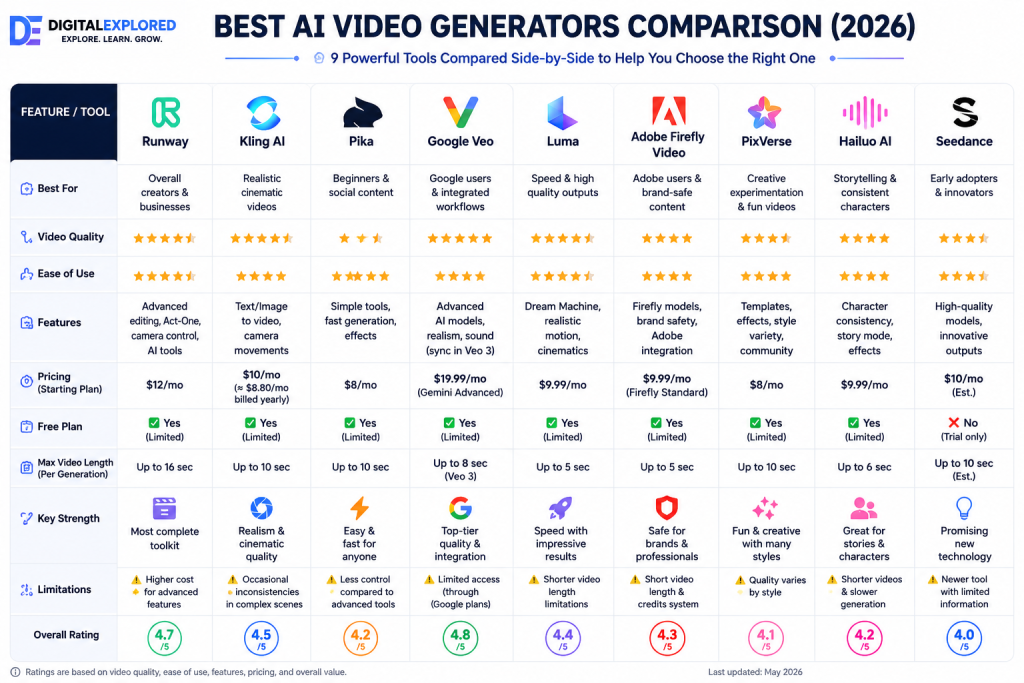
AI Video Generator Comparison Table
Looking at individual reviews is helpful, but comparing the platforms side by side makes it much easier to see where each one excels.
| Feature | Runway | Kling AI | Pika | Google Veo | Luma | Adobe Firefly | MiniMax Hailuo | PixVerse | Seedance |
| Text-to-Video | ⭐⭐⭐⭐⭐ | ⭐⭐⭐⭐⭐ | ⭐⭐⭐⭐☆ | ⭐⭐⭐⭐⭐ | ⭐⭐⭐⭐☆ | ⭐⭐⭐⭐☆ | ⭐⭐⭐⭐☆ | ⭐⭐⭐⭐☆ | ⭐⭐⭐⭐☆ |
| Image-to-Video | ⭐⭐⭐⭐⭐ | ⭐⭐⭐⭐⭐ | ⭐⭐⭐⭐☆ | ⭐⭐⭐⭐☆ | ⭐⭐⭐⭐☆ | ⭐⭐⭐☆☆ | ⭐⭐⭐⭐☆ | ⭐⭐⭐⭐☆ | ⭐⭐⭐⭐☆ |
| Video Quality | ⭐⭐⭐⭐⭐ | ⭐⭐⭐⭐⭐ | ⭐⭐⭐⭐☆ | ⭐⭐⭐⭐⭐ | ⭐⭐⭐⭐☆ | ⭐⭐⭐⭐☆ | ⭐⭐⭐⭐☆ | ⭐⭐⭐⭐☆ | ⭐⭐⭐⭐☆ |
| Editing Tools | ⭐⭐⭐⭐⭐ | ⭐⭐⭐☆☆ | ⭐⭐⭐☆☆ | ⭐⭐⭐☆☆ | ⭐⭐⭐☆☆ | ⭐⭐⭐⭐☆ | ⭐⭐⭐☆☆ | ⭐⭐⭐☆☆ | ⭐⭐⭐☆☆ |
| Ease of Use | ⭐⭐⭐⭐☆ | ⭐⭐⭐⭐☆ | ⭐⭐⭐⭐⭐ | ⭐⭐⭐⭐☆ | ⭐⭐⭐⭐⭐ | ⭐⭐⭐⭐☆ | ⭐⭐⭐⭐☆ | ⭐⭐⭐⭐⭐ | ⭐⭐⭐⭐☆ |
| Collaboration | ⭐⭐⭐⭐⭐ | ⭐⭐☆☆☆ | ⭐⭐☆☆☆ | ⭐⭐⭐☆☆ | ⭐⭐☆☆☆ | ⭐⭐⭐⭐☆ | ⭐⭐☆☆☆ | ⭐⭐☆☆☆ | ⭐⭐☆☆☆ |
| Free Plan | Yes | Yes | Yes | Limited | Yes | Yes | Yes | Yes | Varies |
| Best For | Professionals | Realism | Beginners | Google Users | Speed | Adobe Users | Storytelling | Social Media | Emerging AI |
Best AI Video Generator by Use Case
The overall rankings are useful, but they’re only part of the story.
Different creators have different priorities, so the best AI video generator often depends on what you’re trying to accomplish.
Best AI Video Generator for Beginners
Winner: Pika
Learn more in our complete Pika Review.
If you’re completely new to AI video creation, Pika is the easiest place to start.
Its clean interface, simple workflow, and fast rendering let beginners create impressive videos without needing professional editing experience.
Best AI Video Generator for Professional Creators
Winner: Runway
See our full Runway Review for a deeper look at its workflow and editing tools.
Professional creators often need much more than text-to-video generation.
Runway combines powerful editing tools, collaboration features, project management, and AI generation into a single workflow, making it the strongest all-around choice for commercial work.
Best AI Video Generator for Realistic Videos
Winner: Kling AI
Read our detailed Kling AI Review to see why it ranks so highly for realism.
If realism is your top priority, Kling AI consistently produces some of the most convincing AI-generated footage available today.
Its natural movement, strong prompt adherence, and cinematic visuals make it an excellent option for filmmakers and advertisers.
Best AI Video Generator for Social Media
Winner: Pika
When you’re publishing regularly on TikTok, Instagram Reels, or YouTube Shorts, speed matters just as much as quality.
Pika’s quick generation times and creative effects make it one of the strongest options for short-form content.
Best AI Video Generator for Businesses
Winner: Runway
Businesses need dependable workflows, collaboration features, and consistent output.
Runway combines all of those elements into a platform that’s well suited to agencies, marketing teams, and commercial production.
Best AI Video Generator for Marketing
Winner: Runway
Marketing teams benefit from being able to generate, edit, refine, and export videos without constantly switching between different applications.
Runway’s production workflow helps reduce turnaround times while maintaining professional-quality output.
Best AI Video Generator for YouTube
Winner: Runway
Long-form YouTube videos usually require multiple revisions, scene extensions, and ongoing edits.
Runway’s editing toolkit makes it particularly well suited to creators producing more complex video projects.
Best AI Video Generator for Creative Experimentation
Winner: PixVerse
If your goal is to create eye-catching videos that stand out on social media, PixVerse is difficult to ignore.
Its creative AI effects and stylized transformations encourage experimentation and help creators produce highly shareable content.
Best AI Video Generator for Storytelling
Winner: MiniMax Hailuo
Creators focused on narrative content and cinematic storytelling will appreciate MiniMax Hailuo’s emphasis on scene composition and story-driven generation.
Best AI Video Generator for Adobe Users
Winner: Adobe Firefly
If you already work inside Adobe Creative Cloud, Firefly integrates naturally into your existing workflow and allows you to add AI-powered features without changing the tools you already know.
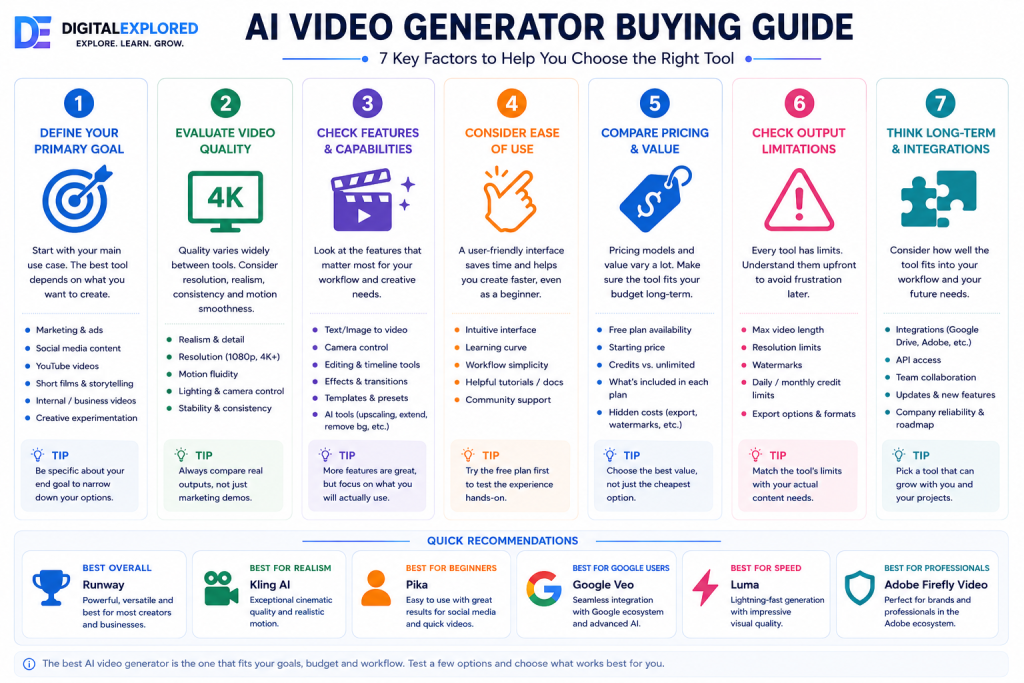
Buying Guide: How to Choose the Best AI Video Generator
Choosing the right AI video generator isn’t just about finding the platform with the longest list of features.
The best choice depends on the type of videos you create, your experience level, your budget, and how the software fits into your existing workflow. A YouTuber, for example, may have very different priorities than an ecommerce business or a marketing agency.
Before committing to a subscription, it’s worth thinking through the factors below.
1. Video Quality
The first question to ask is simple:
Would you be happy publishing the videos this platform produces?
High-quality AI video generation involves much more than sharp visuals. The best platforms consistently deliver:
- Natural human movement
- Realistic facial expressions
- Convincing lighting
- Consistent characters
- Smooth camera movement
- Minimal visual artifacts
- Strong scene composition
If your priority is maximum realism, our Kling AI Review explains why it continues to lead in visual quality. If you want an excellent balance between generation quality and editing flexibility, our Runway Review shows why it remains our top overall recommendation.
2. Text-to-Video vs Image-to-Video
Not everyone starts with an empty prompt.
Ask yourself how you’ll actually create videos.
If you’re generating everything from written descriptions, strong text-to-video performance should be your priority.
On the other hand, if you already have product photos, brand assets, illustrations, or thumbnails, image-to-video quality becomes much more important.
Many affiliate marketers, bloggers, ecommerce businesses, and YouTubers already have existing visuals they want to animate rather than recreate from scratch. In those cases, choosing a platform with excellent image-to-video capabilities can dramatically improve the final results.
3. Editing Capabilities
Creating the initial video is only one step in the production process.
Professional creators rarely publish AI-generated clips exactly as they come out of the model. Instead, they refine them by adjusting scenes, fixing small imperfections, or extending footage.
Useful editing features include:
- Object removal
- Inpainting
- Background replacement
- Camera controls
- Scene extension
- Motion editing
- Timeline editing
- AI masking
- Video expansion
If editing plays an important role in your workflow, Runway remains one of the strongest options on the market.
4. Ease of Use
More features don’t always make a platform better.
If the interface is confusing or requires weeks of learning before you can produce good results, it may slow your workflow rather than improve it.
Beginners should look for software with:
- Clear navigation
- Guided workflows
- Helpful documentation
- Logical interface design
- Minimal setup
Experienced creators may be willing to accept a steeper learning curve if it unlocks more advanced production tools.
5. Rendering Speed
Rendering speed has a surprisingly large impact on productivity.
If you’re generating dozens of videos every week, even saving a few minutes per render quickly adds up.
When comparing platforms, pay attention to:
- Average generation time
- Queue length
- Server availability
- Export speed
- Regeneration speed
Fast rendering is especially valuable for agencies and creators working under tight publishing schedules.
6. Pricing Structure
Looking only at the monthly subscription price rarely tells the whole story.
Instead, compare what’s actually included.
Things worth checking include:
- Monthly credits
- Credit consumption
- Video duration limits
- Resolution limits
- Commercial rights
- Export quality
- Access to premium features
- Additional usage costs
Sometimes a slightly more expensive platform offers significantly better long-term value because you receive more usable generations and a broader feature set.
7. Commercial Licensing
If you’re creating content for clients or your own business, commercial licensing is essential.
Before publishing AI-generated videos commercially, verify:
- Commercial usage rights
- Ownership policies
- AI-generated asset guidelines
- Enterprise permissions
- Copyright documentation
Licensing terms can differ between free and paid plans, so it’s always worth reviewing the latest policies.
8. Collaboration Features
Solo creators may never need collaboration tools.
Businesses and agencies usually do.
Features worth looking for include:
- Shared workspaces
- Team management
- Project organization
- Version history
- Asset libraries
- Approval workflows
- User permissions
As production teams grow, these capabilities become increasingly valuable.
9. Integrations
Think beyond the AI video generator itself.
Does it work well with the rest of your workflow?
Useful integrations might include:
- Adobe Creative Cloud
- Google Workspace
- APIs
- Automation platforms
- Cloud storage
- Publishing tools
Reducing manual file transfers can save a significant amount of time over the course of larger projects.
10. Long-Term Development
AI video generation is evolving at an extraordinary pace.
The platform you choose today should continue improving over time, not fall behind its competitors.
Look for companies that regularly release:
- New AI models
- Better generation quality
- Faster rendering
- Additional editing features
- Workflow improvements
- More competitive pricing
Choosing a platform with an active development roadmap helps ensure your workflow stays relevant as the technology advances.
Should You Use Free AI Video Generators?
For most people, the answer is yes.
Free plans are one of the easiest ways to explore AI video generation without committing to a paid subscription. Nearly every major platform now offers some form of free access, allowing users to test prompts, experiment with image-to-video generation, and get familiar with the interface before upgrading.
That said, free plans almost always come with limitations.
Common restrictions include:
- Limited monthly credits
- Lower export resolutions
- Watermarked videos
- Slower rendering
- Restricted commercial usage
- Locked premium features
If you’re only creating videos occasionally, those limitations may not be a problem.
However, if you’re publishing content regularly or creating videos for clients, a paid subscription usually delivers a much better experience through higher generation limits, faster rendering, better exports, and access to more advanced tools.
Which AI Video Generator Is Best for Different Types of Users?
No single AI video generator is the perfect choice for everyone.
Some platforms prioritize professional production, while others focus on simplicity, cinematic realism, or social media content. The right tool ultimately depends on how you plan to use it.
Here’s a quick breakdown to help narrow your options.
Choose Runway if…
Runway is the best fit if you:
- Create professional content on a regular basis
- Need powerful AI editing tools
- Produce videos for clients
- Work as part of a creative team
- Want an all-in-one production workflow
- Plan to scale your content over time
Rather than being just another AI video generator, Runway functions as a complete production platform. It combines high-quality generation with editing, collaboration, and project management, making it an excellent long-term choice for professionals.
Read the full Runway Review for a detailed breakdown.
Choose Kling AI if…
Kling AI is the better option if you:
- Care most about realism
- Produce cinematic videos
- Create advertisements
- Need high-quality image-to-video generation
- Prioritize visual quality over editing tools
When the goal is to create footage that looks as realistic as possible, Kling AI consistently ranks among the very best platforms available today.
Read our full Kling AI Review to learn more.
Choose Pika if…
Pika is ideal if you:
- Are completely new to AI video creation
- Publish on TikTok or Instagram Reels
- Want fast, straightforward results
- Prefer a simple interface
- Don’t need advanced production features
Pika removes much of the complexity from AI video generation, making it one of the easiest platforms for beginners to learn.
See our complete Pika Review for the full analysis.
Choose Google Veo if…
Google Veo is worth considering if you:
- Already use Google’s AI ecosystem
- Want access to Google’s latest AI models
- Are interested in future AI developments
- Prefer Google’s approach to AI tools
Although availability is still expanding, Google Veo has enormous long-term potential and continues to improve with each new release.
Choose Luma if…
Luma is a great fit if you:
- Value rendering speed
- Publish content frequently
- Want cinematic visuals without a complicated workflow
- Prefer a streamlined interface
Its combination of speed and ease of use makes it particularly attractive for creators who need to produce content efficiently.
Choose Adobe Firefly if…
Adobe Firefly makes the most sense if you:
- Already subscribe to Adobe Creative Cloud
- Edit videos professionally
- Use Premiere Pro or After Effects regularly
- Want AI features built into your existing workflow
For established Adobe users, Firefly feels like a natural extension of the software they’re already familiar with.
Choose MiniMax Hailuo if…
MiniMax Hailuo is a strong option if you:
- Focus on storytelling
- Enjoy creative experimentation
- Produce animated narratives
- Want cinematic scene generation
Its emphasis on narrative-driven content sets it apart from many of the more commercially focused AI video generators.
Choose PixVerse if…
PixVerse is well suited to creators who:
- Produce viral social media content
- Love creative visual effects
- Publish short-form videos regularly
- Want eye-catching AI-generated visuals
If your success depends on grabbing attention within the first few seconds, PixVerse is one of the most enjoyable platforms to work with.
Choose Seedance if…
Seedance is worth exploring if you:
- Enjoy testing new AI tools
- Want to stay ahead of industry trends
- Don’t mind experimenting with emerging platforms
- Are comfortable using software that’s still evolving
While it isn’t as mature as some competitors, its rapid development makes it an exciting platform to watch.
For most creators, though, Runway remains our top overall recommendation. It offers the best combination of video quality, editing capabilities, scalability, and workflow efficiency, making it the most versatile AI video generator currently available.
Frequently Asked Questions
What is the best AI video generator overall?
For most users, Runway is the best AI video generator overall. Our full Runway Review explains exactly why.
It combines high-quality video generation with powerful editing tools, collaboration features, and a professional production workflow. Instead of simply generating clips, Runway also helps you edit, refine, and organize projects in one place.
That said, the best choice still depends on your priorities. If photorealistic video quality is your main concern, Kling AI may be a better fit, while beginners will likely feel more comfortable starting with Pika.
Which AI video generator creates the most realistic videos?
If realism is your top priority, Kling AI is currently one of the strongest options available.
Its videos consistently showcase:
- Natural human movement
- Convincing facial expressions
- Realistic lighting
- Smooth camera motion
- Excellent prompt accuracy
For filmmakers, advertisers, and creators producing cinematic content, Kling AI is hard to beat.
For a more detailed breakdown, read our Kling AI Review.
Which AI video generator is easiest for beginners?
Pika is our top recommendation for beginners.
Its intuitive interface, minimal learning curve, and fast generation process allow new users to create impressive videos within minutes, even without prior editing experience.
If you’re just getting started with AI video creation, Pika is one of the most approachable platforms available today.
You can also read our complete Pika Review before deciding.
Can AI Video Generators Replace Video Editors?
Not completely.
AI video generators have improved dramatically over the past few years, but they still work best as creative assistants rather than complete replacements for professional video editing software.
Today’s leading platforms can generate scenes, animate images, remove objects, extend clips, and automate repetitive editing tasks. That can save creators a significant amount of time, especially during the early stages of production.
However, traditional editing tools are still important for projects that require precise control over pacing, audio, color grading, motion graphics, or complex multi-scene timelines.
For many creators, the most effective workflow combines both approaches. AI handles the heavy lifting—such as generating footage or creating first drafts—while conventional editing software is used to polish the final result.
As AI technology continues to evolve, the line between generation and editing will likely become even more blurred, but human creativity and editorial judgment remain difficult to replace.
Are AI-Generated Videos Safe to Use Commercially?
In many cases, yes.
Most leading AI video generators allow commercial use through their paid plans, making them suitable for marketing campaigns, YouTube channels, client work, product demonstrations, and business presentations.
That said, licensing policies vary between providers.
Before using AI-generated videos commercially, it’s a good idea to review the platform’s terms regarding:
- Commercial usage rights
- Ownership of generated content
- Copyright policies
- Brand and trademark usage
- Restrictions on free-plan exports
These policies can change over time, so it’s worth checking the latest documentation before publishing or selling AI-generated content.
Do AI Video Generators Require Video Editing Experience?
Not necessarily.
One of the biggest advantages of modern AI video generators is that they’re designed to make video creation more accessible.
Platforms such as Pika and Luma are particularly beginner-friendly, allowing users to generate impressive videos with little to no editing experience. Most of the work involves describing what you want through prompts rather than manually editing footage.
More advanced tools like Runway offer additional editing capabilities, but they’re still considerably easier to learn than traditional professional editing software.
If you’ve never edited a video before, you can still start creating useful content with today’s AI-powered tools.
How Much Do AI Video Generators Cost?
Pricing varies depending on the platform and the features included.
Most AI video generators follow a subscription model, with costs typically increasing as you need more generation credits, faster rendering, higher resolutions, or advanced editing tools.
Many providers also offer free plans, allowing users to test the platform before committing to a paid subscription.
When comparing pricing, don’t focus only on the monthly fee. Consider factors such as:
- Monthly generation credits
- Export quality
- Video length limits
- Rendering speed
- Commercial usage rights
- Included AI features
A slightly more expensive plan may offer better overall value if it significantly increases the amount of content you can produce.
Final Verdict: What Is the Best AI Video Generator?
After comparing today’s leading platforms, Runway stands out as the best AI video generator for most creators.
It delivers an excellent balance of video quality, AI-powered editing, ease of use, collaboration tools, and long-term scalability. Whether you’re producing YouTube videos, marketing campaigns, client projects, or content for your own business, Runway provides one of the most complete AI video production workflows currently available.
That doesn’t mean it’s the right choice for everyone.
If your priority is photorealistic video generation, our Kling AI Review explains why it’s one of the strongest alternatives. Beginners looking for a simple and approachable experience should read our Pika Review, while creators wanting the most complete workflow can explore our Runway Review.
Ultimately, the best AI video generator is the one that matches your workflow, budget, and creative goals.
The good news is that most of the platforms on this list offer free plans or trials, making it easy to experiment before choosing a subscription.
As AI video technology continues to improve, creators will have access to increasingly powerful tools that reduce production time while expanding creative possibilities. Choosing the right platform today can help future-proof your workflow as the industry continues to evolve.
If you’re looking for the best overall combination of quality, features, and flexibility, Runway is our top recommendation for 2026.
3 thoughts on “Best AI Video Generators (2026): The 9 Best AI Video Creation Tools Compared”