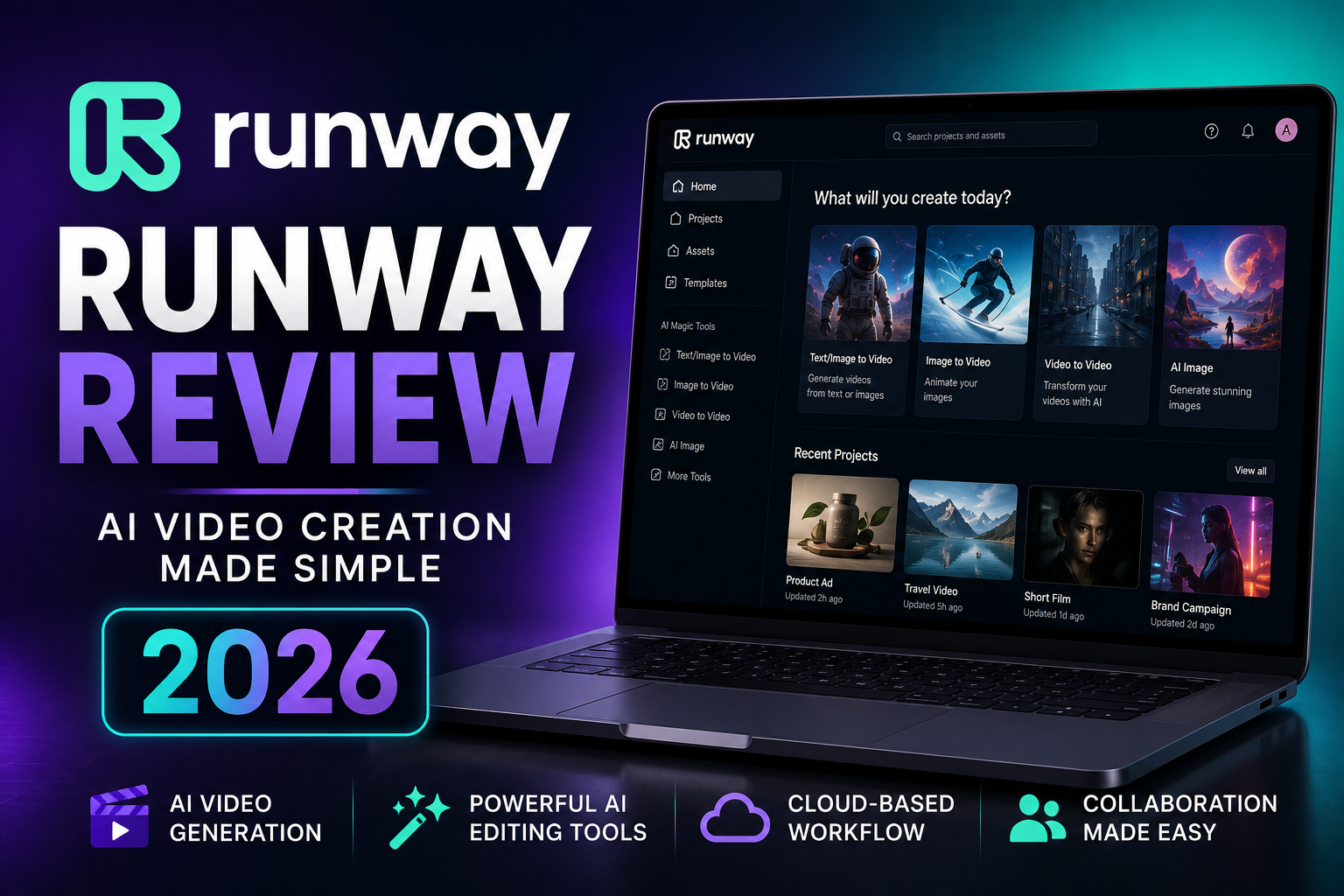
In this Runway Review we will go over how AI video generation has advanced at an incredible pace over the past few years, and how Runway has played a significant role in that progress.
Table of Contents
Originally known for AI-powered editing tools, the platform has evolved into a much broader creative workspace. Today, it combines text-to-video generation, image animation, video transformation, AI-assisted editing, asset management, and collaboration features in a single browser-based environment.
That breadth is what separates Runway from many competitors.
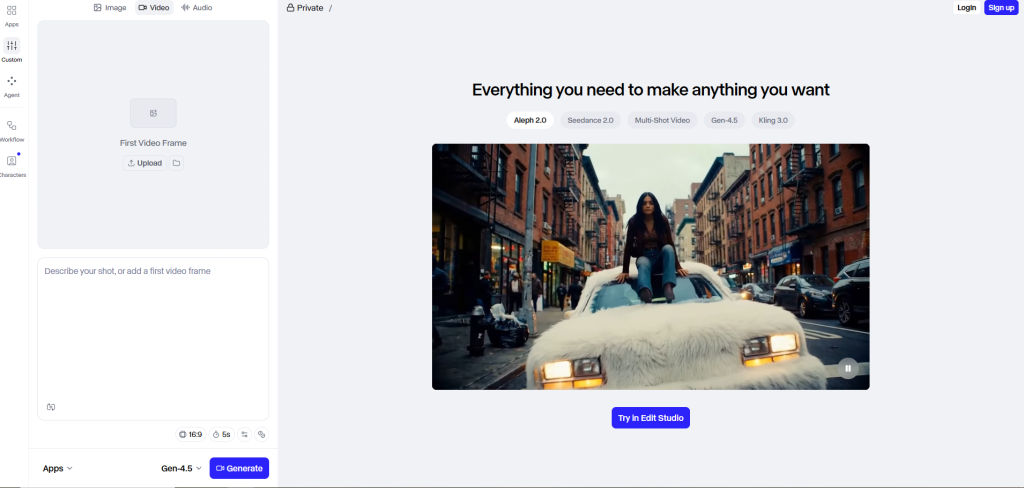
Some AI platforms focus almost entirely on generating videos. Runway aims to support much more of the creative process, helping users generate, edit, refine, organize, and manage content without constantly switching between different applications.
For many creators, that can be a major advantage.
For others, it may mean paying for features they’ll rarely use.
So is Runway actually worth the subscription?
The answer depends less on whether it can generate impressive AI videos—which it certainly can—and more on whether its broader production workflow fits the way you create content.
In this review, we’ll examine Runway’s features, video quality, editing capabilities, ease of use, pricing, real-world performance, strengths, weaknesses, and who should consider using it. By the end, you should have a clear idea of whether it’s the right AI video platform for your workflow.
Quick Verdict
| Category | Rating |
| Ease of Use | 8.8 / 10 |
| AI Video Generation | 9.0 / 10 |
| AI Editing Tools | 9.6 / 10 |
| Workflow & Collaboration | 9.7 / 10 |
| Feature Depth | 9.5 / 10 |
| Value for Money | 8.4 / 10 |
| Pricing Transparency | 7.8 / 10 |
| Overall Score | 9.1 / 10 |
Pros
- Comprehensive AI creative platform rather than just a video generator.
- Strong text-to-video and image-to-video capabilities.
- Excellent collection of AI-assisted editing tools.
- Browser-based workflow with no need for high-end local hardware.
- Built-in collaboration, cloud projects, and asset management.
- Regular model updates and feature improvements.
- Suitable for creators, agencies, marketers, and businesses.
Cons
- Credit-based generation can become expensive with heavy use.
- Results remain inconsistent and often require multiple attempts.
- Prompt writing takes practice to master.
- Character consistency across scenes is still challenging.
- Not a complete replacement for professional editing software.
- Many advanced features are only worthwhile if you use them regularly.
Bottom Line
Runway is one of the most complete AI-powered creative platforms currently available.
If your goal is simply generating AI videos, there are specialized competitors that may suit you just as well.
But if you want a platform that combines AI generation, editing, project organization, and collaboration into a single workflow, Runway is among the strongest options on the market.
It’s particularly well suited to creators, agencies, marketing teams, entrepreneurs, and businesses producing visual content regularly.
For occasional users, however, the ongoing subscription and credit system may be harder to justify.
What Is Runway?
Runway is a cloud-based AI creative platform that combines AI video generation with a broad collection of editing and production tools.
Instead of focusing solely on creating videos from prompts, the platform supports multiple stages of the creative process—from generating footage to refining, organizing, and managing projects inside a single browser-based workspace.
Its core capabilities include:
- Text-to-video generation
- Image-to-video generation
- Video-to-video transformation
- AI image generation
- Background removal
- Object removal
- Motion tracking
- AI masking
- Video expansion
- Frame interpolation
- Subtitle generation
- Camera motion controls
- Cloud project management
- Team collaboration
- Asset organization
This wider feature set makes Runway feel less like a standalone AI video generator and more like an AI-assisted production environment.
A creator can generate a clip, refine it using built-in editing tools, organize assets, collaborate with teammates, and continue working without immediately exporting everything into another application.
That doesn’t mean Runway replaces professional editing software entirely.
If your workflow relies on advanced timeline editing, detailed color grading, complex audio mixing, or high-end post-production, applications such as Premiere Pro or DaVinci Resolve remain essential.
Instead, Runway fills the growing space between content generation and traditional editing, helping creators automate repetitive tasks and move from concept to finished assets much faster.
Who Is Runway For?
Runway appeals to a wide range of users, but not everyone benefits from the platform in the same way.
The more of its workflow you use, the more valuable it becomes.
It’s particularly well suited to:
- Content creators producing YouTube videos or short-form content.
- Entrepreneurs creating marketing assets.
- Affiliate marketers repurposing written content into video.
- Ecommerce businesses producing product visuals.
- Marketing teams managing campaigns.
- Agencies collaborating on client projects.
- Freelancers expanding their creative services.
- Filmmakers experimenting with concepts and pre-production.
By contrast, hobbyists creating the occasional AI clip may find it difficult to justify an ongoing subscription, especially if they don’t take advantage of Runway’s broader editing and collaboration tools.
What Makes Runway Different?
Many AI video platforms compete almost entirely on generation quality.
Runway takes a different approach.
Rather than asking, “How can we generate better AI videos?” the platform asks, “How can we make the entire creative workflow more efficient?”
That philosophy is reflected throughout the product.
Instead of generating a clip and immediately moving to another application, you can continue working with it inside the same environment.
You might remove an unwanted object, expand the frame, generate subtitles, organize project assets, collaborate with teammates, or prepare multiple creative variations before exporting the finished result.
That integrated workflow is arguably Runway’s biggest strength.
If you only need an AI video generator, some competing platforms may offer a simpler experience.
If you regularly create visual content from concept through production, however, Runway’s broader ecosystem becomes much more compelling.
Runway Features: What Can You Actually Do With It?
Runway’s feature set is one of the strongest reasons to choose it over a more specialized AI video generator.
Rather than focusing exclusively on generation, the platform combines AI models with editing, transformation, organization, and production tools that support much more of the creative process.
Not every feature will matter equally.
A YouTuber creating AI B-roll will use Runway differently from a marketing agency managing client campaigns, and both will have different priorities than a filmmaker developing visual concepts.
The more useful question isn’t “How many features does Runway include?”
It’s “Do those features make your workflow faster, easier, or more efficient?”
Text-to-Video Generation
Text-to-video is one of Runway’s core capabilities.
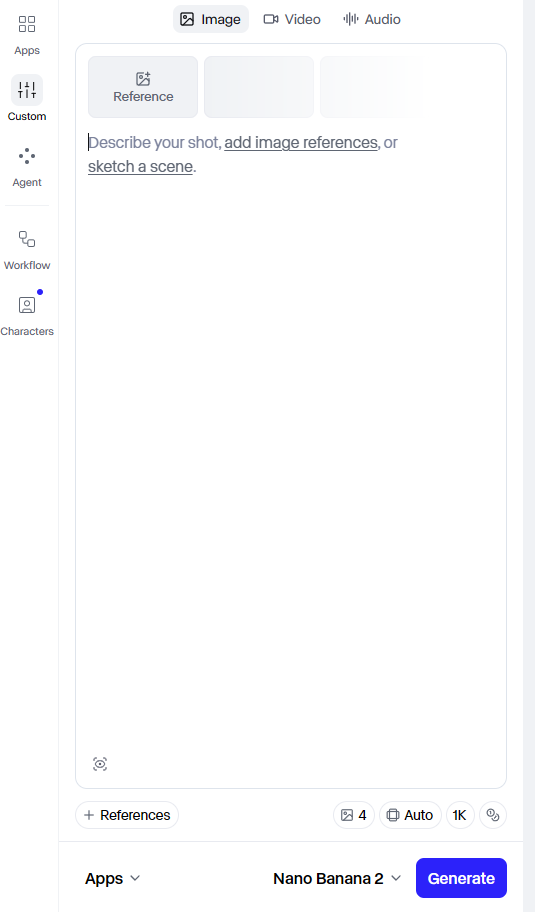
Describe the scene you want using a written prompt, and the platform attempts to generate a matching video.
A strong prompt typically includes details such as:
- The subject.
- The action taking place.
- The environment.
- Camera movement.
- Lighting.
- Composition.
- Mood.
- Visual style.
This allows creators to produce footage that would otherwise require cameras, actors, locations, animation, or stock video.
A marketer might generate a cinematic advertisement.
A YouTuber could create B-roll illustrating an abstract concept.
A filmmaker could visualize a scene during pre-production.
An entrepreneur could rapidly test promotional ideas before investing in traditional production.
The trade-off is predictability.
Even detailed prompts don’t guarantee perfect results.
The model may interpret movement differently than expected, change objects during the sequence, ignore parts of the prompt, or produce unexpected camera behavior.
The most successful users treat AI generation as an iterative process.
Generate a version.
Review it critically.
Adjust the prompt.
Generate again.
Repeat until the output matches your creative goal.
Runway rewards experimentation, patience, and good prompting far more than it rewards expecting the first result to be perfect.
Image-to-Video Generation
Image-to-video has quickly become one of the most practical applications of AI video generation, and Runway handles it particularly well.
Instead of creating an entirely new scene from a text prompt, you start with an existing image and ask the model to animate it.
That simple change opens up a wide range of possibilities.
A product photo can become a promotional video.
Concept art can turn into a cinematic sequence.
An illustration can gain realistic movement.
Existing marketing assets can be reused across multiple formats without organizing another video shoot.
For creators who already have a library of images, image-to-video often delivers more predictable results than text-to-video because the model begins with a defined visual reference rather than interpreting an entire scene from scratch.
That extra level of control is one reason many marketers, ecommerce businesses, and YouTubers rely on this workflow.
Common Use Cases
- Product demonstrations
- Ecommerce advertising
- Social media content
- AI B-roll
- Animated concept art
- Website hero videos
- Promotional campaigns
The quality of the final animation still depends on the source image.
High-resolution images with clear subjects generally produce the strongest results, while cluttered or low-quality references tend to lead to less consistent animations.
[Insert Screenshot: Image-to-Video Interface]
Video-to-Video Transformation
One feature that helps distinguish Runway from many AI video generators is video-to-video transformation.
Instead of creating footage from scratch, you begin with an existing video and use AI to reinterpret or transform it into a different visual style.
That opens up creative possibilities that extend beyond standard generation.
For example, you might:
- Apply a stylized artistic look to existing footage.
- Create animated versions of live-action scenes.
- Experiment with cinematic aesthetics.
- Prototype visual concepts before full production.
- Produce creative variations for marketing campaigns.
For agencies and production teams, this can significantly reduce the time required to create multiple visual concepts from the same source material.
Rather than reshooting or manually recreating footage, you can generate several stylistic variations from a single video.
Like every generative AI workflow, however, results aren’t perfectly predictable.
Some transformations closely match your expectations.
Others may require several iterations before producing something worth using.
AI Image Generation
Runway also includes AI image generation, allowing creators to produce visuals from text prompts without leaving the platform.
While image generation isn’t the platform’s primary focus, integrating it into the broader creative workflow is genuinely useful.
Images can become:
- Storyboard concepts
- Marketing graphics
- Product visuals
- Character references
- Inputs for image-to-video generation
Keeping these tools inside the same workspace reduces the need to switch between several AI platforms just to complete a single project.
For creators producing content at scale, that smoother workflow is often more valuable than having the absolute best image model available.
Background Removal
Background removal is one of those features that sounds simple until you’ve spent hours masking footage manually.
Runway automates much of that work using AI.
Instead of creating precise masks frame by frame, creators can isolate subjects far more quickly.
This is particularly valuable for:
- Product videos
- Talking-head content
- Marketing assets
- Social media campaigns
- Promotional videos
Although complex scenes may still require manual adjustments, the feature dramatically reduces the amount of repetitive editing needed for many common workflows.
Object Removal
Object removal addresses another common production challenge.
Need to remove an unwanted person from the background?
A distracting sign?
An object that doesn’t belong in the frame?
Instead of rebuilding the shot manually, Runway attempts to reconstruct the scene after removing the selected object.
Like every AI-assisted editing tool, results depend on the complexity of the footage.
Simple removals often work remarkably well.
Busy scenes with overlapping movement can still require additional editing.
Even so, the amount of manual work saved can be substantial.
Motion Tracking
Motion tracking is an essential tool for more advanced production workflows.
It allows graphics, effects, or other visual elements to follow moving subjects throughout a scene.
Without automated tracking, attaching effects to moving objects often becomes a time-consuming manual process.
Runway simplifies much of that work.
Potential applications include:
- Product highlights
- Motion graphics
- Text overlays
- Promotional callouts
- Visual effects
For creators producing commercial content, motion tracking can save a significant amount of editing time.
Automatic Masking
Masking is another task that traditionally demands patience.
Selecting people or objects frame by frame can be one of the most repetitive parts of video editing.
Runway uses AI to automate much of this process.
Automatic masking makes it easier to isolate subjects for:
- Background replacement
- Visual effects
- Color adjustments
- Creative compositing
- Scene refinements
It’s not flawless—difficult footage can still require manual cleanup—but for many everyday editing tasks, it removes hours of repetitive work.
Video Expansion
Video expansion is particularly useful when repurposing content across different platforms.
Imagine you’ve recorded a video horizontally but later need a vertical version for TikTok or Instagram Reels.
Rather than cropping important parts of the frame, Runway can use AI to extend the scene beyond its original boundaries.
This helps preserve composition while adapting content to different aspect ratios.
For marketers publishing across several channels, that’s a practical feature that can reduce duplicate production work.
Frame Interpolation
Frame interpolation creates additional frames between existing ones to produce smoother motion.
The feature is especially useful when:
- Improving older footage
- Slowing clips down
- Enhancing motion quality
- Creating smoother transitions
While it’s unlikely to replace every professional slow-motion workflow, it offers a quick way to improve perceived motion quality without manually rebuilding footage.
Camera Motion Controls
Runway also allows creators to introduce virtual camera movement into generated scenes.
Instead of relying entirely on static compositions, you can create more dynamic results through simulated camera motion.
Common movements include:
- Push-ins
- Pull-backs
- Panning
- Tilting
- Orbiting
Subtle camera movement often makes AI-generated footage feel more cinematic and less artificial.
Like any AI tool, the outcome isn’t guaranteed, but when it works well, it noticeably enhances the final result.
Subtitle Generation
Adding subtitles is one of the final production steps many creators overlook until the very end.
Runway simplifies that process with built-in subtitle generation.
For creators publishing on YouTube, TikTok, Instagram, LinkedIn, or other social platforms, subtitles improve accessibility and often increase viewer retention.
Instead of manually transcribing every video, creators can generate captions automatically and make adjustments where needed.
This isn’t a headline feature, but it’s one of those workflow improvements that saves time on almost every project.
Cloud Projects and Asset Management
As creative projects become more complex, staying organized becomes just as important as creating good content.
Runway includes cloud-based project management and asset organization tools that allow creators to keep footage, images, prompts, and generated assets together.
For solo creators, this mainly improves organization.
For agencies and teams, it’s considerably more valuable.
Projects become easier to manage, revisions stay organized, and assets remain accessible without depending entirely on local storage.
That broader production workflow is one of the clearest differences between Runway and more generation-focused AI platforms.
Team Collaboration
Collaboration is another area where Runway stands out.
Many AI video generators are built primarily for individual creators.
Runway goes further by supporting shared creative workflows.
Marketing teams, agencies, production companies, and businesses can collaborate on projects without constantly exporting files between different tools.
As production scales, these workflow improvements become increasingly important.
Generating the video is only one step.
Reviewing it, organizing it, revising it, and delivering it efficiently often determine how valuable the platform becomes in real-world use.
Feature Summary
| Feature | Primary Benefit | Best For |
| Text-to-Video | Generate videos from prompts | Content creators, marketers |
| Image-to-Video | Animate existing images | Ecommerce, advertisers |
| Video-to-Video | Transform existing footage | Agencies, filmmakers |
| AI Image Generation | Create supporting visuals | Storyboards, concepts |
| Background Removal | Isolate subjects | Marketing, product videos |
| Object Removal | Remove distractions | Commercial editing |
| Motion Tracking | Attach effects to moving subjects | Professional creators |
| Automatic Masking | Faster subject isolation | Editors |
| Video Expansion | Adapt content for different formats | Social media |
| Frame Interpolation | Smoother motion | Video enhancement |
| Camera Motion Controls | More cinematic movement | Filmmakers, advertisers |
| Subtitle Generation | Faster caption creation | YouTubers, marketers |
| Cloud Projects | Better organization | Teams, agencies |
| Collaboration | Shared creative workflows | Businesses, production teams |
Runway Pricing
Pricing is one of the most important factors to evaluate before committing to any AI platform.
Unlike traditional software subscriptions, where a monthly payment often unlocks unlimited use, most AI video platforms rely on credits.
That means the real cost isn’t just the subscription price—it’s how many generations, edits, or exports you can complete before those credits run out.
Runway follows that same model.
Its plans are designed to support everyone from casual users testing AI video generation to professional teams producing content every day.
Before subscribing, it’s worth considering not only the monthly fee but also how often you’ll realistically use the platform.
Free Plan
One of Runway’s biggest advantages is that you don’t have to subscribe immediately to see what it can do.
The free plan gives new users a chance to explore the platform, test different AI models, and understand how the workflow fits their creative process before spending any money.
That makes it much easier to answer practical questions such as:
- Does the generation quality meet my expectations?
- Is the interface intuitive?
- Does the workflow fit how I create content?
- How quickly do I use credits?
- Would I actually use the editing tools?
Those answers are far more valuable than any feature comparison.
Like most AI platforms, however, the free plan comes with limitations.
Depending on the current subscription structure, these may include:
- Limited credits
- Restricted access to newer AI models
- Export limitations
- Watermarks or reduced-quality outputs for certain features
- Fewer collaboration capabilities
Because Runway updates its pricing periodically, it’s always worth checking the latest plan details before making a decision.
For testing the platform, though, the free plan is more than sufficient.
Paid Plans
Runway offers several paid subscription tiers aimed at different types of users.
Although specific pricing and feature allocations change over time, the plans generally fall into three categories:
Individual Creators
Designed for creators producing content regularly.
These plans typically include:
- More monthly credits
- Higher generation limits
- Better export options
- Access to newer AI models
- Faster processing priority
This is usually the best choice for YouTubers, affiliate marketers, freelancers, and entrepreneurs who publish content consistently.
Professional Users
Professional plans expand the available resources and workflow capabilities.
Additional benefits often include:
- Larger credit allocations
- Increased storage
- More advanced collaboration
- Higher project limits
- Improved workflow management
For businesses producing content every week, these plans often provide the best balance between capability and cost.
Enterprise Solutions
Runway also provides enterprise options for larger organizations.
These plans are intended for businesses requiring:
- Team management
- Enterprise security
- Administrative controls
- Larger production capacity
- Dedicated support
- Custom agreements
Pricing is generally customized according to organizational requirements rather than listed publicly.
Understanding Credits
Credits are one of the biggest factors influencing the real cost of using Runway.
Every AI generation consumes computational resources.
Instead of offering unlimited AI generation, Runway allocates a monthly pool of credits that users spend on supported features.
The exact credit cost depends on several variables, including:
- The AI model you’re using
- Video duration
- Resolution
- Generation complexity
- Certain editing operations
This means two users on the same subscription plan can have very different experiences.
Someone producing a few short clips each week may rarely think about credits.
Another creator experimenting extensively with prompts, generating multiple variations, and working on several client projects may reach the monthly limit much sooner.
Before upgrading, it’s worth estimating how many videos you realistically expect to create each month rather than focusing only on the advertised credit allocation.
Is Runway Good Value for Money?
Value depends almost entirely on how much of the platform you actually use.
If you only need an AI video generator, Runway’s broader production environment may feel unnecessary.
In that case, a more specialized platform could provide better value.
On the other hand, if your workflow regularly involves:
- AI generation
- Background removal
- Object removal
- Motion tracking
- Subtitle generation
- Video transformation
- Asset organization
- Collaboration
then consolidating those tasks into a single platform can justify the subscription cost.
Replacing several tools with one integrated workflow doesn’t just reduce software costs—it can also save a considerable amount of production time.
For professionals, that efficiency is often where Runway delivers its greatest value.
Who Gets the Best Value?
| User Type | Value |
| Beginner | Good |
| YouTube Creator | Very Good |
| Affiliate Marketer | Good |
| Ecommerce Business | Very Good |
| Agency | Excellent |
| Marketing Team | Excellent |
| Professional Creator | Excellent |
| Solo Hobbyist | Fair |
The more of Runway’s workflow you use, the better the value becomes.
Creators who only generate occasional AI videos may never take full advantage of features like collaboration, project organization, or advanced AI editing.
Professional teams, by contrast, often benefit from almost every part of the platform.
Pricing Verdict
Runway isn’t the cheapest AI video platform available.
It’s also not trying to be.
Instead of competing solely on generation costs, it combines AI generation with editing, project management, and collaboration.
For individual creators who only need AI-generated clips, the subscription may feel expensive compared with more focused competitors.
For agencies, marketing teams, businesses, and professionals managing larger production workflows, however, the broader feature set often justifies the higher investment.
Ultimately, the platform offers strong value—but only if you make use of more than its video generation capabilities.
Video Quality
AI video quality is difficult to measure objectively.
A single prompt can produce dramatically different results across multiple generations, and the outcome depends on factors such as prompt quality, model selection, reference images, generation settings, and plain luck.
Because of that, the better question isn’t whether Runway always creates outstanding videos.
It doesn’t.
The more useful question is how often it produces footage that’s good enough to use—and how much work is required to get there.
Visual Quality
Runway is capable of producing genuinely impressive visuals.
With well-written prompts, the platform can generate cinematic scenes featuring convincing lighting, composition, camera movement, and atmosphere.
Marketing content, concept visuals, product advertisements, and AI-assisted storytelling are all areas where the platform performs particularly well.
Its newer generation models have noticeably improved visual realism compared with earlier releases.
That said, quality isn’t perfectly consistent.
Even when using nearly identical prompts, one generation might look polished while the next contains distracting artifacts or unexpected changes.
This inconsistency is currently a limitation of AI video generation as a whole rather than something unique to Runway.
Motion Quality
Convincing motion remains one of the hardest problems in AI video generation.
Poor movement immediately breaks immersion.
When Runway performs well, camera movement feels smooth and cinematic.
Subjects move naturally, and scenes flow in a way that often resembles professionally filmed footage.
When it struggles, however, common issues include:
- Unnatural body movement
- Changing object shapes
- Inconsistent facial features
- Sudden visual artifacts
- Unexpected camera behavior
Most experienced users expect to regenerate scenes several times before selecting a final version.
That workflow is now standard across nearly every AI video platform.
Prompt Accuracy
Prompt writing is arguably the most important skill when using Runway.
The platform responds best when prompts are:
- Clear
- Specific
- Visually descriptive
- Structured
Short, vague prompts often produce generic or unpredictable results.
More detailed prompts generally improve consistency by giving the model clearer creative direction.
Even then, prompt accuracy isn’t perfect.
The model may:
- Ignore certain instructions.
- Reinterpret movement.
- Change the framing.
- Introduce unexpected visual elements.
- Focus on details that weren’t intended to be the subject.
Rather than treating prompts as precise commands, it’s more realistic to think of them as creative direction.
Good prompting improves the odds of success, but it doesn’t guarantee a perfect result.
Image-to-Video Quality
Image-to-video is one of Runway’s strongest capabilities.
Starting from an existing image gives the model a clear visual foundation, which often produces more reliable results than text-only generation.
High-quality source images typically lead to:
- Better composition
- More stable subjects
- More realistic motion
- Stronger visual continuity
For marketers, ecommerce businesses, and content creators with existing visual assets, this workflow is often more practical than generating every scene from scratch.
Character Consistency
Maintaining consistent characters across multiple scenes remains one of the industry’s biggest challenges.
Runway has improved significantly over time, but perfect continuity is still difficult to achieve.
Common issues include:
- Facial features changing between generations
- Clothing variations
- Hair inconsistencies
- Different proportions
- Shifting visual details
For short standalone clips, this usually isn’t a major problem.
For longer narratives involving recurring characters, however, you’ll likely need additional generations—or manual editing—to maintain consistency.
Professional creators should keep this limitation in mind when planning more ambitious projects.
Rendering and Export Quality
Generating an impressive preview is only part of the equation.
The exported file needs to hold up once it’s used in a real project.
Runway generally produces clean exports that are suitable for YouTube, social media, marketing campaigns, product pages, presentations, and commercial content.
Higher subscription tiers unlock higher-quality exports and additional generation capabilities, making them more appropriate for professional work.
As with any AI platform, it’s worth reviewing the final export carefully before publishing.
Occasionally you’ll notice small visual artifacts, unexpected frame transitions, or inconsistencies that weren’t obvious during generation.
Professional creators should treat AI-generated footage like any other creative asset: review it before it reaches an audience.
How Reliable Is the Output?
One of the biggest misconceptions about AI video generation is that entering a prompt guarantees the desired result.
That’s not how current models work.
Runway is capable of producing exceptional videos, but it still behaves probabilistically rather than deterministically.
You should expect to:
- Experiment with prompts.
- Generate multiple variations.
- Discard weaker results.
- Refine your inputs.
- Repeat the process until you’re satisfied.
For experienced users, this becomes a normal part of the workflow.
Instead of trying to force a perfect first generation, they treat the AI like a creative collaborator—producing several options and selecting the strongest one.
That mindset leads to much better results than expecting every generation to be production-ready.
Video Quality Verdict
Runway consistently produces some of the strongest AI-generated video currently available.
Its biggest strengths include:
- Cinematic visual quality.
- Strong image-to-video generation.
- Convincing lighting and composition.
- Smooth camera movement.
- Continuous improvements through newer AI models.
Its biggest weaknesses remain familiar across the AI video industry:
- Inconsistent generations.
- Variable prompt interpretation.
- Character continuity challenges.
- The need for multiple attempts before achieving the desired result.
Overall, Runway earns high marks for visual quality, provided you approach it as an iterative creative tool rather than a one-click video generator.
Ease of Use
Despite the breadth of its feature set, Runway is surprisingly approachable.
That doesn’t mean it’s instantly intuitive.
Rather, the platform does a good job of organizing a large collection of AI tools without making the interface feel overwhelming.
The learning curve depends largely on your goals.
If you’re only generating AI videos, you’ll become productive fairly quickly.
If you plan to use the editing tools, cloud projects, collaboration features, and production workflows, expect to spend more time learning how everything fits together.
First-Time Experience
Creating your first AI video is straightforward.
A typical workflow looks like this:
- Create or open a project.
- Select the AI generation tool.
- Enter a prompt or upload a reference image.
- Configure generation settings.
- Generate the video.
- Review the result.
- Refine or regenerate if necessary.
- Export the finished clip.
The platform guides users through these steps logically, reducing the friction often associated with more complex creative software.
For someone familiar with modern web applications, the basic workflow feels approachable after only a short period of experimentation.
Interface Design
Runway’s interface is clean without feeling overly minimal.
Tools are grouped logically, projects remain organized, and the workspace encourages experimentation rather than hiding features behind complicated menus.
That balance is important.
Some AI platforms become difficult to navigate as they add more capabilities.
Runway generally avoids that problem by presenting advanced tools in a structured way rather than overwhelming users immediately.
As your projects become larger, the organization tools become increasingly valuable.
Instead of managing dozens of exported files across several folders, you can keep assets, generations, and revisions together inside the platform.
Learning Curve
The biggest learning curve isn’t the interface.
It’s understanding how to get consistently good AI results.
Most new users discover that:
- Better prompts produce better videos.
- Small wording changes can dramatically affect output.
- Different models behave differently.
- Some generations require several attempts.
- Reference images often improve reliability.
Those lessons take practice.
Fortunately, the platform itself doesn’t make that process more difficult than necessary.
If you’ve previously used creative software such as Canva, Adobe Express, Figma, Premiere Pro, or DaVinci Resolve, Runway’s overall structure will likely feel familiar.
Workflow Efficiency
Runway’s greatest usability advantage isn’t how quickly you can generate a video.
It’s how many production tasks you can complete without leaving the platform.
Instead of moving between separate applications for:
- AI generation
- Background removal
- Object removal
- Motion tracking
- Subtitle creation
- Asset organization
you can complete much of that work inside a single browser-based environment.
For creators producing content every day, those small workflow improvements compound over time.
Saving just a few minutes on each project quickly becomes several hours across a month.
Browser-Based Workflow
Because Runway operates primarily in the cloud, you don’t need an especially powerful computer to use its AI models.
Most of the heavy computation happens on Runway’s servers.
That provides several practical benefits:
- No lengthy software installation.
- Access from different devices.
- Automatic project syncing.
- Easier collaboration.
- Less dependence on expensive hardware.
The obvious trade-off is that you need a reliable internet connection.
If your connection is unstable, uploading assets and generating videos becomes considerably less enjoyable.
Beginner Friendliness
Runway is easier to learn than many professional creative applications, but it isn’t quite as immediately approachable as simpler AI video generators.
That’s largely because the platform offers much more than generation alone.
A beginner interested only in AI video may initially ignore many of the editing and project-management tools.
Over time, however, those features often become some of the platform’s greatest strengths.
Rather than outgrowing the software quickly, users can gradually expand into more advanced workflows as their needs evolve.
Ease of Use Verdict
Runway strikes a strong balance between simplicity and capability.
It’s accessible enough for newcomers to create videos without feeling overwhelmed, while offering enough depth to support experienced creators working on larger projects.
The interface is well organized, the browser-based workflow reduces technical barriers, and the integrated production environment eliminates much of the friction associated with moving between multiple creative applications.
The learning curve comes less from using the software and more from learning how to work effectively with AI generation itself.
Performance
Performance is about more than visual quality.
A platform can generate beautiful videos yet still become frustrating if generation is slow, prompts are inconsistent, or workflows regularly break down.
Runway performs well overall, but—as with every AI generation platform—there are trade-offs worth understanding before committing to it as part of your workflow.
Generation Speed
Generation times vary considerably.
Several factors influence how quickly videos are produced:
- Model selection.
- Video duration.
- Queue length.
- Subscription tier.
- Overall platform demand.
During quieter periods, generations often complete within a reasonable timeframe.
During peak demand, users may experience longer queues before processing begins.
This isn’t unique to Runway.
Most cloud-based AI generation services experience similar fluctuations because computational resources are shared across users.
For creators working against deadlines, it’s worth allowing extra time for experimentation rather than assuming every generation will complete immediately.
Stability
Overall platform stability is strong.
Projects are stored in the cloud, which reduces the risk of losing work due to local hardware problems.
Browser-based access also means updates happen automatically without requiring manual installations.
That said, occasional service interruptions, temporary slowdowns, or model-specific issues can still occur—as with virtually every online AI platform.
Most users are unlikely to encounter serious stability problems during normal use, but production teams should avoid leaving critical generations until the last possible moment.
Prompt Reliability
Runway generally follows prompts well, particularly when they’re detailed and visually descriptive.
However, prompt interpretation remains one of the biggest variables affecting generation quality.
Common issues include:
- Ignoring smaller prompt details.
- Unexpected camera framing.
- Altered movement.
- Additional visual elements.
- Different stylistic interpretations.
These aren’t necessarily software bugs.
They’re a reflection of how generative AI models currently work.
Experienced users often generate several variations rather than expecting one prompt to produce a perfect result immediately.
Overall Performance Verdict
Runway delivers a dependable production experience for most creators.
Generation speeds are generally reasonable, the browser-based platform is stable, and the integrated workflow reduces friction between creative tasks.
The biggest performance limitation isn’t the software itself—it’s the current state of AI generation.
Expect to iterate, refine prompts, and generate multiple versions before arriving at your preferred result.
Approached with those expectations, Runway performs consistently well for both individual creators and professional teams.
Runway Pros and Cons
No AI platform is perfect, and Runway is no exception.
Its greatest strengths come from combining AI generation with editing and production tools, but those same strengths can also make it more expensive and more complex than platforms focused purely on video generation.
Looking at both sides provides a clearer picture than simply listing features.
Pros
Comprehensive AI Creative Platform
One of Runway’s biggest advantages is that it isn’t just another AI video generator.
Instead of stopping at text-to-video or image-to-video creation, it supports much more of the production workflow.
Within a single browser-based workspace, you can:
- Generate videos
- Transform existing footage
- Remove backgrounds and objects
- Track motion
- Create subtitles
- Organize assets
- Collaborate with team members
For creators who regularly move between multiple applications, bringing these tasks together can significantly streamline production.
Excellent AI Editing Tools
This remains Runway’s clearest competitive advantage.
Many competing platforms focus almost entirely on generation.
Runway helps creators continue working with their footage after it’s generated.
Features such as object removal, automatic masking, frame interpolation, video expansion, and motion tracking eliminate hours of repetitive editing work that would otherwise require specialist software.
For agencies and professional creators, those productivity gains often matter more than marginal differences in generation quality.
Strong Video Generation
Runway consistently produces high-quality AI-generated video.
With well-written prompts, the platform is capable of creating cinematic scenes featuring convincing lighting, composition, and camera movement.
Its image-to-video capabilities are particularly useful for creators who already have product photography, illustrations, concept art, or other visual assets they want to animate.
While output isn’t perfectly consistent, the platform performs well enough to compete with the strongest AI video generators currently available.
Browser-Based Workflow
Because everything operates in the cloud, creators don’t need expensive local hardware to access advanced AI models.
Projects remain synchronized across devices, updates happen automatically, and collaboration becomes considerably easier than with desktop-only software.
This flexibility is especially valuable for distributed teams and freelancers working across multiple devices.
Excellent for Teams
Collaboration isn’t simply an added feature.
It’s integrated into the platform’s overall workflow.
Teams can organize projects, share assets, review creative work, and manage revisions without constantly transferring files between different applications.
As production volume increases, these workflow improvements become increasingly valuable.
Frequent Product Updates
AI evolves quickly, and Runway has consistently expanded its capabilities through new models and feature releases.
Rather than remaining static after launch, the platform continues to improve its generation quality, editing tools, and production workflows.
For long-term subscribers, ongoing development increases the platform’s overall value.
Cons
Credit-Based Pricing
The biggest criticism of Runway is also common across the AI industry.
Every generation consumes credits.
If your first attempt isn’t usable—and many won’t be—you’ll spend additional credits refining prompts and generating alternatives.
Heavy users should expect prompt experimentation to become part of their monthly cost rather than an occasional exception.
Results Aren’t Perfectly Consistent
AI generation remains unpredictable.
Some outputs exceed expectations.
Others require substantial refinement—or are discarded entirely.
Even experienced users rarely expect the first generation to be the final one.
That variability is part of working with current AI models and should be factored into both budgets and production timelines.
Prompt Writing Takes Practice
Runway isn’t difficult to operate.
Creating consistently excellent results, however, requires learning how the models interpret prompts.
New users often underestimate how much small wording changes can influence camera movement, composition, pacing, or subject behavior.
Improving prompt-writing skills generally has a greater impact on output quality than changing generation settings alone.
Doesn’t Replace Professional Editing Software
Although Runway offers one of the strongest AI-assisted editing environments available, it doesn’t completely replace traditional editing applications.
Creators producing feature-length content or advanced commercial work may still rely on:
- Premiere Pro
- DaVinci Resolve
- Final Cut Pro
- Other professional editing suites
Runway complements these workflows rather than replacing them outright.
Advanced Features Can Be Underused
Many of Runway’s biggest strengths only become valuable if you actually use them.
A creator who simply generates short AI clips may never benefit from cloud projects, collaboration tools, advanced masking, or project organization.
In that case, paying for the broader platform may not represent the best value.
Internet Dependency
Because Runway is cloud-based, a stable internet connection is essential.
Large uploads, lengthy generations, and collaborative workflows all depend on reliable connectivity.
Users working with unstable or slow connections may find the experience noticeably less enjoyable.
Real User Feedback
Official feature lists explain what a platform is designed to do.
User feedback reveals how it performs once creators begin relying on it for real projects.
No review represents every experience, and community discussions should always be interpreted with caution. Even so, several themes appear consistently across independent reviews and creator conversations.
What Users Like
High-Quality AI Video
Many users praise Runway’s ability to generate visually impressive footage from relatively simple prompts.
The platform’s newer models have significantly improved realism, camera movement, lighting, and composition compared with earlier versions.
Creators regularly highlight its usefulness for:
- Marketing videos
- Product demonstrations
- AI B-roll
- Storyboarding
- Creative concept development
For many users, Runway has become a practical production tool rather than simply an interesting AI experiment.
Editing Workflow
One of the most common compliments isn’t actually about generation quality.
It’s about everything that happens afterward.
Users appreciate being able to:
- Remove objects.
- Isolate subjects.
- Track motion.
- Generate subtitles.
- Organize projects.
without constantly switching between different applications.
That integrated workflow often saves more time than improvements in generation quality alone.
Frequent Improvements
Runway has built a reputation for evolving quickly.
New AI models, editing capabilities, and workflow improvements appear regularly, giving long-term subscribers confidence that the platform continues to improve rather than remaining static.
For professionals investing in a creative workflow, that ongoing development is an important advantage.
Browser Accessibility
Users also appreciate the convenience of cloud-based access.
Projects can be opened from different computers, collaboration becomes easier, and powerful local hardware isn’t required for AI generation.
This makes the platform particularly attractive for freelancers, agencies, and distributed teams.
Common Complaints
Credits Disappear Quickly
The most frequent criticism is predictable.
Generating multiple versions while refining prompts consumes credits faster than many users expect.
For beginners especially, learning through experimentation can become expensive.
Creators who generate content every day should pay close attention to how quickly they use their monthly allocation.
Inconsistent Output
Even excellent prompts don’t guarantee excellent results.
Users frequently mention:
- Unexpected visual artifacts.
- Changing subjects.
- Ignored prompt details.
- Variable motion quality.
- Multiple generations before success.
These limitations are shared across the AI video industry rather than being unique to Runway.
Queue Times
During busy periods, users occasionally report slower generation speeds.
Waiting several minutes for a single generation isn’t unusual when platform demand is particularly high.
Professional creators working against deadlines should account for these delays when planning production schedules.
Learning Prompt Writing
Another recurring theme is that mastering prompts takes time.
Many new users initially expect AI generation to behave like a search engine.
In reality, the platform responds much more effectively to carefully structured visual descriptions.
Those willing to develop stronger prompting skills generally report significantly better results over time.
Overall Community Consensus
Looking across reviews, creator discussions, and long-term user experiences, a fairly consistent picture emerges.
Users generally agree that Runway is one of the most capable AI creative platforms available today.
The strongest praise centers on its combination of generation and editing rather than on any single feature.
The most common criticisms focus on the realities of current AI technology rather than fundamental flaws in the platform itself.
Users Most Often Praise
- High-quality AI video generation.
- Excellent AI-assisted editing tools.
- Strong browser-based workflow.
- Collaboration features.
- Cloud project management.
- Frequent product updates.
- Professional production environment.
Users Most Often Criticize
- Credit consumption.
- Inconsistent generations.
- Prompt sensitivity.
- Generation queues during busy periods.
- Learning curve for prompt writing.
- Ongoing subscription costs.
Overall, community sentiment is overwhelmingly positive among creators who regularly produce visual content.
The more frequently users create videos, the more valuable Runway tends to become.
Who Should Use Runway?
Runway isn’t designed for one specific audience.
Its strength lies in supporting different types of creators through the same production workflow.
That said, some users will benefit far more than others.
Content Creators
Content creators are one of Runway’s core audiences.
Whether you’re producing YouTube videos, Instagram Reels, TikTok content, LinkedIn videos, or online courses, the platform can significantly reduce the amount of manual production work involved.
Common uses include:
- AI-generated B-roll
- Animated visuals
- Intro sequences
- Product demonstrations
- Social media content
- Creative storytelling
Rather than replacing creativity, Runway removes many of the repetitive production tasks that slow creators down.
YouTubers
Runway is particularly useful for YouTube creators who regularly need original visuals.
Instead of relying exclusively on stock footage, creators can generate scenes tailored specifically to their scripts.
Examples include:
- AI B-roll
- Educational visuals
- Motion graphics
- Background replacements
- Visual explainers
Subtitle generation also helps streamline one of the final production steps before publishing.
Affiliate Marketers
Affiliate marketers increasingly rely on video content to support blog posts, comparison articles, landing pages, and social media campaigns.
Runway can assist with creating:
- Product demonstrations
- Promotional clips
- Landing page videos
- Social advertisements
- Supporting visuals for written reviews
For marketers already producing video regularly, integrating AI generation with editing tools inside one platform can noticeably speed up content production.
Ecommerce Businesses
Ecommerce stores often have an extensive library of product photography.
Runway’s image-to-video capabilities allow those existing assets to become animated promotional videos without requiring another production shoot.
Businesses can create:
- Product showcases
- Seasonal campaigns
- Marketplace content
- Website hero videos
- Social media advertisements
Combined with background removal and object removal, these tools simplify many common marketing workflows.
Marketing Teams
Marketing departments rarely create just one piece of content.
They produce campaigns.
Campaigns require organization, revisions, collaboration, and multiple creative variations.
This is where Runway’s project management features become particularly valuable.
Instead of treating every video as an isolated project, teams can manage campaigns more efficiently within a shared creative environment.
Agencies
Creative agencies arguably receive some of the greatest value from Runway.
Client work often involves:
- Multiple revisions
- Shared assets
- Team collaboration
- Creative experimentation
- Tight deadlines
Having AI generation, editing, and project management inside one platform reduces the amount of administrative work involved in moving projects from concept to delivery.
Freelancers
Freelancers can also expand the services they offer without dramatically increasing production costs.
Potential services include:
- AI advertisements
- Promotional videos
- Product demonstrations
- Social media campaigns
- Marketing visuals
Runway helps smaller businesses deliver work that previously required significantly larger production budgets.
Filmmakers
Although Runway isn’t intended to replace professional filmmaking tools, it has become increasingly useful during pre-production.
Filmmakers can use AI generation for:
- Storyboarding
- Concept visualization
- Scene experimentation
- Creative mood testing
- Pitch presentations
Rather than replacing traditional production, it accelerates early creative exploration.
Who Should Avoid Runway?
Runway is an impressive platform, but that doesn’t automatically make it the right choice for everyone.
Understanding who shouldn’t subscribe is just as important as knowing who should.
Casual Hobbyists
If you only create an AI video once every few months, it’s difficult to justify paying for a platform as comprehensive as Runway.
Many of its strongest features only become valuable through regular use.
Occasional experimentation is often better suited to a free plan or a more specialized generator.
Users Looking Only for AI Generation
Some creators simply want to generate short AI videos.
They don’t need:
- Collaboration.
- Asset management.
- Project organization.
- AI editing.
- Video transformation.
For those users, a generation-first platform may offer a simpler and more cost-effective experience.
Users Expecting Perfect AI
One unrealistic expectation still appears frequently.
Some people expect AI video generation to work like typing instructions into a computer.
Current AI simply doesn’t behave that way.
Runway still requires:
- Prompt refinement.
- Multiple generations.
- Creative judgment.
- Manual review.
Anyone expecting flawless first-attempt output is likely to be disappointed—not because of Runway specifically, but because of the current state of generative AI.
Offline Creators
Because the platform is cloud-based, it depends heavily on a reliable internet connection.
Creators working in environments with limited connectivity may find browser-based workflows frustrating compared with locally installed software.
Users Requiring Advanced Timeline Editing
Runway has impressive editing capabilities, but it isn’t a replacement for dedicated non-linear editing software.
If your projects depend on:
- Advanced multicam editing.
- Detailed color grading.
- Professional audio mixing.
- Complex timelines.
- Broadcast-level finishing.
You’ll still want software such as Premiere Pro or DaVinci Resolve as part of your workflow.
Runway works best alongside those applications rather than replacing them completely.
Runway vs the Competition
The AI video market has become increasingly competitive.
Rather than asking which platform is objectively best, it’s more useful to consider which one best supports your specific workflow.
Each major competitor has different priorities.
Runway vs Kling AI
Kling AI focuses heavily on AI video generation.
Its strengths include:
- Image-to-video
- Multi-Shot Generation
- Element Reference
- Motion Control
- Native audio
Runway takes a broader approach.
Instead of concentrating almost entirely on generation, it combines AI video creation with editing, project organization, collaboration, and asset management.
If generating AI footage is your primary objective, Kling is an outstanding option.
If you’d like a deeper look at the platform, read my complete Kling AI Review.
I also compared the two platforms in my detailed Kling AI vs Runway comparison to help you decide which is the better choice.
If you want to continue working with that footage inside the same platform, Runway offers the more complete workflow.
Runway vs OpenAI Sora
OpenAI’s Sora has generated significant attention for its visual quality.
However, access remains more limited than Runway.
Runway currently provides:
- A mature browser-based platform.
- AI editing tools.
- Collaboration features.
- Cloud projects.
- Production workflows.
For many creators, accessibility and workflow are more valuable than marginal improvements in raw generation quality.
Runway vs Google Veo
Google Veo focuses on cinematic AI video generation and benefits from Google’s broader AI ecosystem.
Runway differentiates itself by offering a complete production environment rather than concentrating solely on video generation.
Creators looking for an end-to-end creative workflow will often find Runway’s broader feature set more useful.
For a more detailed overview, you can check our full Google Veo vs Runway comparison.
Runway vs Pika
Pika emphasizes speed and simplicity.
It’s particularly appealing for creators producing short-form social media content.
Runway targets a different audience.
Its editing tools, collaboration features, and broader production capabilities make it more suitable for creators managing larger or more complex projects.
If you want to compare them even further, you can check out the full comparison article for Runway vs Pika.
Runway vs Luma Dream Machine
Luma Dream Machine is known for producing visually impressive standalone clips.
Runway complements strong generation quality with a much wider creative ecosystem.
For creators regularly producing marketing content, client work, or collaborative projects, those workflow advantages often outweigh differences in raw generation quality.
Competition Summary
| Platform | Best For | Biggest Strength |
| Runway | Professional creators | Complete AI production workflow |
| Kling AI | AI video generation | Image-to-video and generation controls |
| OpenAI Sora | High-end visual generation | Outstanding realism (availability varies) |
| Google Veo | Cinematic AI generation | Google ecosystem |
| Pika | Short-form creators | Speed and simplicity |
| Luma Dream Machine | Cinematic clips | High-quality standalone generations |
Is Runway Worth It?
After looking at its features, pricing, workflow, performance, and user feedback, one conclusion becomes fairly clear.
Runway isn’t simply an AI video generator.
It’s an AI-powered creative platform designed to support much more of the production process.
That distinction is important because the platform’s biggest strength isn’t any single feature.
It’s how those features work together.
Text-to-video generation, image-to-video animation, AI-assisted editing, object removal, motion tracking, subtitle generation, project organization, and collaboration combine to create a workflow that’s difficult to replicate using several disconnected tools.
For creators producing content regularly, that integrated approach can save a considerable amount of time.
The question is whether you’ll actually use those capabilities.
Where Runway Excels
Runway performs exceptionally well when AI video generation is only one stage of a larger creative process.
Its biggest strengths include:
- AI-assisted editing.
- Browser-based production.
- Cloud projects.
- Asset organization.
- Collaboration.
- Strong image-to-video capabilities.
- High-quality AI video generation.
- Regular platform improvements.
These features are especially valuable for agencies, marketing teams, businesses, and creators who publish content consistently.
Instead of constantly moving projects between several different applications, much of the workflow stays inside one platform.
That alone can make production significantly more efficient.
Where Runway Falls Short
Despite its impressive capabilities, Runway isn’t a perfect solution.
The biggest limitations are largely shared across the AI video industry.
Generation remains inconsistent.
Prompt writing takes practice.
Credits disappear quickly if you experiment extensively.
Character consistency continues to improve but isn’t flawless.
Generation speed varies depending on platform demand.
The platform also doesn’t replace traditional editing software for projects requiring advanced timeline editing, detailed color grading, professional audio mixing, or complex finishing work.
Those aren’t necessarily weaknesses unique to Runway.
They’re simply realistic expectations creators should have before subscribing.
Who Gets the Most Value?
Runway provides the greatest value for users who regularly produce visual content.
That includes:
Agencies
Generating content is only one part of agency work.
Projects also require revisions, collaboration, asset management, and client organization.
Runway’s broader workflow supports those requirements exceptionally well.
Marketing Teams
Marketing campaigns often involve multiple creative assets across several channels.
Being able to generate, edit, organize, and collaborate inside one environment can significantly reduce production time.
Professional Creators
Professional creators typically produce more than isolated AI clips.
They manage projects, refine footage, organize assets, and publish content consistently.
Runway fits naturally into those workflows.
Ecommerce Businesses
Image-to-video generation, background removal, and AI-assisted editing make creating product-focused content considerably easier.
Existing product photography can become promotional videos without organizing another production shoot.
YouTubers
Runway is well suited to YouTube creators producing:
- AI B-roll.
- Visual explainers.
- Product demonstrations.
- Motion graphics.
- Supporting visuals.
Subtitle generation and AI editing also reduce the amount of manual post-production required.
Affiliate Marketers
Affiliate marketers can use Runway to create:
- Product demonstrations.
- Comparison videos.
- Landing page content.
- Social media advertisements.
- Supporting visuals for written reviews.
Although platforms like Kling AI may be slightly stronger for pure AI video generation, Runway becomes more attractive if editing and production are equally important.
Final Verdict
Runway has earned its reputation as one of the leading AI creative platforms available today.
Its biggest strength isn’t that it produces the most realistic AI video in every situation.
It’s that it combines high-quality AI generation with an impressive collection of editing, organization, and collaboration tools that support much more of the creative process.
That makes it particularly valuable for creators who produce content consistently rather than occasionally.
If you’re regularly building YouTube videos, marketing campaigns, ecommerce promotions, client work, or commercial creative projects, Runway can replace several disconnected tools with a more streamlined workflow.
That efficiency often becomes more valuable than improvements in generation quality alone.
The platform isn’t perfect.
AI generation remains unpredictable.
Credits require careful management.
Prompt writing takes practice.
And professional editors will still rely on dedicated software for advanced post-production.
Those limitations don’t overshadow what Runway does well.
They simply define where it fits within a modern creative workflow.
If you’re looking for more than an AI video generator—and want a platform that helps you generate, refine, organize, and collaborate on creative work—Runway is one of the strongest choices currently available.
For most creators, the best approach is simple:
Start with the free plan.
Create a few genuine projects instead of test prompts.
See how quickly you use credits.
Evaluate how often the editing tools save you time.
If the platform consistently removes friction from your workflow, upgrading to a paid plan becomes an easy decision.
Frequently Asked Questions
Is Runway free?
Yes. Runway offers a free plan that lets you explore the platform and test many of its AI tools before subscribing. The free tier includes limited credits and access to selected features, making it ideal for evaluating whether the workflow suits your needs.
Is Runway good for beginners?
Yes.
Although Runway includes a large collection of professional tools, the interface is well organized and approachable. Beginners interested in AI video generation can start creating content quickly, while more advanced editing features can be explored over time.
Can Runway replace Premiere Pro?
Not completely.
Runway excels at AI-assisted generation and editing, but professional editors working on complex productions will still benefit from dedicated editing software such as Premiere Pro or DaVinci Resolve.
Many creators use Runway alongside those applications rather than instead of them.
Is Runway good for YouTube?
Yes.
Runway is particularly useful for generating AI B-roll, visual explainers, product demonstrations, subtitles, and supporting visuals that enhance YouTube videos.
Does Runway support image-to-video generation?
Yes.
Image-to-video is one of Runway’s strongest workflows, allowing creators to animate existing images into realistic video sequences for marketing, ecommerce, education, and social media.
Can Runway remove backgrounds and objects?
Yes.
Runway includes AI-assisted background removal and object removal tools that significantly reduce manual editing for many common production tasks.
Is Runway suitable for agencies?
Absolutely.
Cloud projects, collaboration tools, asset management, and AI-assisted editing make Runway particularly attractive for agencies handling multiple clients, campaigns, and creative revisions.
Does Runway use credits?
Yes.
Most AI generation features consume credits. Usage depends on the selected model, generation settings, video duration, and other factors. Before subscribing, it’s worth estimating how much content you expect to create each month.
Is Runway worth paying for?
If you regularly create video content, the answer is generally yes.
Creators who use both the generation and editing features often receive excellent value because the platform consolidates several production tasks into one workflow.
If you only generate occasional AI videos, however, a more specialized platform may represent better value.
What are the best Runway alternatives?
Some of the strongest alternatives include:
- Kling AI
- OpenAI Sora
- Google Veo
- Pika
- Luma Dream Machine
- Hailuo AI
- PixVerse
Each platform has different strengths.
Runway stands out by offering one of the most complete AI-assisted production environments rather than focusing solely on video generation.
Can Runway create commercial content?
Yes.
Runway is designed with commercial creators in mind and is widely used for marketing campaigns, product demonstrations, social media content, advertisements, educational videos, and client work.
As with any AI platform, you should review the current licensing and commercial-use terms before publishing or delivering client projects, since those policies can change over time.
Does Runway have an API?
Runway offers developer capabilities for eligible users and enterprise workflows. Because API availability, access requirements, and pricing may change, it’s best to review the latest developer documentation before planning an integration.
Does Runway work on low-end computers?
Generally, yes.
Because most AI processing happens in the cloud, you don’t need a high-end graphics card or workstation to use the platform.
A modern web browser and a stable internet connection are usually enough to access Runway’s core features.
Keep in mind that uploading large assets and working with high-resolution projects will still benefit from a fast internet connection.
How often does Runway release new features?
Runway has established a strong track record of frequent updates.
The platform regularly introduces:
- New AI models
- Improved generation quality
- Additional editing capabilities
- Workflow enhancements
- Performance improvements
That pace of development is one of the platform’s biggest long-term strengths. Subscribers aren’t simply paying for the features available today—they’re also investing in a platform that continues to evolve rapidly.
Bottom Line
Runway is one of the most complete AI-powered creative platforms available today.
If your workflow regularly includes AI video generation, editing, project management, and collaboration, it’s one of the easiest platforms to recommend.
If you simply want to generate occasional AI videos, you’ll likely find better value in a more generation-focused alternative.
But for creators who view AI as part of a complete production workflow rather than a standalone novelty, Runway delivers an impressive combination of capability, flexibility, and long-term value.
5 thoughts on “Runway Review: Is It the Best AI Video Generator in 2026?”