Kling AI Review (2026): Is It Worth Paying For?
This Kling AI review answers the question every potential buyer eventually asks: is the platform genuinely worth paying for, or does it simply look impressive in marketing demos? Some tools excel at creating visually impressive clips but offer little control over the final output. Others provide advanced features yet become expensive once you start generating videos regularly.
The platform has attracted attention because it aims to balance both sides of that equation. Instead of focusing on a single AI model, it combines text-to-video generation, image animation, multi-shot storytelling, native audio, motion controls, and developer APIs within one creative platform.
On paper, that’s an impressive package. The more important question is whether it delivers enough value to justify paying for it.
In this review, we’ll take a detailed look at where Kling AI performs well, where it falls short, how its pricing works, and who will get the most value from it. By the end, you should have a clear idea of whether it’s the right AI video generator for your workflow.
Quick Verdict
| Category | Rating |
| Ease of Use | ★★★★☆ |
| Features | ★★★★★ |
| Output Quality | ★★★★☆ |
| Pricing Transparency | ★★★☆☆ |
| Value for Money | ★★★★☆ |
| Overall Rating | 8.8 / 10 |
Best For
- Content creators producing short-form videos
- Affiliate marketers creating promotional content
- YouTubers generating AI B-roll
- Ecommerce businesses creating product videos
- Marketing agencies producing creative concepts quickly
- Developers looking for AI video APIs
Not Ideal For
- Long-form video editors
- Professionals needing a complete timeline-based editing suite
- Users on a very limited budget
- Teams requiring perfectly consistent AI outputs
- Creators working with prompts that may trigger moderation systems
Biggest Strengths
- Excellent image-to-video generation
- Comprehensive collection of AI creative tools
- Multi-shot storytelling workflows
- Native audio generation
- Element Reference for better subject consistency
- API access for developers
- Free plan available for testing
Biggest Weaknesses
- Credit-based pricing can become expensive with frequent use
- Free exports include watermarks
- Output quality isn’t perfectly consistent
- Generation speed can slow during busy periods
- Community reports of moderation restrictions on certain prompts
- Doesn’t replace professional video editing software
Verdict in One Sentence: Kling AI is one of the strongest AI video generation platforms currently available for short-form content creation, offering an impressive balance of creative control and powerful generation tools, although its credit-based pricing and limited editing capabilities mean it won’t be the right choice for everyone.
If your goal is to create AI-powered marketing videos, YouTube visuals, product demonstrations, or social media content, Kling AI is well worth trying. The free plan makes it easy to test the platform before deciding whether a paid subscription fits your workflow.
Table of Contents
What Is Kling AI?
Rather than trying to become another traditional video editor, Kling AI focuses on something much more specific: generating high-quality video content from prompts and reference media.
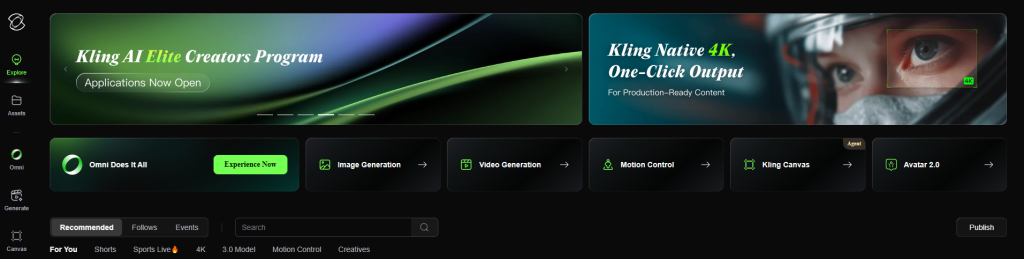
Developed by Kuaishou Technology, the company behind one of the world’s largest short-video platforms, Kling brings together several AI creative tools inside a single workspace. Instead of jumping between multiple applications, you can generate videos, animate images, create AI artwork, experiment with audio, and even integrate video generation into your own software through its developer APIs.
That broader approach helps distinguish it from platforms that concentrate solely on text-to-video generation.
At its core, the workflow is refreshingly straightforward:
- Choose the generation tool.
- Enter a text prompt or upload a reference image.
- Configure settings such as duration, aspect ratio, quality, and motion.
- Generate the video using credits.
- Refine, regenerate, extend, or export the final result.
Compared with traditional production, the difference is substantial.
| Traditional Workflow | Kling AI Workflow |
| Camera equipment | Text prompts or images |
| Actors and filming | AI-generated scenes |
| Manual animation | AI-generated motion |
| Video editing software | Built-in generation tools |
| Multiple creative applications | Unified creative workspace |
The key thing to understand is that Kling isn’t trying to replace software like professional video editors.
Once you’ve generated your clips, you’ll still need dedicated editing software if your project requires timeline editing, advanced transitions, captions, collaboration tools, or complex post-production work.
Think of Kling as a powerful content generation engine rather than a complete production suite. It excels at creating the visual assets you’ll later assemble into a finished video.
Kling AI Features
Feature depth is where Kling AI separates itself from many competing AI video generators.
Instead of relying on a single headline feature, the platform combines multiple creative tools that work together throughout the content creation process. Whether you’re creating product advertisements, YouTube visuals, or social media campaigns, the emphasis is on giving you more control over how AI-generated content is produced.
Let’s look at each feature in more detail.
Text-to-Video
Text-to-video remains the foundation of the platform.
Describe the scene you want, and Kling generates a short video based on your prompt. While that concept isn’t unique anymore, Kling offers enough customization to make the process feel less restrictive than many early AI video generators.
If you’re producing marketing content or rapidly testing creative ideas, this can dramatically reduce the time spent creating visual concepts.
This feature is particularly useful for creating product advertisements, marketing campaigns, social media videos, YouTube intros, and quickly visualizing creative concepts before investing in full production.
Why It Matters
The biggest advantage isn’t simply saving time—it’s lowering the barrier to creating video altogether.
Instead of organizing equipment, filming locations, actors, and editing software, you can often move from an idea to a usable concept in minutes. That makes experimentation far easier, particularly during the early stages of a project.
Where It Still Falls Short
Like every current AI video generator, results depend heavily on prompt quality.
Some prompts produce impressive videos immediately, while others require several iterations before reaching an acceptable result. Since each generation consumes credits, that trial-and-error process can increase costs over time.
Image-to-Video
If there’s one feature that consistently stands out, it’s image-to-video generation.
Rather than creating an entirely new scene from scratch, Kling takes an existing image and adds realistic movement, camera motion, and environmental effects to bring it to life.
For many creators, this ends up being even more useful than text-to-video.
Imagine you’ve already invested in professional product photography or created AI artwork. Instead of letting those assets remain static, you can transform them into animated promotional videos without scheduling another shoot.
That opens up plenty of practical use cases.
In practice, this feature appeals to a wide group. Ecommerce stores can bring product images to life, bloggers can make articles more engaging with embedded videos, affiliate marketers can create original promotional content, and social media creators can produce eye-catching visuals without relying entirely on stock footage.
A simple product photo can become a polished promotional clip suitable for Instagram Reels, TikTok, YouTube Shorts, or landing pages.
Why Users Like It
Community feedback frequently highlights image-to-video as one of Kling’s strongest capabilities because it tends to preserve the original image well while introducing natural-looking movement.
The result often feels less like an animation filter and more like genuine camera motion.
Multi-Shot Generation
Many AI video platforms still generate isolated clips.
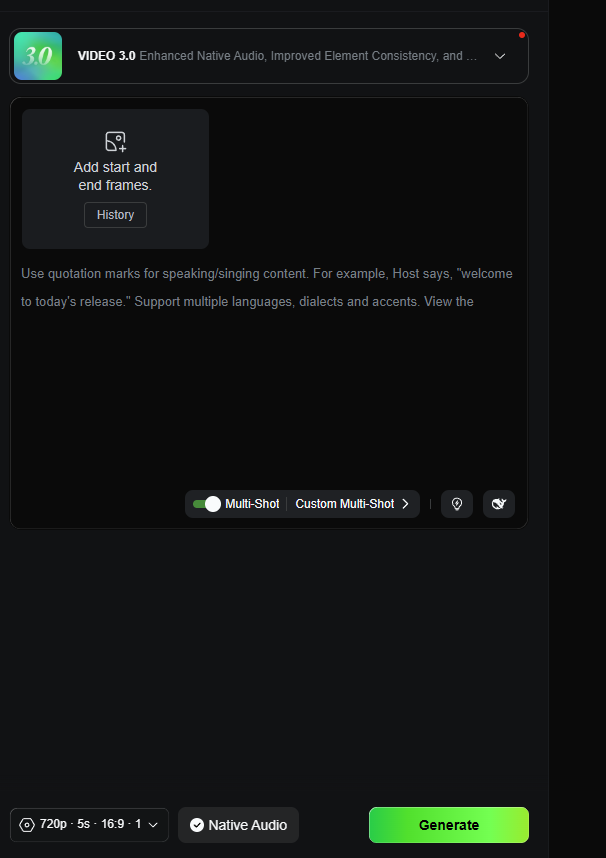
Kling takes a different approach by allowing creators to generate connected sequences made up of multiple shots.
That might not sound significant at first, but it changes how larger projects come together.
Instead of producing several unrelated clips and stitching them together manually, you can build a coherent sequence from the beginning. That usually means less editing later and smoother storytelling overall.
Ideal For
- Commercial advertisements
- Product showcases
- Promotional campaigns
- Short narrative videos
Benefits
- Better scene continuity
- More cohesive storytelling
- Less manual editing
- Faster production workflows
For marketers and agencies producing short-form commercial content, this feature alone can eliminate a surprising amount of repetitive editing work.
Custom Multi-Shot
For creators who want even more control, Custom Multi-Shot expands on the standard workflow.
Rather than allowing the AI to determine how each scene progresses, you can define individual shots yourself.
A simple product advertisement might look something like this:Shot 1: Product close-up
Shot 2: Lifestyle demonstration
Shot 3: Feature showcase
Shot 4: Brand reveal
That extra control makes Kling feel less like an automatic generator and more like a creative assistant that follows your direction.
It’s particularly appealing if you’re producing marketing videos where pacing and scene order matter.
Element Reference
One of the biggest challenges with AI-generated video is maintaining visual consistency.
Generate several clips featuring the same character or product, and there’s a good chance something will change. Facial features may shift, clothing can look different, or a product might subtly change shape between scenes.
Kling AI attempts to solve this with Element Reference, a feature designed to preserve important visual elements across multiple generations.
If you’re producing branded content, this isn’t just a nice extra—it’s one of the platform’s most valuable capabilities.
Particularly Useful For
- Brand campaigns
- Character-driven storytelling
- Ecommerce advertising
- Product marketing
- Multi-scene commercial videos
While it won’t guarantee perfect consistency every time, it significantly reduces one of the most common frustrations associated with AI-generated media.
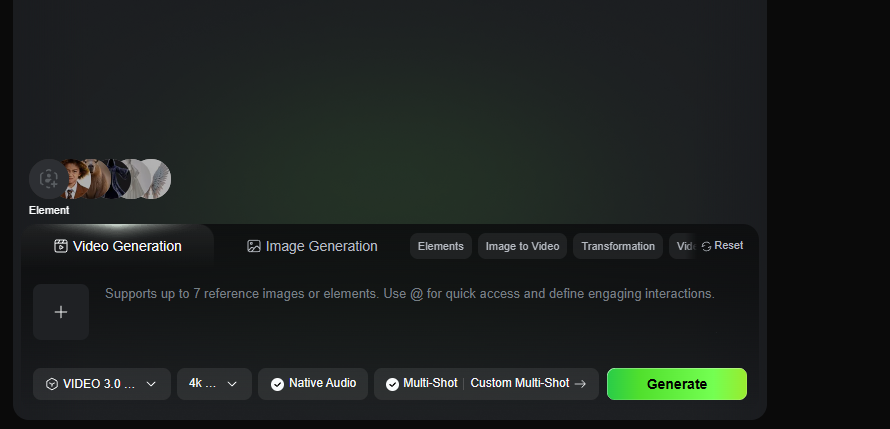
Native Audio
Many AI video generators still produce silent footage, leaving creators to source music, sound effects, and dialogue elsewhere.
Kling moves part of that workflow into the platform by supporting native audio generation for compatible workflows.
That doesn’t eliminate the need for dedicated audio software in every project, but it can streamline production considerably—especially if you’re creating social content or short promotional videos where speed matters.
Advantages
- Reduces post-production work
- Speeds up publishing
- Creates more complete AI-generated scenes
- Improves storytelling for dialogue-based content
For many creators, having audio and visuals generated together simply means fewer tools to manage.
Lip Sync and Character Speech
Generated characters become much more believable when their speech actually matches their facial movements.
Kling includes lip-sync functionality that synchronizes spoken dialogue with animated characters, making AI presenters feel considerably more natural than simple voice-over animations.
This feature opens the door to several practical use cases.
Particularly Helpful For
- Educational videos
- Virtual presenters
- Faceless YouTube channels
- Marketing explainers
- Character-driven content
Support for multilingual dialogue also makes it easier to adapt content for different audiences without rebuilding an entire project from scratch.
Motion Controls
Prompt quality influences every AI-generated video, but camera movement is another area where creators often want more control.
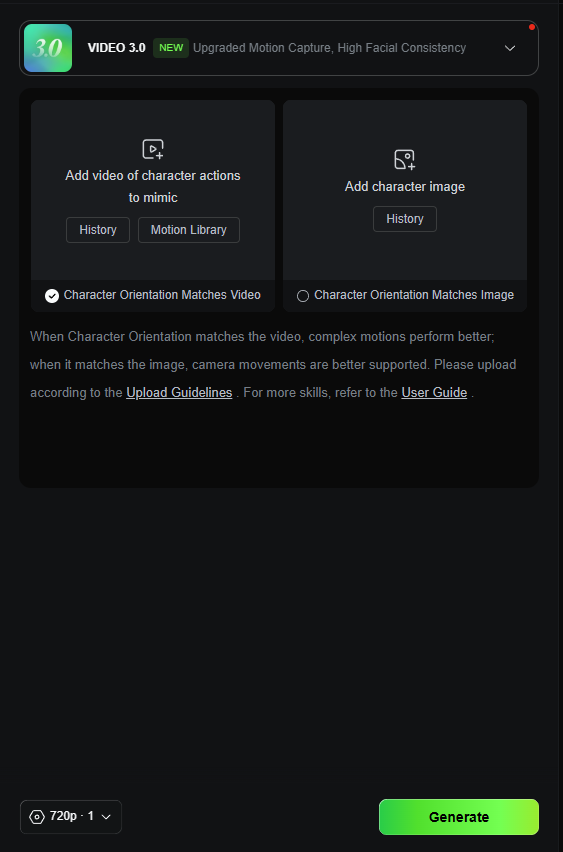
Motion Controls allow you to guide how the virtual camera behaves instead of leaving every movement to the AI’s interpretation.
Rather than relying entirely on descriptive prompts, you can influence camera direction, subject movement, and cinematic framing more deliberately.
That additional control becomes particularly valuable when producing commercial content.
Best For
- Product showcases
- Cinematic establishing shots
- Character movement
- Advertising sequences
- Dynamic social media videos
Practical Benefits
- More predictable camera motion
- Better cinematic composition
- Stronger storytelling
- Increased creative control
Motion Controls won’t completely eliminate experimentation—you’ll still regenerate clips occasionally—but they do make achieving a specific visual style considerably easier.
AI Effects
Kling also includes a growing collection of AI-powered visual effects aimed primarily at short-form content creators.
Instead of manually building visual transformations inside traditional editing software, you can apply AI-generated effects directly within the platform.
For creators publishing frequently on social platforms, that can save a surprising amount of time.
Well Suited For
- TikTok videos
- Instagram Reels
- Viral short-form content
- Promotional campaigns
Benefits
- Faster production
- Minimal technical expertise required
- Easy experimentation with trends
- Less editing work afterward
Professional editors probably won’t replace advanced compositing software with these effects, but for rapid content production they’re genuinely useful.
Sound Generation
Beyond native audio, Kling also provides sound-generation tools that help complete scenes without immediately switching to another application.
These tools can assist with:
- Ambient sounds
- Background audio
- Character dialogue
- Scene enhancement
For creators producing complete short-form videos, keeping video and audio generation inside one platform creates a noticeably smoother workflow.
API Access
Although Kling is clearly designed with creators in mind, it also targets businesses and developers.
Its API allows companies to integrate AI video generation directly into their own products, internal tools, or automated workflows.
That expands Kling well beyond individual content creation.
Common Use Cases
- AI content platforms
- Marketing automation software
- SaaS applications
- Creative workflow automation
- Enterprise content generation
Developer pricing is separate from consumer subscriptions, so businesses considering integration should review the official API documentation before planning implementation.
Benefits
- Workflow automation
- Scalable content generation
- Product integration
- Reduced manual production
4K Output
For creators publishing commercial work, export quality matters.
Kling offers 4K output on eligible subscription tiers, making it more suitable for professional marketing campaigns, client work, and larger-format publishing.
Higher-resolution exports are particularly useful for:
- Commercial advertising
- Brand campaigns
- Product demonstrations
- Professional marketing materials
That said, availability depends on your subscription plan and may change over time, so it’s worth checking the latest plan comparison before assuming 4K exports are included.
Commercial Use
One of Kling’s strongest selling points is that it isn’t built solely for hobbyists.
Many of its features are clearly aimed at commercial creators who publish content regularly.
Examples include:
- Product advertisement generation
- Image-to-video animation
- Element Reference
- Native audio
- Multi-shot storytelling
- API integrations
Together, these capabilities support a wide variety of professional workflows, including:
- Affiliate marketing
- Ecommerce advertising
- Agency content creation
- Social media marketing
- Promotional campaigns
As always, commercial creators should review the latest licensing terms before publishing client work or monetized content, since usage policies can change over time.
Feature Summary
| Feature | Primary Benefit | Best For | Notes |
| Text-to-Video | Generate videos from prompts | Creators, marketers | Fast concept creation |
| Image-to-Video | Animate existing images | Ecommerce, bloggers | One of Kling’s standout features |
| Multi-Shot | Create connected scenes | Advertisers | Better storytelling |
| Custom Multi-Shot | Define shot sequences | Advanced creators | Greater creative control |
| Element Reference | Maintain consistency | Brands, agencies | Helps preserve subjects |
| Native Audio | Built-in audio generation | Storytelling | Less post-production |
| Lip Sync | Synchronize speech | Educators, creators | Supports multilingual dialogue |
| Motion Controls | Direct camera movement | Cinematic creators | More precise generation |
| AI Effects | Ready-made visual effects | Social creators | Fast content production |
| Sound Generation | Generate supporting audio | Short-form creators | Complements video generation |
| API Access | Software integration | Developers | Separate pricing |
| 4K Output | High-resolution exports | Agencies | Depends on subscription |
Kling AI Pricing
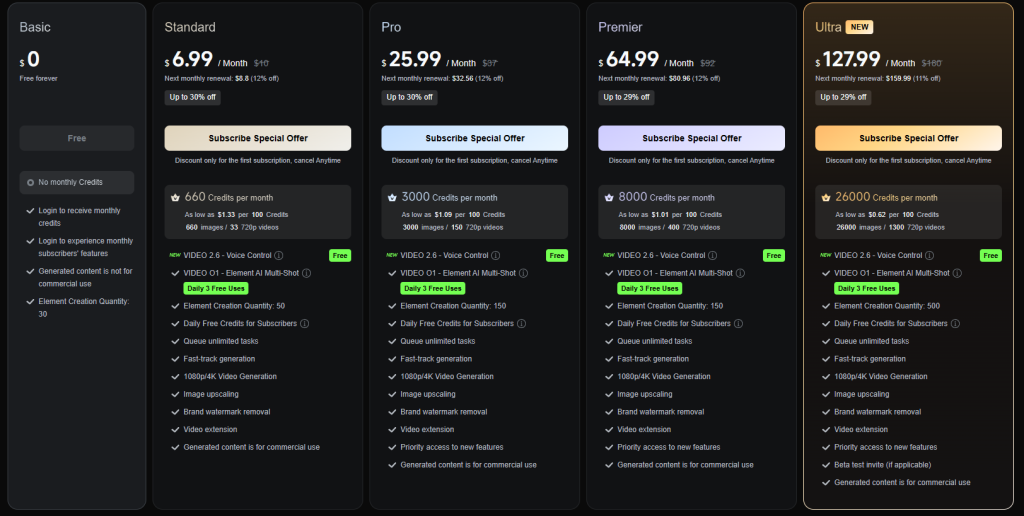
Pricing is one of the areas where it’s worth slowing down before making a decision.
Unlike many SaaS products that offer unlimited usage for a monthly fee, Kling AI primarily operates on a credit-based system. Every generation consumes credits, meaning your actual cost depends on how often you create videos—and how many attempts it takes to get the result you’re looking for.
If you’re an experienced prompt writer who usually gets usable results quickly, this may not be a major concern.
If you’re still learning, however, it’s easy to burn through credits while experimenting.
Because subscription plans, credit allocations, and pricing change periodically, always check Kling’s official pricing page before subscribing.
Free Plan
Kling offers a free plan that gives new users daily credits to explore the platform before paying.
That makes it easy to evaluate:
- Video quality
- Prompt interpretation
- User interface
- Workflow
- Generation speed
The main limitation is that free exports include a watermark, making them unsuitable for most professional or client-facing work.
Think of the free plan as an extended trial rather than a long-term production solution.
Paid Plans
Paid subscriptions are designed for creators publishing content on a regular basis.
Depending on the plan, benefits may include:
- Watermark-free exports
- Higher generation limits
- Access to premium features
- Higher-quality outputs
Rather than recommending a specific subscription, it’s better to compare the latest plans directly on Kling’s website since names, pricing, and included features continue to evolve.
Understanding the Credit System
The credit system is arguably Kling’s biggest strength—and its biggest drawback.
On one hand, paying according to usage makes sense for occasional creators who don’t generate large volumes of video every month.
On the other hand, every regeneration consumes additional credits.
That creates an interesting trade-off.
Experienced users who consistently write effective prompts often use credits efficiently.
Beginners usually need more experimentation, which naturally increases overall costs.
It’s no surprise that credit usage remains one of the most common discussion points within the Kling community.
Watermarks
One limitation you’ll notice immediately on the free plan is the watermark.
According to Kling’s official documentation, videos generated under the free tier include a visible watermark. If you’re creating content for clients, publishing commercial campaigns, or building a professional brand, you’ll almost certainly want a paid subscription before using generated videos publicly.
For casual experimentation, though, the watermark isn’t much of a concern. It allows you to evaluate the platform without committing financially.
Refund Policy
Refund policies aren’t always front and center when evaluating AI software, but they’re worth checking—particularly if you’re considering a higher-tier subscription.
Kling’s official payment terms include provisions relating to certain prepaid unused services if the platform itself discontinues those services. Broader refund eligibility depends on the current payment policy, so it’s wise to review the latest terms before making a purchase.
API Pricing
If you’re interested in integrating Kling into your own application rather than using it as an individual creator, consumer subscriptions aren’t the relevant pricing model.
Developer API pricing is separate and should be reviewed through Kling’s official developer documentation, where usage limits, pricing, and implementation details are outlined.
Is Kling AI Good Value for Money?
Whether Kling represents good value depends less on the subscription price and more on how you create content.
If you’re generating videos regularly for marketing campaigns, ecommerce products, YouTube channels, or client work, the platform offers a substantial amount of creative capability in one place.
Its strongest value comes from combining features that often require several separate tools elsewhere, including:
- Image-to-video animation
- Multi-shot storytelling
- Element Reference
- Native audio generation
- Commercial content creation
- Developer APIs
For creators publishing frequently, that integrated workflow can save both time and software costs.
The equation changes if you’re only producing a handful of videos each month.
Since every generation consumes credits, occasional users may find themselves paying for capacity they rarely use—or watching credits disappear while experimenting with prompts.
Overall, the platform offers solid value, but you’ll get the most from it if AI video creation is already part of your regular workflow rather than an occasional curiosity.
Which Plan Should You Choose?
| User Type | Recommended Plan |
| Beginner | Free Plan |
| Content Creator | Paid Membership |
| Affiliate Marketer | Paid Membership |
| Ecommerce Business | Paid Membership |
| Marketing Agency | Higher-Tier Plan |
| Developer | API Pricing |
If you’re undecided, the free plan remains the easiest recommendation. It lets you explore the interface, test output quality, and see how the credit system fits your workflow before spending anything.
Kling AI Pros and Cons
No AI video platform gets everything right.
Kling delivers an impressive feature set and some genuinely innovative creative tools, but it also shares many of the limitations affecting the wider AI video industry. Looking at both sides provides a much clearer picture than focusing only on feature lists.
Pros
Excellent Feature Depth
Many AI video generators concentrate on a single headline capability.
Kling feels more like a complete creative toolkit.
Text-to-video generation, image animation, motion controls, multi-shot storytelling, native audio, Element Reference, and API access all work together within one platform, making it suitable for a wide range of content creation workflows.
Outstanding Image-to-Video Generation
If one feature consistently earns praise from both reviewers and users, it’s image-to-video generation.
Being able to transform existing product photography, artwork, or illustrations into animated content creates opportunities that would otherwise require significantly more production work.
For ecommerce stores, marketers, and affiliate websites, this alone can justify exploring the platform.
Native Audio Support
Generating video and audio together simplifies production.
Rather than exporting silent clips and immediately opening another application, many projects can move much closer to publication directly inside Kling.
That won’t eliminate dedicated audio editing software entirely, but it certainly reduces the number of production steps.
Multi-Shot Storytelling
Most AI generators still think in individual clips.
Kling encourages creators to think in sequences.
That distinction matters because advertisements, explainers, and promotional videos rarely consist of one isolated shot.
Generating connected scenes reduces manual editing and often produces more coherent results.
Better Subject Consistency
Maintaining the same product, character, or object across multiple scenes remains difficult throughout the AI video industry.
Element Reference doesn’t completely solve that challenge, but it noticeably improves continuity compared with relying on prompt engineering alone.
For agencies and brands working with recognizable products, that’s a valuable addition.
Free Plan Available
One of Kling’s strongest advantages is accessibility.
Rather than requiring immediate payment, the free plan gives new users enough access to evaluate video quality, workflow, and usability before making a financial commitment.
Considering how quickly AI software evolves, being able to test before subscribing is a significant benefit.
Developer API
Many competitors stop at serving individual creators.
Kling goes further by offering API access for businesses and developers.
Whether you’re building automation tools, AI-powered software, or internal content pipelines, having official API support makes the platform considerably more flexible.
Cons
Credit-Based Pricing
The feature mentioned most often by users isn’t image quality—it’s credits.
Every generation consumes them.
If your first result isn’t usable, regenerating costs more.
That isn’t necessarily a flaw, but it does reward careful prompting and can make experimentation feel more expensive than unlimited-generation subscription models.
Watermarks on Free Exports
The free plan is excellent for learning the platform, but watermark-free publishing requires a paid subscription.
For professional creators, that’s unlikely to be a deal-breaker, but it’s still an important limitation.
Not a Complete Video Editor
It’s easy to mistake Kling for an all-in-one production suite.
It isn’t.
The platform generates content exceptionally well, but it doesn’t replace professional editing software for timeline editing, advanced transitions, captions, collaborative workflows, or detailed post-production.
Most creators will still pair it with another editing application.
Output Isn’t Perfectly ConsistentNo matter how advanced AI video becomes, generation remains probabilistic.
Some clips will exceed expectations.
Others won’t.
Occasionally you’ll regenerate several times before achieving exactly the look you envisioned.
That’s true across the industry, not just with Kling, but it’s still something prospective users should understand.
Slower During Peak Demand
Community discussions frequently mention longer generation times during busy periods.
For occasional users this may only be a minor inconvenience.
For agencies processing dozens of projects every day, slower queues can become a more noticeable productivity issue.
Moderation Restrictions
Some users report prompts being rejected by Kling’s moderation systems.
For most marketing, educational, and commercial content this isn’t likely to be a significant issue.
However, creators working in more sensitive subject areas should be aware that moderation policies can occasionally interrupt certain workflows.
Pricing Can Change
One final consideration is simply how quickly AI platforms evolve.
Subscription tiers, feature availability, generation limits, and credit allocations are updated regularly across the industry.
Before committing to a long-term subscription, it’s always worth confirming the latest pricing directly through Kling’s official website.
Real User Feedback
Feature lists tell you what a platform is supposed to do.
User feedback helps reveal how it performs once people start relying on it for real projects.
No collection of reviews represents every user’s experience, and community discussions should always be viewed as anecdotal rather than statistically representative. Even so, recurring themes provide useful insight into what you can realistically expect from Kling AI.
What Users Like
High-Quality Image-to-Video Results
Image-to-video generation consistently receives the strongest praise.
Many users report that Kling preserves the original image well while producing movement that feels surprisingly natural.
That makes it particularly effective for:
- Product photography
- AI artwork
- Marketing assets
- Character illustrations
If your business already has a library of existing visuals, being able to convert those into animated promotional videos without another photo shoot can save a significant amount of time.
Cinematic Motion
Another frequently mentioned strength is the quality of motion.
Rather than producing obviously artificial animations, Kling often creates camera movement that feels more deliberate and cinematic.
When combined with Motion Controls and Multi-Shot Generation, the resulting clips can look considerably more polished than many people expect from AI-generated video.
Frequent Improvements
AI software changes quickly, and Kling appears to be evolving at a steady pace.
Users regularly mention improvements introduced through newer model versions, including:
- Native audio
- Multi-shot workflows
- Better consistency
- Additional creative controls
For long-term users, continuous development adds value beyond the features available today.
Strong Commercial Applications
Many reviewers highlight Kling’s usefulness for commercial work, particularly:
- Product advertisements
- AI-generated B-roll
- Social media marketing
- Ecommerce visuals
- Creative agency concepts
That aligns well with the audience Kling appears to be targeting.
Common Complaints
Even the strongest AI video generators have limitations, and Kling is no exception. Several criticisms appear repeatedly across user reviews and community discussions.
Credit Costs Add Up
The most common complaint revolves around the credit system.
Every generation consumes credits, whether the result is perfect or not. If you need several attempts to refine a prompt—and most creators do—your available credits disappear much faster than expected.
Experienced prompt writers generally adapt to this over time, but newcomers often find themselves using more credits than anticipated while learning how the platform responds.
This isn’t unique to Kling, but it’s one of the trade-offs of a usage-based pricing model.
Failed Generations
Closely tied to credit usage is frustration when generations don’t produce usable results.
AI video remains probabilistic rather than deterministic. Even detailed prompts occasionally generate clips that miss the intended composition, movement, or style.
When unsuccessful generations still consume credits, experimentation becomes a little more expensive than many users expect.
Inconsistent Output
Kling is capable of producing genuinely impressive videos.
It also produces occasional disappointments.
That inconsistency reflects the current state of AI video generation more broadly than it does any specific weakness in Kling itself. Some prompts generate polished results immediately, while others require several iterations before reaching an acceptable quality level.
If your workflow depends on predictable, repeatable output every time, you’ll still need to budget for review and refinement.
Generation Speed
Another recurring theme involves waiting times.
During quieter periods, videos are generated reasonably quickly.
At peak usage times, however, community members frequently report slower processing speeds and longer queues.
For creators publishing a few videos each week, this may not matter much.
For agencies handling multiple client projects every day, slower generation can become a more noticeable bottleneck.
Moderation Restrictions
Like most AI generation platforms, Kling applies moderation policies to prompts.
Some users report having prompts rejected or blocked when they involve certain subjects or visual requests.
For typical commercial work, educational content, and marketing campaigns, these restrictions are unlikely to affect day-to-day use. However, creators working with more sensitive topics should be aware that moderation systems can occasionally interrupt their workflow.
Overall Community Consensus
After reviewing independent feedback, several themes emerge consistently.
Users Frequently Praise
- Excellent image-to-video quality
- Natural-looking cinematic movement
- Strong creative controls
- Multi-shot storytelling
- Native audio integration
- Commercial content capabilities
Users Most Often Criticize
- Credit consumption
- Failed generations that still use credits
- Slower processing during busy periods
- Moderation restrictions
- Pricing transparency
Overall, the community generally views Kling AI as one of the stronger AI video generation platforms available today. The praise tends to focus on its creative capabilities, while the criticism centers primarily on pricing mechanics and the natural limitations of current AI generation technology.
Who Should Use Kling AI?
Kling isn’t trying to appeal to every type of video creator.
Instead, its strengths are concentrated around AI-assisted content generation rather than traditional editing. If your workflow already revolves around creating visual assets quickly, you’ll likely get considerably more value from the platform than someone producing feature-length videos.
Here’s where Kling fits particularly well.
YouTubers
If you’re running a YouTube channel—especially a faceless one—Kling can remove one of the biggest production bottlenecks: creating visuals.
It’s particularly useful for generating:
- AI B-roll
- Intro sequences
- Visual explainers
- Cinematic cutaway footage
Instead of relying entirely on stock footage, you can generate visuals tailored specifically to your script and branding.
Affiliate Marketers
Affiliate marketers often need a steady stream of visual content for blogs, landing pages, YouTube videos, email campaigns, and social media.
Kling makes it possible to create:
- Product demonstrations
- Promotional videos
- Comparison visuals
- Social advertisements
- Supporting website videos
Creating original promotional assets instead of relying solely on stock libraries can also help content feel more distinctive.
Bloggers
Written content increasingly performs better when supported by video.
Rather than producing long-form video productions, bloggers can use Kling to generate:
- Supporting animations
- Social media snippets
- Embedded explainer videos
- Promotional clips
This provides additional content formats without requiring a full video production workflow.
Ecommerce Businesses
Product marketing is arguably one of Kling’s strongest use cases.
Its image-to-video feature allows businesses to animate existing product photography, making it possible to create promotional videos without organizing expensive video shoots.
Examples include:
- Product launches
- Seasonal campaigns
- Marketplace listings
- Social advertisements
- Product showcases
For stores with hundreds of existing product images, that represents a considerable time saver.
Agencies
Creative agencies often need to move from concept to presentation quickly.
Kling’s combination of Multi-Shot Generation, Motion Controls, Element Reference, and Native Audio makes it well suited for rapidly building concepts before investing in traditional production.
Even if the final advertisement is filmed professionally, AI-generated storyboards and concepts can accelerate the creative process.
Freelancers
Freelancers offering digital marketing or creative services can expand what they deliver without investing heavily in production equipment.
Potential services include:
- AI advertisements
- Social media videos
- Product animations
- Promotional content
For solo creators, the platform effectively lowers the barrier to offering video-based services.
Developers
Unlike many creator-focused platforms, Kling also provides API access.
Businesses building AI-powered software, automation tools, or internal content systems can integrate video generation directly into their products rather than relying exclusively on the web interface.
Beginners
Despite its advanced capabilities, Kling remains approachable for newcomers.
The free plan gives beginners an opportunity to learn prompt writing, explore different generation tools, and understand how AI video creation works before committing to a subscription.
There is still a learning curve, particularly around prompt engineering and efficient credit usage, but the interface itself is relatively straightforward.
Who Should Avoid Kling AI?
Understanding who shouldn’t buy a product is often just as valuable as knowing who should.
Kling excels at AI content generation, but there are several situations where another platform may be a better fit.
Long-Form Video Editors
If your work revolves around editing lengthy videos with multiple timelines, transitions, captions, and collaborative workflows, Kling isn’t designed for that purpose.
You’ll still need dedicated editing software for:
- Timeline editing
- Advanced transitions
- Audio mixing
- Caption management
- Multi-user collaboration
Think of Kling as a content generator rather than a replacement for your editor.
Teams Needing Perfect Consistency
AI generation remains inherently variable.
Even with Element Reference improving continuity, creators who require identical outputs every time should expect to spend time reviewing and refining generated clips.
If consistency is absolutely critical, traditional production methods still offer greater predictability.
Budget-Conscious Creators
Credit-based pricing rewards efficient workflows.
If you’re experimenting constantly, regenerating prompts, or creating videos only occasionally, costs may become harder to justify compared with subscription services offering more predictable pricing.
Sensitive Content Creators
Because moderation systems occasionally reject certain prompts, creators regularly working with sensitive or heavily moderated topics should consider whether those restrictions might interfere with their workflow.
Users Looking for Traditional Editing Software
Finally, if your goal is editing existing footage rather than generating entirely new footage, Kling simply isn’t the right tool.
Its strength lies in creating AI-generated assets—not replacing professional post-production software.
Kling AI vs the Competition
The AI video market has become increasingly competitive over the past two years.
Rather than asking which platform is objectively “best,” it’s usually more helpful to ask which one best supports your particular workflow.
Different tools excel in different areas.
Kling AI vs Runway
| Category | Kling AI | Runway |
| AI Video Generation | Excellent | Excellent |
| Image-to-Video | Excellent | Strong |
| Editing Tools | Limited | More Comprehensive |
| Motion Controls | Advanced | Advanced |
| Best For | AI Generation | Production Workflows |
If your priority is generating AI-powered visuals with advanced creative controls, Kling has the edge.
If you need a broader editing environment alongside AI generation, Runway remains the stronger option.
If you want to go in even more details, you can check out the full article comparing Kling AI vs Runway.
Kling AI vs OpenAI Sora
OpenAI’s Sora has generated enormous interest because of its impressive video quality.
Availability, however, remains more limited than Kling.
Kling differentiates itself by offering:
- A mature web-based creator platform
- Image-to-video generation
- Multi-shot storytelling
- Native audio
- Commercial creator workflows
For many users, accessibility and workflow may prove more important than marginal differences in raw generation quality.
Kling AI vs Google Veo
Google Veo focuses heavily on cinematic AI video generation.
Kling takes a broader approach by combining multiple creative tools into a single platform aimed at commercial creators.
If you’re already invested in Google’s ecosystem, Veo may naturally fit your workflow.
If you’re looking for an all-around AI creative studio today, Kling currently offers a more complete creator experience.
Kling AI vs Pika
Pika has built its reputation around simplicity and speed.
If your goal is to produce short, attention-grabbing clips for TikTok, Instagram Reels, or YouTube Shorts with minimal setup, it’s an excellent option.
Kling, on the other hand, aims higher.
Instead of focusing solely on quick social content, it provides a broader production toolkit that includes:
- Multi-Shot Generation
- Element Reference
- Motion Controls
- Native Audio
- Image-to-Video
For creators who want more creative control over how scenes develop, Kling offers significantly more flexibility.
If speed is your highest priority, Pika remains attractive. If you regularly produce commercial content or want greater control over the final output, Kling is the stronger choice.
Kling AI vs Luma Dream Machine
Luma Dream Machine has earned praise for producing visually striking, cinematic clips with relatively little effort.
Its strength lies in creating impressive standalone videos.
Kling approaches the problem differently.
Rather than concentrating only on individual clips, it expands the creative workflow with features designed for larger projects, including Multi-Shot Storytelling, Motion Controls, Native Audio, and Element Reference.
Neither platform is objectively better in every scenario.
If you’re looking for quick cinematic generations, Luma is an excellent choice.
If you’re building marketing campaigns, YouTube content, or multi-scene advertisements, Kling’s broader feature set makes it the more versatile platform.
Comparison Summary
| Platform | Best For | Biggest Strength |
| Kling AI | Commercial creators | Complete AI video creation workflow |
| Runway | Video editors | Integrated editing environment |
| OpenAI Sora | High-end AI generation | Exceptional visual quality (availability varies) |
| Google Veo | Cinematic AI generation | Google ecosystem integration |
| Pika | Social media creators | Fast, simple content creation |
| Luma Dream Machine | Cinematic clips | High-quality standalone video generation |
The right choice ultimately depends less on benchmark comparisons and more on how you create content.
If you’re looking for an AI video generator that balances creative flexibility with a broad collection of production tools, Kling remains one of the most compelling options available.
Is Kling AI Worth It?
After examining its features, pricing model, intended audience, and community feedback, one conclusion becomes fairly clear.
ThisI isn’t simply another text-to-video generator.
It’s a creative platform built around AI-assisted video production.
That distinction matters because the platform’s real strength isn’t any individual feature—it’s how those features work together.
Text-to-video generation, image animation, multi-shot storytelling, motion controls, native audio, Element Reference, and developer APIs combine to create a workflow that’s considerably more capable than many entry-level AI video tools.
Just as importantly, Kling has a good understanding of its audience.
Rather than trying to replace professional editing software, it focuses on helping creators generate high-quality visual assets as efficiently as possible.
For many users, that’s exactly what’s needed.
Where Kling Excels
The platform is particularly impressive if your work involves creating visual content at scale.
Whether you’re producing:
- Marketing campaigns
- Product demonstrations
- Social media videos
- YouTube B-roll
- Promotional advertisements
Kling offers enough creative control to produce videos that feel intentionally designed rather than randomly generated.
Image-to-video generation remains the standout feature.
If you already have product photography, AI artwork, or existing visual assets, being able to transform them into polished video content without another production shoot represents significant practical value.
Multi-Shot Generation and Motion Controls also help distinguish Kling from simpler competitors by making larger projects easier to structure.
Where It Still Has Limitations
At the same time, it’s important to approach the platform with realistic expectations.
Kling doesn’t replace professional editing software.
You’ll still need another editor for:
- Timeline editing
- Advanced transitions
- Caption workflows
- Audio mixing
- Detailed post-production
The credit-based pricing model also requires careful consideration.
Generating excellent AI video often involves experimentation, and experimentation consumes credits.
Experienced users typically become more efficient over time, but newcomers should expect a learning period where prompt refinement increases overall costs.
Finally, output consistency—while good—isn’t perfect.
That’s a limitation shared by virtually every AI video generator currently available.
Who Gets the Most Value?
After evaluating the platform as a whole, several audiences stand out.
YouTubers
Kling is particularly useful if you’re producing:
- AI-generated B-roll
- Intro sequences
- Visual explainers
- Cinematic cutaways
- Faceless YouTube content
Instead of spending hours searching stock libraries, you can generate visuals that better match your script and branding.
Affiliate Marketers
Affiliate marketers regularly need original visual content for:
- Product demonstrations
- Comparison videos
- Landing pages
- Blog articles
- Social advertisements
Creating original assets rather than relying exclusively on stock footage can help content stand out while reinforcing your own brand identity.
Ecommerce Businesses
Few audiences benefit from Kling as much as ecommerce businesses.
Image-to-video generation makes it possible to animate existing product photography into promotional content suitable for websites, marketplaces, and social media.
That dramatically reduces the cost of producing fresh marketing material.
Marketing Agencies
Agencies often need concepts before committing to full production.
Kling’s creative controls allow teams to develop campaign ideas, storyboards, and advertising concepts far more quickly than traditional production methods.
Bloggers
Bloggers increasingly benefit from multimedia content.
Kling offers an efficient way to create:
- Embedded videos
- Social media teasers
- Promotional clips
- Visual summaries
without investing heavily in traditional video production.
Developers
API access also makes Kling attractive for businesses building AI-powered software or automating creative workflows.
That enterprise capability separates it from many consumer-focused competitors.
Overall Rating
| Category | Score |
| Ease of Use | 8.5 / 10 |
| Feature Depth | 9.5 / 10 |
| Creative Control | 9.3 / 10 |
| Commercial Use | 9.2 / 10 |
| Value for Money | 8.3 / 10 |
| Pricing Transparency | 7.5 / 10 |
| Overall Rating | 8.8 / 10 |
Final Verdict
Kling AI has firmly established itself as one of the most capable AI video generation platforms currently available.
Its biggest advantage isn’t that it has the industry’s single best feature.
It’s that it brings together an unusually broad collection of high-quality creative tools inside one platform.
Image-to-video generation is excellent.
Multi-Shot Storytelling makes larger projects easier to organize.
Motion Controls provide greater creative direction.
Element Reference improves subject consistency.
Native Audio reduces reliance on additional software.
And API access extends the platform beyond individual creators into professional and enterprise workflows.
Those strengths make Kling particularly appealing for marketers, YouTubers, agencies, ecommerce businesses, affiliate marketers, and anyone regularly producing short-form commercial content.
The weaknesses are equally clear.
Credit-based pricing encourages thoughtful experimentation rather than endless iteration.
Output quality, while often excellent, still varies between generations.
And despite its growing feature set, Kling remains a content generation platform—not a replacement for professional editing software.
None of those limitations significantly undermine its value.
They simply define where the platform fits within a modern content creation workflow.
If your goal is generating high-quality AI video rather than replacing your existing editor, Kling AI deserves a place near the top of your shortlist.
For most creators, the best approach is simple:
Start with the free plan.
Experiment with several real projects.
Evaluate the output quality, workflow, and credit usage.
If it integrates well into your production process, upgrading to a paid subscription becomes a much easier decision.
Frequently Asked Questions
Is Kling AI free?
Yes. The platform offers a free plan that includes daily credits, allowing you to explore the platform before paying for a subscription. Videos generated under the free plan include a watermark.
Does Kling AI add watermarks?
Yes. According to Kling’s official documentation, videos exported from the free plan include a watermark. Paid subscriptions remove this limitation.
How do Kling AI credits work?
Kling uses a credit-based generation system. Every video generation consumes credits, and the amount required depends on the feature and generation settings used. Since credit allocations and pricing can change over time, it’s worth checking the latest plan details before subscribing.
Can Kling AI generate audio?
Yes. Kling supports native audio generation for supported workflows and includes additional audio capabilities that help reduce post-production work.
Does Kling AI support image-to-video generation?
Yes. Image-to-video is widely regarded as one of Kling’s strongest features, allowing you to animate existing images into realistic short videos.
Can Kling AI create 4K videos?
Yes, 4K output is available on eligible subscription tiers. Because plan features evolve regularly, verify current availability before purchasing.
Is Kling AI good for YouTube?
Yes. It’s particularly well suited for generating B-roll, intros, visual explainers, cinematic cutaways, and other supporting assets for YouTube videos.
Is Kling AI good for affiliate marketing?
Yes. Kling AI is a strong fit for affiliate marketers who need to produce original visual content without investing in traditional video production.
You can use it to create:
- Product demonstrations
- Comparison videos
- Landing page visuals
- Social media advertisements
- Supporting videos for blog posts
Instead of relying exclusively on stock footage, you can generate content that better reflects your own branding and helps differentiate your marketing materials.
Why is Kling AI sometimes slow?
Generation times vary depending on platform demand.
Community discussions frequently mention slower processing during peak usage periods when many users are generating videos simultaneously. During quieter periods, videos are generally produced much faster.
Why was my prompt blocked?
Kling applies moderation policies to generated content.
If a prompt violates those policies—or is interpreted as potentially violating them—it may be rejected before generation begins. Since moderation rules evolve over time, the exact behavior depends on the platform’s current guidelines.
Can I cancel my subscription?
Yes. Subscription management is handled through your Kling account.
Because cancellation policies and billing terms may change, review the latest membership information before subscribing or renewing.
Does Kling AI offer refunds?
Kling’s official payment terms include provisions relating to certain prepaid unused services if the platform itself discontinues those services.
For standard subscription purchases, refund eligibility depends on the current payment policy, so it’s best to verify the latest terms directly before purchasing.
Does Kling AI have an affiliate program?
Yes.
Kling offers an official affiliate program.
However, several important details—including commission rates, cookie duration, payment schedule, approval requirements, and the affiliate platform used—could not be independently verified from reliable public sources at the time of writing. If you’re planning to promote Kling AI, you should confirm these details directly through the company’s official affiliate resources before applying.
What are the best Kling AI alternatives?
Some of the strongest alternatives currently available include:
- Runway
- OpenAI Sora
- Google Veo
- Pika
- Luma Dream Machine
- Hailuo AI
- PixVerse
Each platform approaches AI video generation slightly differently.
If your priority is advanced editing workflows, Runway may be the better option.
If you’re looking for cinematic standalone generations, Luma Dream Machine or Sora are worth exploring.
If rapid social content is your focus, Pika remains a strong contender.
Kling distinguishes itself by combining image-to-video generation, multi-shot storytelling, creative controls, native audio, and developer APIs into a single platform.
Pricing and Feature Verification
AI software evolves at an extraordinary pace.
Features that exist today may expand, move between subscription tiers, or change entirely within a few months.
Before subscribing, it’s worth confirming the latest information regarding:
- Membership plans
- Credit allocations
- Watermark policies
- Refund eligibility
- Commercial-use licensing
- API pricing
- Newly released features
Checking the official documentation ensures you’re making your decision based on the most current information rather than outdated pricing or feature lists.
Final Thoughts
Kling AI succeeds because it understands what many creators actually need.
Most marketers, YouTubers, ecommerce businesses, and agencies aren’t looking for another complex editing suite—they’re looking for a faster way to create compelling visual content.
That’s where Kling performs exceptionally well.
Its combination of high-quality image-to-video generation, text-to-video capabilities, Multi-Shot Storytelling, Motion Controls, Element Reference, Native Audio, and API access creates one of the most complete AI video creation ecosystems currently available.
Just as importantly, those features aren’t isolated additions. They complement one another to create a workflow that feels thoughtfully designed rather than a collection of unrelated AI tools.
Of course, no platform is perfect.
The credit-based pricing model rewards efficient prompting but can become expensive if you’re constantly regenerating videos.
Output quality, while often impressive, still varies from one generation to the next.
And like every AI video platform available today, Kling works best alongside traditional editing software rather than replacing it entirely.
Those limitations are worth considering, but they don’t overshadow the platform’s strengths.
For creators producing short-form commercial content, marketing videos, ecommerce promotions, YouTube assets, or AI-enhanced social media campaigns, Kling AI stands out as one of the strongest options currently available.
If you’re still undecided, there’s little downside to starting with the free plan.
Spend a few days generating real projects rather than simple test prompts.
That will give you a much clearer understanding of how the platform fits your workflow than any review ever could.
If those projects consistently save you time while producing content you’re happy to publish, upgrading to a paid subscription becomes a straightforward decision.
Final Rating
| Category | Rating |
| Ease of Use | 8.5 / 10 |
| Feature Depth | 9.5 / 10 |
| Creative Control | 9.3 / 10 |
| Commercial Use | 9.2 / 10 |
| Value for Money | 8.3 / 10 |
| Pricing Transparency | 7.5 / 10 |
| Overall Score | ⭐ 8.8 / 10 |
Bottom Line
Kling AI is one of the most complete AI video generation platforms currently available. It offers an excellent balance of output quality, creative control, and commercial usability, making it particularly well suited for marketers, content creators, YouTubers, agencies, and ecommerce businesses.
It isn’t a replacement for professional video editing software, and its credit-based pricing means you’ll want to use it efficiently. But if your goal is creating original AI-powered video content faster, few platforms currently offer a more capable or better-rounded experience.
3 thoughts on “Kling AI Review: Is It Worth It in 2026?”